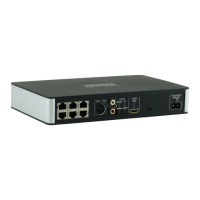
The Almando Multiplay Surround (Decoder II) is a sophisticated audio device designed to integrate third-party entertainment electronics into a 5.1 surround sound setup, particularly compatible with Bang & Olufsen audio systems and speakers. It aims to simplify the complex world of home entertainment by offering extensive connectivity, automatic source detection, and intelligent priority switching, all controllable via a single remote or a dedicated smartphone app.
Function Description:
The core function of the Almando Multiplay Surround is to act as a central hub for various audio and video sources, transforming them into a cohesive 5.1 surround sound experience using Bang & Olufsen speakers. It supports a wide range of input devices, including modern TVs via HDMI ARC, classic Bang & Olufsen audio systems via Powerlink, digital audio streamers via COAX and OPTICAL inputs, PCs/MACs via USB (acting as a sound card), and analog devices via RCA.
One of its key features is automatic source detection. When a connected source begins playing, the Multiplay Surround automatically detects the activity and activates the appropriate loudspeakers. This eliminates the need for manual input selection, streamlining the user experience. In scenarios where multiple sources are active simultaneously, an intelligent priority circuit ensures that only the source with the highest priority is heard, preventing audio conflicts.
The device is certified by Dolby and DTS, guaranteeing high-quality surround sound processing. It can handle various speaker configurations, from a simple 2.0 stereo setup to a full 5.1 surround system, offering flexibility to users based on their speaker availability and preferences. This includes configurations with or without a center speaker and subwoofer, allowing for tailored audio environments.
Usage Features:
The Almando Multiplay Surround is designed for ease of use, primarily managed through a dedicated smartphone application, the "Almando Play App," and for initial setup, the "Google Home App."
Initial Setup:
- Speaker Connection: The device provides six RJ45 jacks for connecting Bang & Olufsen speakers in a 5.1 setup. Newer B&O speakers with RJ45 Powerlink jacks (e.g., BeoLab 18) connect directly via CAT 7 patch cables. Older B&O loudspeakers with 8-pin DIN Powerlink sockets (e.g., BeoLab 8000) require special RJ45 to Powerlink adapter cables. The device supports various speaker setups, including front, surround, center, and subwoofer connections. For instance, a BeoLab 7 can be connected as a center speaker, outputting center tone on both Powerlink audio signals, allowing for mono or stereo center speaker configurations. Subwoofers like a BeoLab 2 connect to a specific RJ45 socket. If passive loudspeakers are connected to a BeoLab 14 subwoofer, additional CAT 7 cables are needed for front and surround speakers.
- Source Connection:
- HDMI (e)ARC / CEC: Connects to a television using the supplied HDMI cable. Users must activate the HDMI (e)ARC function in their TV's setup menu, allowing the TV remote to control the volume.
- POWERLINK (8-pin DIN): For classic Bang & Olufsen audio systems (e.g., BeoSound 9000, BeoSound Overture). Newer B&O systems (e.g., BeoSound Essence, BeoSound Moment) can also connect with an adapter cable.
- COAX & OPTICAL: Digital inputs for devices with volume-controllable optical outputs (e.g., Sonos Port, BeoSound Core, Sonos Connect). The OPTICAL input can be paired with HDMI (e)ARC for TVs requiring parallel optical cabling.
- RCA: For devices with stereo RCA output (preferably adjustable by volume), such as Sonos Connect, Sonos Port, or turntables.
- USB: Allows connection of a PC or MAC, where the Multiplay Surround acts as a sound card, or for playing music from a connected USB storage device.
- Ethernet Connection (Optional): The device is WiFi certified for wireless network connection. It also features an integrated switch with two RJ45 sockets for optional wired connection to the network, with the second socket usable for another device (e.g., a TV).
- Power Supply: After all speakers and sources are connected, the device is connected to the power supply.
- App Installation: Download and install the "Google Home App" for initial setup (device naming, WLAN access) and the "Almando Play App" for audio settings and daily use. Both apps are available for Android and iOS.
Almando Play App Features:
The Almando Play App provides comprehensive control and configuration options:
- Rooms (Main Screen): Displays available Almando devices in the network. Users can select a device to play music or configure it. Device names can be customized. An icon provides details of current playback and volume control.
- Settings: This crucial section allows individual configuration for speakers and inputs.
- Speakers:
- Wireless Speakers (Optional): If a WiSA transmitter module is integrated, a page opens to connect wireless speakers (e.g., BeoLab 18).
- Speaker Configuration: Users select individual speakers (Front Left, Center, Right, Surround Left, Surround Right, LFE) to configure.
- Distance Adjustment: A slider adjusts the speaker's distance to the seating position.
- Volume Adjustment: Users can raise or lower the volume of selected speakers relative to others (up to 12 dB).
- Large Speaker Indication: Users specify if a speaker is "large" (suitable for deep bass) and if a subwoofer is connected when LFE is selected.
- Test Tone: A switch activates a test tone to identify speakers, verify connections, and adjust volume ratios between speakers.
- Generate B&O Data Signal: Determines if data signals are sent to B&O speakers (necessary for BeoLab 5, BeoLab 4500, or BeoLab Penta; otherwise, it should remain deactivated).
- Input Settings: Each input can be configured separately.
- DOWNMIX: Determines which speakers play back audio for the active input (e.g., 2/0 for stereo front speakers, 3/2 for full surround).
- Sound Settings: Adjusts treble and bass levels (up to 12 dB each) and enables/disables loudness.
- Volume Settings: Sets the channel-specific initial volume (gain) for the active input.
- Delay / Lipsync: For HDMI or SPDIF 2 inputs, a slider synchronizes picture and sound, particularly useful for news programs or talk shows.
- Pair Inputs: Allows pairing HDMI ARC and OPTICAL inputs for TVs requiring parallel optical cabling despite HDMI-CEC.
- Manage Music Services: Selects favorite music services (e.g., Spotify) for quick access from the app.
- Manage Main Services: Defines which icons appear in the app's tab bar for daily use.
- AirPlay: Sets an AirPlay password.
- Network: Accesses network settings.
- Firmware > Status & Update: Displays and updates firmware.
- Factory Reset: Resets the device to factory defaults.
- Restart Device: Restarts the device, similar to disconnecting from the mains.
- Download Manual (PDF): Accesses the instruction manual within the app.
- Radio Page: Allows users to start desired radio stations, with options for favorites, local stations, search, history, recommendations, popular stations, trending, high quality, and new stations.
- Music Page: Provides quick access to various music streaming services (e.g., Amazon Music, Apple Music, Apple Podcasts, Audible, Deezer, SoundCloud, Spotify, Tidal) and allows users to manage which services are listed.
- Inputs Page: Displays all available inputs in order of priority, with the active input highlighted. It shows the device status and signal type. Horizontally arranged buttons allow switching Dolby Pro Logic on/off with desired modes, which are stored permanently for the active input. For HDMI ARC and OPTICAL inputs, a slider adjusts the volume balance between ambient and spoken sound, useful for improving speech intelligibility or quieting commentators during multichannel audio broadcasts.
Maintenance Features:
- Firmware Updates: The Almando Play App includes a section for displaying and updating the device's firmware, ensuring the device remains up-to-date with the latest features and improvements.
- Factory Reset: Users can reset the device to factory defaults via the app, which can be useful for troubleshooting or reconfiguring the system.
- Restart Device: The app provides a function to restart the device, serving as a convenient alternative to physically disconnecting it from the power supply.
- Manual Access: The instruction manual is available as a downloadable PDF within the app, offering easy access to information on installation and operation.
- Safety Instructions: The manual emphasizes critical safety measures, including using the supplied power cord, ensuring operating voltage matches local mains, protecting the device from moisture and water, avoiding direct sun exposure and proximity to heat sources, allowing condensation to dissipate before powering on, and unplugging during thunderstorms or extended periods of disuse. Improper use or opening the device voids the warranty.

 Need help?
 Power
Power Ports & interfaces
 Weight and Dimensions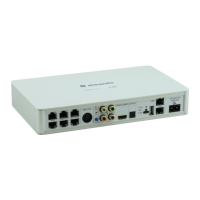

 To Next Page