Installaon Configuraon
Step 17
Step 1
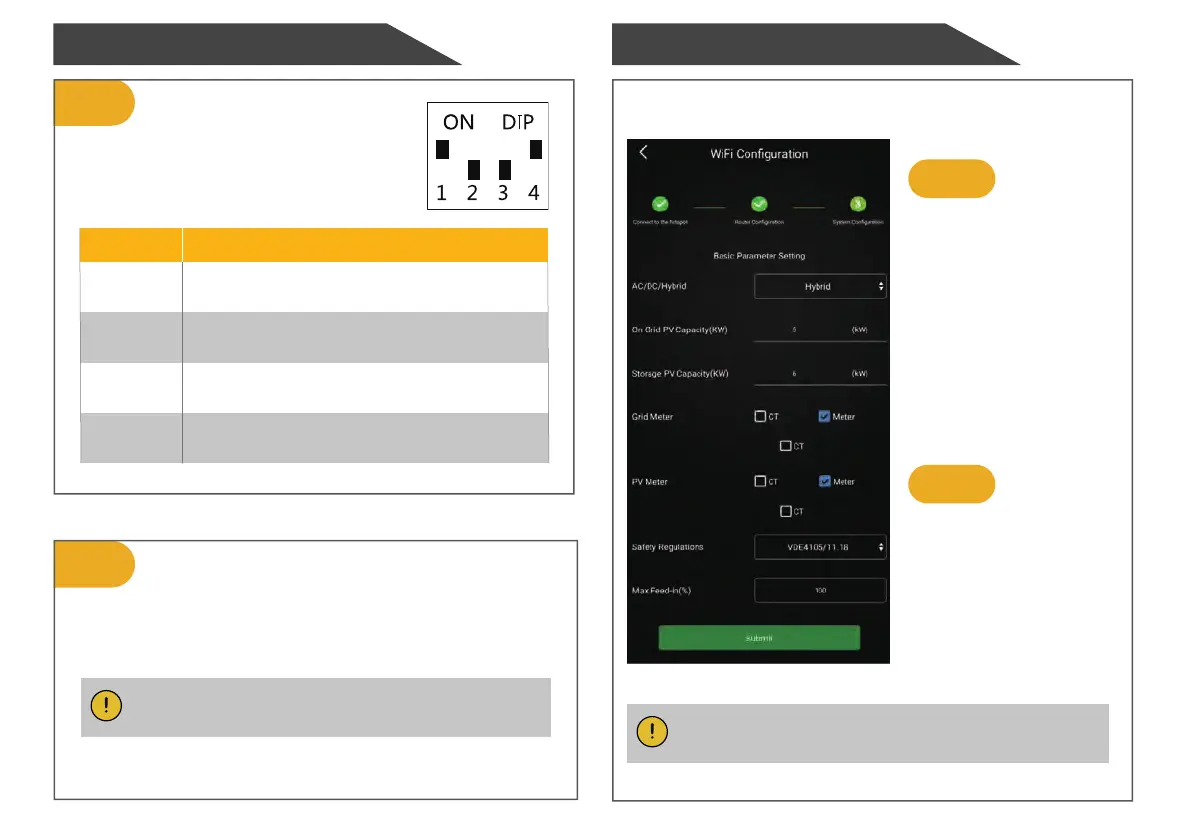
DIP Switch Configuration
Configuration on AlphaAPP
DIP Switch Description
Dial to "OFF" for three-phase system
and "ON" for single-phase system.
When the system mode is
selected as DC, only tick
"Meter" on the right of the
"Grid Meter" .
When the system mode is
selected as AC or Hybrid,
tick both "Meter" on the
right of the "Grid Meter"
and "PV side meter".
Step 2
Click "Submit" and enter the
"System information" page
to check the meter model.
The setting is successful if
meter model is Backup-
Box-PLUS.
Undefined
1
2
3
4
Undefined
Dial to "ON" for power recovery delay and
"OFF" to turn off power recovery delay.
Step 18
After installation, close and lock the upper cover.
Note: Please keep the key properly.
Note: It is forbidden to tick CT to modify the ratio.


 To Next Page