ALPHA TECHNICS PRECISION TEMPERATURE
4600 SERIES THERMOMETER
ALPHA TECHNICS PRECISION TEMPERATURE
4600 SERIES THERMOMETER
- O P E R A T I N G I N S T R U C T I O N S -
1. Determine that a probe is connected to the
unit.
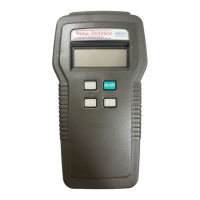
2. Press the green colored rubber key marked
“ON/OFF” to turn the unit ON. (Pressing
this key again will turn the unit OFF.)
3 READOUT:
Display Explanation
°C/°F symbols Reading is displayed
in degrees C or F
-40.00 to +150.00* Actual temperature
(-40.00 to +299.98) in degrees Celsius
(Fahrenheit)
“LO”* Temperature is below
-40.00°C (-40.00°F) or
a probe is not inserted
“HI”* Temperature is above
150.00°C (299.98°F)
Flashing battery Battery needs
symbol replacement**
*Some versions of 4600 Series thermometers will have
different temperature ranges. See the special specifications
in the back of this manual or packed separately with the unit.
**To ensure that erroneous results are not displayed, the
numerical segments are disabled (all turned on or all off) one
hour, of running time, after the battery symbol starts flashing.
3
24
- NOTES -
Model 4600 Manual-3.5x8.5-rev.indd, Spread 6 of 16 - Pages (6, 27) 1/11/2007 2:03 PM


 To Next Page