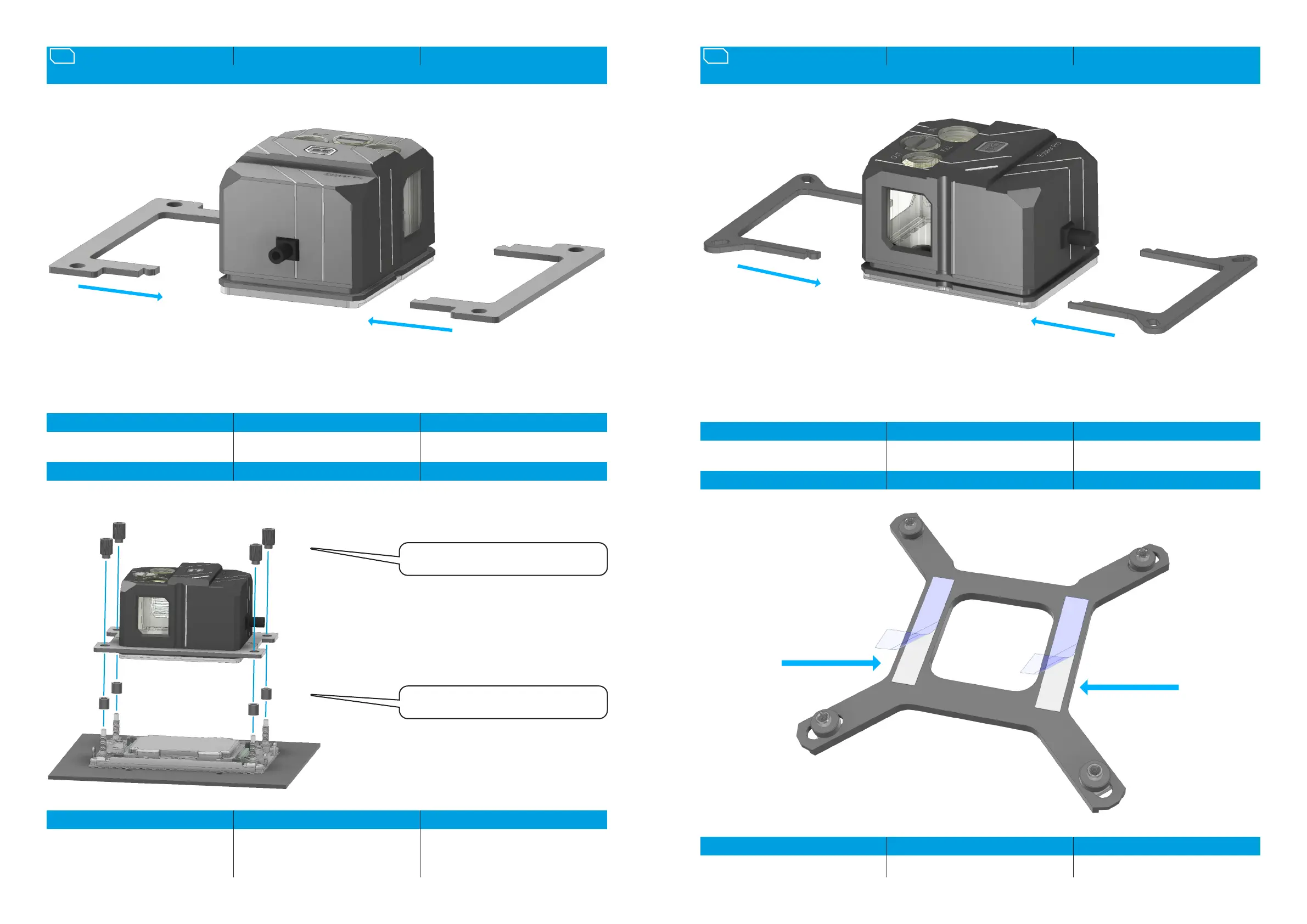
BRACKET ASSEMBLY HALTERMONTAGE SUPPORT DE MONTAGE10.
SOCKET ASSEMBLY SOCKELMONTAGE INSTALLATION DU SOCLE
INTEL LGA 4189
EN DE FR
Select the appropriate holder and plug it
together. Both holders are mounted
identically.
Entsprechende Halterahmen wählen und
zusammenstecken. Beide Halterungen
werden identisch montiert.
Sélectionnez le cadre de maintien
correspondant et emboîtez-le. Les deux
supports sont montés de manière identique.
EN DE FR
Place the spacers on the threaded bolts.
Place the cooler with the holder on the base.
Screw the knurled nuts crosswise onto the
threaded bolts in the outer corners.
Platzieren Sie die Abstandshalter auf die
Gewindebolzen. Setzen Sie den Kühler mit
der Halterung auf den Sockel. Drehen Sie die
Rändelmuttern kreuzweise auf die
Gewindebolzen in den äußeren Ecken ein.
Placez les entretoises sur les boulons letés.
Placez le refroidisseur avec le support sur le
socle. Vissez les écrous moletés en croix sur
les boulons letés dans les coins extérieurs.
4x 6,5mm Spachers /
Abstandshalter / l‘entretoise
4x 4189 Knurled nuts /
Rändelmuttern / Ècrous moletès
EN DE FR
Remove the protective lm from the
backplate.
Entfernen Sie die Schutzfolie von der
Backplate.
Retirez le lm de protection de la plaque
arrière.
BRACKET ASSEMBLY HALTERMONTAGE SUPPORT DE MONTAGE11.
SOCKET ASSEMBLY SOCKELMONTAGE INSTALLATION DU SOCLE
INTEL LGA 1700
EN DE FR
Select the appropriate holder and plug it
together. Both holders are mounted
identically.
Entsprechende Halterahmen wählen und
zusammenstecken. Beide Halterungen
werden identisch montiert.
Sélectionnez le cadre de maintien
correspondant et emboîtez-le. Les deux
supports sont montés de manière identique.




 To Next Page