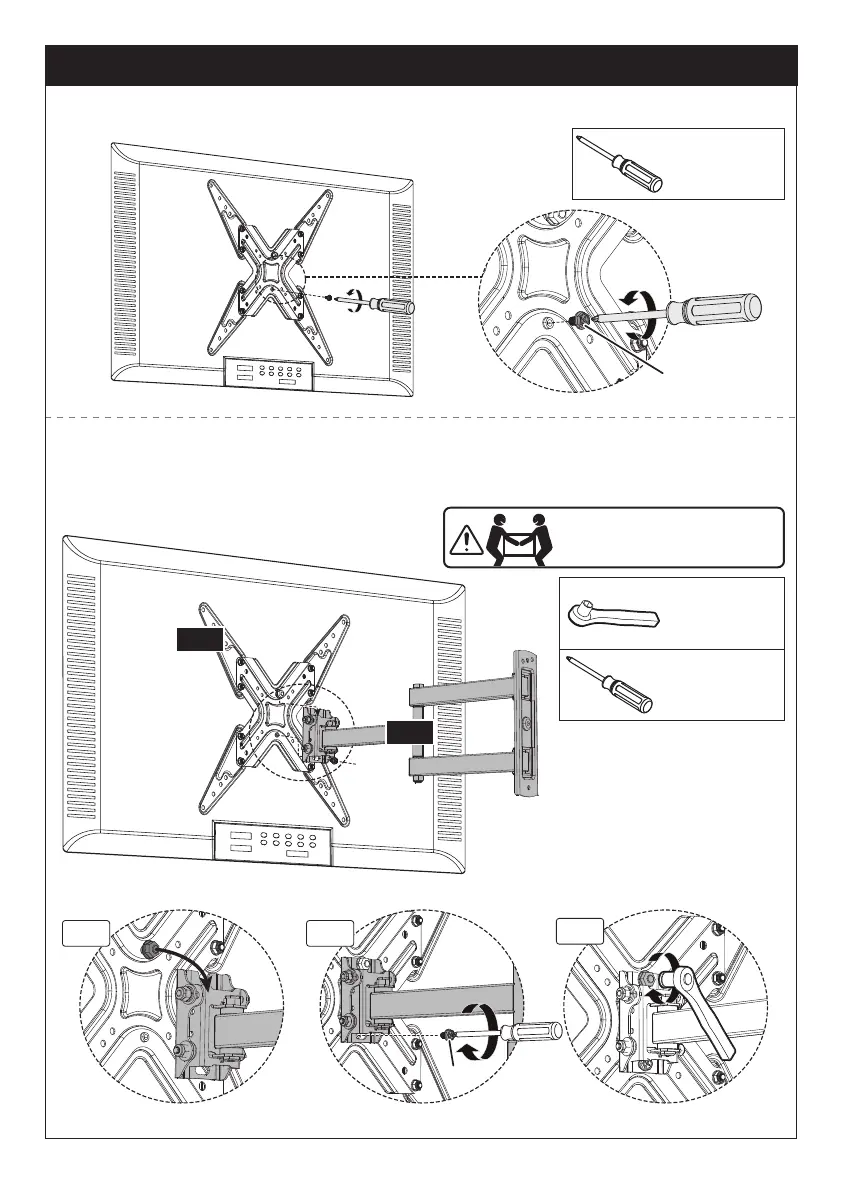
Step 5 Secure the TV onto the Arm Assembly / Wall Plate
5-1 Slightly loosen the pre-assembled bolts [S1].
5-2 Hang the TV to the arm assembly / wall plate [01B], making sure the upper bolt
hangs on the hook on the arm assembly / wall plate [01B].
5-3 Tighten the bolt [S1] to secure the TV to the arm assembly / wall plate [01B].
5-4 Tighten the top nut.
01A
1/2″ (13mm)
Socket Wrench
(Not lncluded)
Phillips
Screwdriver
(Not lncluded)
S1
5-2
S1
5-3
5-4
HEAVY! You may need
assistance with this step.
Phillips
Screwdriver
(Not lncluded)
01B
02 03 04
05 06 07 08 09
10 11 12 13
14
15 16


 To Next Page