EasyManua.ls Logo

Alphamount APTVS06 - User Manual

Alphamount APTVS06
12 pages
Print Icon
To Next Page IconTo Next Page
Loading...
Model: APTVS06
Table Top TV Stand Instruction Manual
V2.0
Thank you for choosing this Alphamount product! At Alphamount we strive
to provide you with the best quality products and services in the industry.
Should you have any issues, please don't hesitate to contact at
support@alphamount.com (US/CA/DE/UK/FR/IT/ES/AU)
Question and Answer IconNeed help?

Do you have a question about the Alphamount APTVS06 and is the answer not in the manual?

Summary

Important Safety and Compatibility

Safety Precautions

General warnings to avoid personal injuries and property damage during use.

VESA Pattern Compatibility Check

Verify TV VESA pattern compatibility (100x100mm to 400x400mm) before mounting.

Required Installation Tools

Lists necessary tools like Phillips screwdriver and drill bits for installation.

Supplied Parts and Hardware

Parts for Base and Pillar Assembly (Step 1)

Details parts for assembling the base and pillar, including bolts, washers, and foot pads.

Parts for TV Plate Connection (Step 2)

Lists parts for connecting the TV plate to the support pillar, including nuts, bolts, and allen key.

Parts for TV Bracket Attachment (Step 3)

Shows TV brackets, various bolts (M4, M6, M8), washers, and optional spacers.

Optional Parts for Wall Mounting (Step 5)

Includes lag screw, washer, and wall anchor for optional safety rope installation.

Assembly Instructions

Step 1: Assemble the Base

Attaching foot pads and support pillar to the tempered glass base.

Step 2: Connect TV Plate to Pillar

Mounting the TV plate onto the assembled support pillar.

Step 3: Secure Brackets to TV

Selecting correct bolts and ensuring proper thread engagement for TV bracket attachment.

Step 4: Attach TV and Manage Wires

Hanging the TV, securing it with a safety lock, and managing cables.

TV Mounting Options

Option A: Flat Back TVs

Attaching TV brackets to a flat-back TV using specific bolts and optional spacers.

Option B: Round Back TVs

Attaching TV brackets to a round-back TV using specific bolts and optional spacers.

Option C: TVs with a Bump

Mounting TV brackets on TVs with a 'bump', using spacers as needed.

Option D: Cable Interference

Using spacers for cable interference or inset holes to create extra space.

Optional Safety Rope Installation

Secure Rope to Wall

Instructions for securing the safety rope to wood stud or concrete/brick walls.

Overview

This document provides an instruction manual for the Alphamount Table Top TV Stand, model APTVS06. It outlines the assembly process, safety precautions, and hardware details necessary for proper installation and use.

Function Description

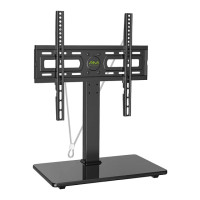
The Alphamount Table Top TV Stand is designed to securely hold a television on a flat surface, such as a table or entertainment unit. Its primary function is to provide a stable and elevated platform for a TV, allowing for optimal viewing angles and efficient use of space. The stand is constructed with a tempered glass base and a support pillar, which together form a robust foundation for the television. The design incorporates a TV plate and TV brackets that attach to the back of the television, enabling it to be mounted onto the support pillar. This setup allows for height adjustment of the TV, offering flexibility to suit different viewing preferences and room configurations. Additionally, the stand includes features for wire management, helping to maintain a neat and organized appearance by concealing cables. An optional safety rope is also provided, allowing users to secure the TV stand to a wall for enhanced stability and to prevent accidental tipping, particularly in homes with children or pets. The stand is compatible with various VESA patterns, ensuring it can accommodate a wide range of TV models within specified size and weight limits.

Usage Features

The Alphamount Table Top TV Stand offers several features designed to enhance its usability and adaptability.

  • VESA Compatibility: The stand is designed to accommodate TVs with VESA patterns ranging from 100x100mm (4x4 inches) up to 400x400mm (16x16 inches). This broad compatibility ensures that it can be used with a significant number of television models. Users are instructed to verify their TV's VESA pattern before installation to ensure compatibility.
  • Height Adjustment: A key feature of this TV stand is its adjustable height. The TV plate can be connected to the support pillar at three different height positions, allowing users to choose the most suitable viewing height for their specific setup. This flexibility is crucial for optimizing the viewing experience, whether the TV is placed on a low cabinet or a higher surface.
  • Cable Management: To help maintain a tidy appearance, the stand includes wire clips (H) that attach to the support pillar. These clips are used to route and organize TV cables, preventing them from dangling loosely and contributing to a cleaner aesthetic.
  • Safety Features: The stand incorporates a safety lock (G) that secures the TV brackets to the TV plate, preventing the TV from accidentally dislodging. This lock is inserted into upward-facing hooks on the TV bracket and tightened until it touches the TV, ensuring a firm attachment.
  • Optional Wall Securing: For added safety, particularly in environments where there's a risk of the TV tipping over, an optional safety rope (J) is provided. This rope can be secured to a wood stud wall or a concrete/brick wall using lag screws (A1), washers (A2), and wall anchors (A3) (for concrete/brick). This feature significantly enhances the stability of the TV stand and the attached television.
  • Spacer Options for Diverse TV Backs: The manual details various options for mounting the TV, including scenarios for flat back TVs, round back TVs, and TVs with a "bump" or inset holes. Spacers (TV8, TV9, TV10) of different thicknesses (2.5mm, 10mm, 22mm) are provided to create necessary clearance between the TV and the TV brackets, accommodating irregular TV backs or cable interference. Steel washers (TV7) are used with these spacers to ensure they remain in place.
  • Bolt Selection Guide: The manual provides a clear guide for selecting the correct bolt length (M4, M6, M8) for attaching the TV brackets to the TV. It emphasizes the importance of adequate thread engagement (at least 5 turns) to ensure a secure fit, warning against bolts that are too short (which won't hold the TV) or too long (which can damage the TV).

Maintenance Features

While the manual primarily focuses on assembly and usage, it implicitly suggests several maintenance practices through its instructions and warnings:

  • Regular Inspection: The initial warning to "carefully read all instructions before attempting installation" and to "verify all parts are included and undamaged" implies a need for regular inspection of the stand's components. Users should periodically check for any loose bolts, damaged parts, or signs of wear that could compromise the stand's stability and safety.
  • Proper Cleaning: Although not explicitly stated, the tempered glass base and metal components would benefit from routine cleaning with appropriate, non-abrasive cleaners to maintain their appearance and prevent dust buildup.
  • Adherence to Weight Capacity: The warning "Do not exceed weight capacity" is a crucial maintenance instruction. Overloading the stand can lead to structural failure and damage to the TV or stand itself. Users should always ensure their TV's weight is within the stand's specified limits.
  • Correct Assembly and Mounting: The manual stresses the importance of "proper mounting, incorrect assembly or inappropriate use." Following the assembly steps precisely and using the correct hardware (bolts, washers, spacers) as instructed is a form of preventative maintenance, ensuring the stand functions as intended and avoids premature wear or failure.
  • Securing the Safety Rope (Optional but Recommended): For long-term stability and safety, especially in dynamic environments, securing the safety rope to the wall is a maintenance action that prevents accidental tipping and protects the investment in the TV and stand.
  • Contacting Customer Service for Issues: The instruction to "contact our customer service at support@alphamount.com" if "you have any issues" or "require replacement parts" highlights the importance of addressing problems promptly rather than attempting makeshift repairs that could further compromise the stand's integrity. This ensures that any necessary repairs or part replacements are done with genuine components and expert advice.

Alphamount APTVS06 Specifications

General IconGeneral
TiltYes
MaterialSteel
ColorBlack
TypeFull motion
CompatibilityLCD, LED, Plasma TVs
Weight CapacityUp to 88 lbs
Tilt Range-5° to +10°
Max Load Capacity88 lbs

Related product manuals