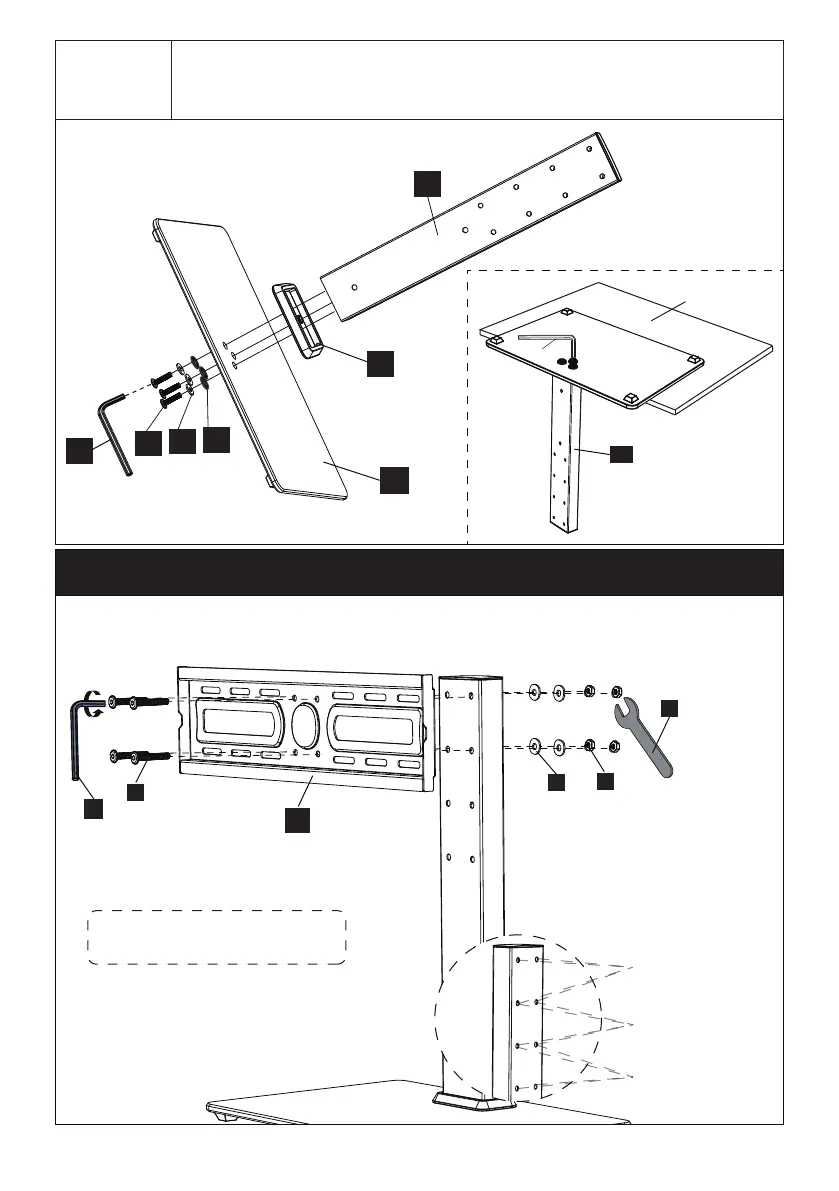
Connect TV plate to support pillar by using bolt [E], steel washer [D] and
M6 nut [A] .
Step 2 Connect the TV Plate to Support Pillar
Attach the support pillar [02] to tempered glass base [01] using
plastic cover [03], plastic washers [C], steel washers [D],
bolts [B] and Allen key [I]
Step 1-2
01
B
D
C
I
03
02
05
Note: There are three choices
for height adjustment. You can
choose your desired height
position while connecting the TV
plate [04] to support pillar [02]
Note: You may need assistance
with this step.
E
D
A
I
I
04
Table
I
First Choice for
Height Adjustment
Second Choice for
Height Adjustment
Third choice for
height Adjustment
02


 To Next Page