Step 4 Attach TV to the TV Plate and Manage the Wires
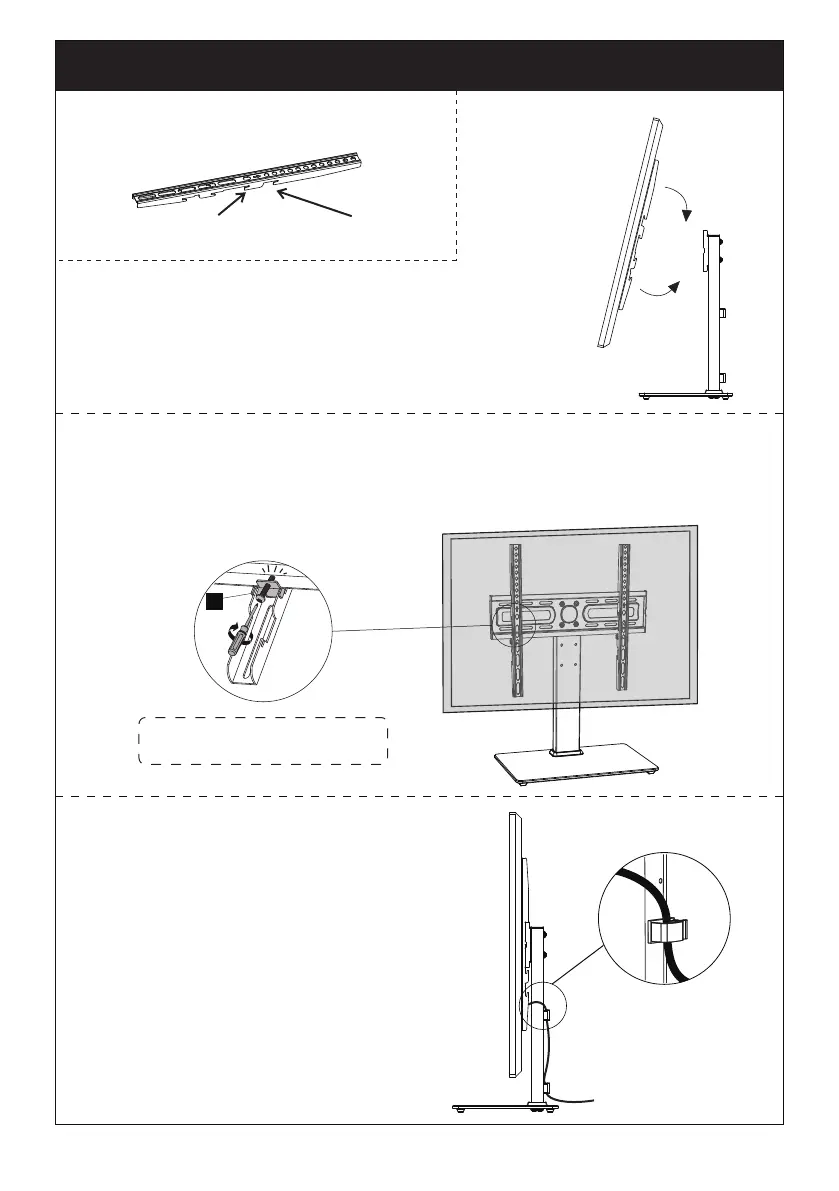
TV brackets are two-height-adjustable.
You can choose the proper height.
The second
choice
The first
choice
Step 4-1 Hang the TV with brackets to the TV plate
Step 4-2 Push the bottom of the TV to TV plate
Step 4-1
Step 4-2
Step 4-4
Step 4-3 Insert the safety lock [G] into the upward facing hooks at
the midway to lower part of the TV bracket. Please note this is where
the lower part of the TV bracket meets the TV plate. Then tighten the
bolts of the safety lock [G] until the bolts touch the TV.
Note: Please note, there is
no bolt holes in the TV plate
“Be gentle”
G
09
Step 4-4 Manage the wires


 To Next Page