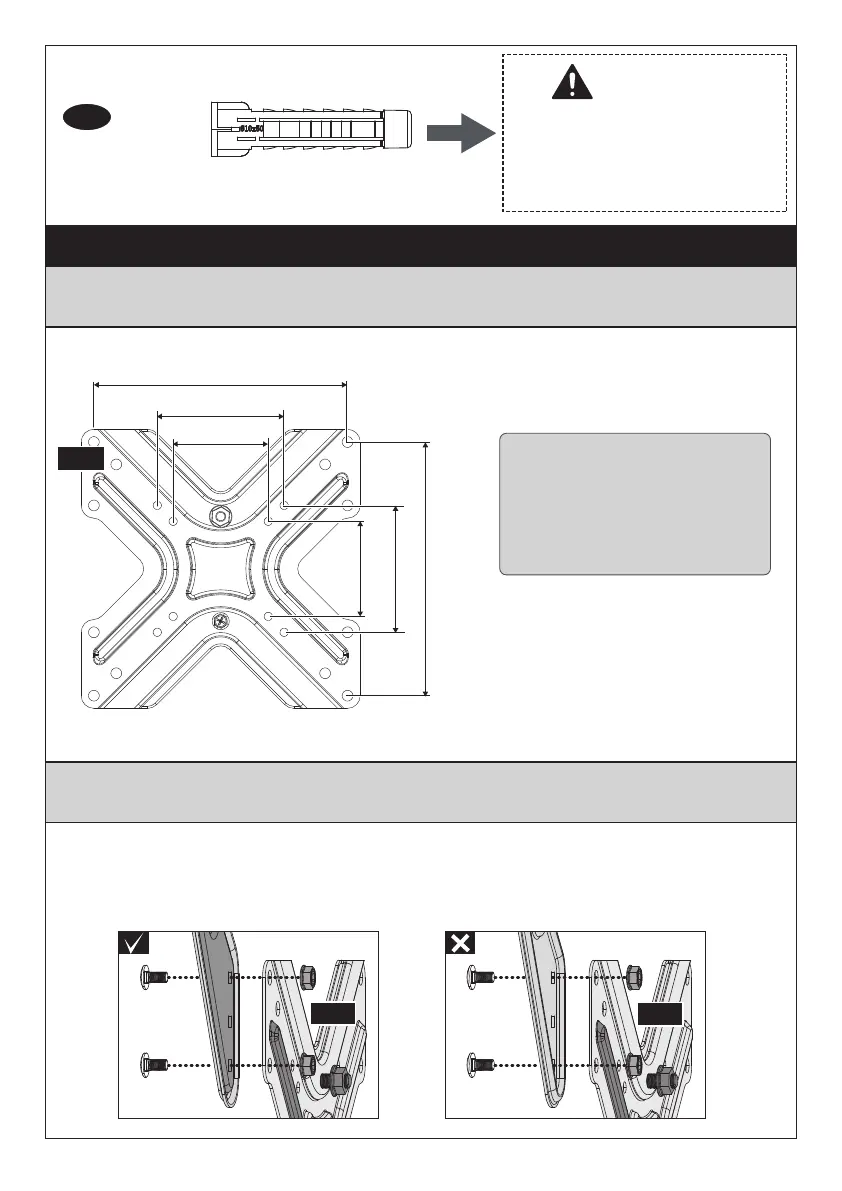
Step 1 Choose the Combination that Fits Your VESA Hole Pattern
For VESA hole pattern:
75 x 75mm (3 x 3″)
100 x 100mm (3.9 x 3.9″)
200 x 100mm (7.9 x 3.9″)
200 x 200mm (7.9 x 7.9″)
NO need to attach the extender brackets to faceplate. Skip to
Page 07.
Need to attach the extender brackets to faceplate. See Fig. 1 to
Fig. 4.
100mm (3.9″)
200mm (7.9″)
75mm (3″)
100mm (3.9″)
200mm (7.9″)
75mm (3″)
01A
NOTE:
The side with bump on the extender bracket should connect with the faceplate.
Please do not firmly tighten the bolts [G] and nuts [H] until Step 2 is finished.
01A
01A
Option A
Option B
This anchor is for concrete
or brick walls ONLY. DO
NOT use them in drywall or
wood studs.
CAUTION!
x 4
Wall Anchor
A2
02 03 04
05 06 07 08 09
10 11 12 13 14
15 16


 To Next Page