EasyManua.ls Logo

Alpine 3D Shuttle 7980M - Page 11

Alpine 3D Shuttle 7980M
46 pages
Print Icon
To Next Page IconTo Next Page
To Previous Page IconTo Previous Page
Loading...
«
BASIC
OPERATION
>
Preparation
for
Playback
+
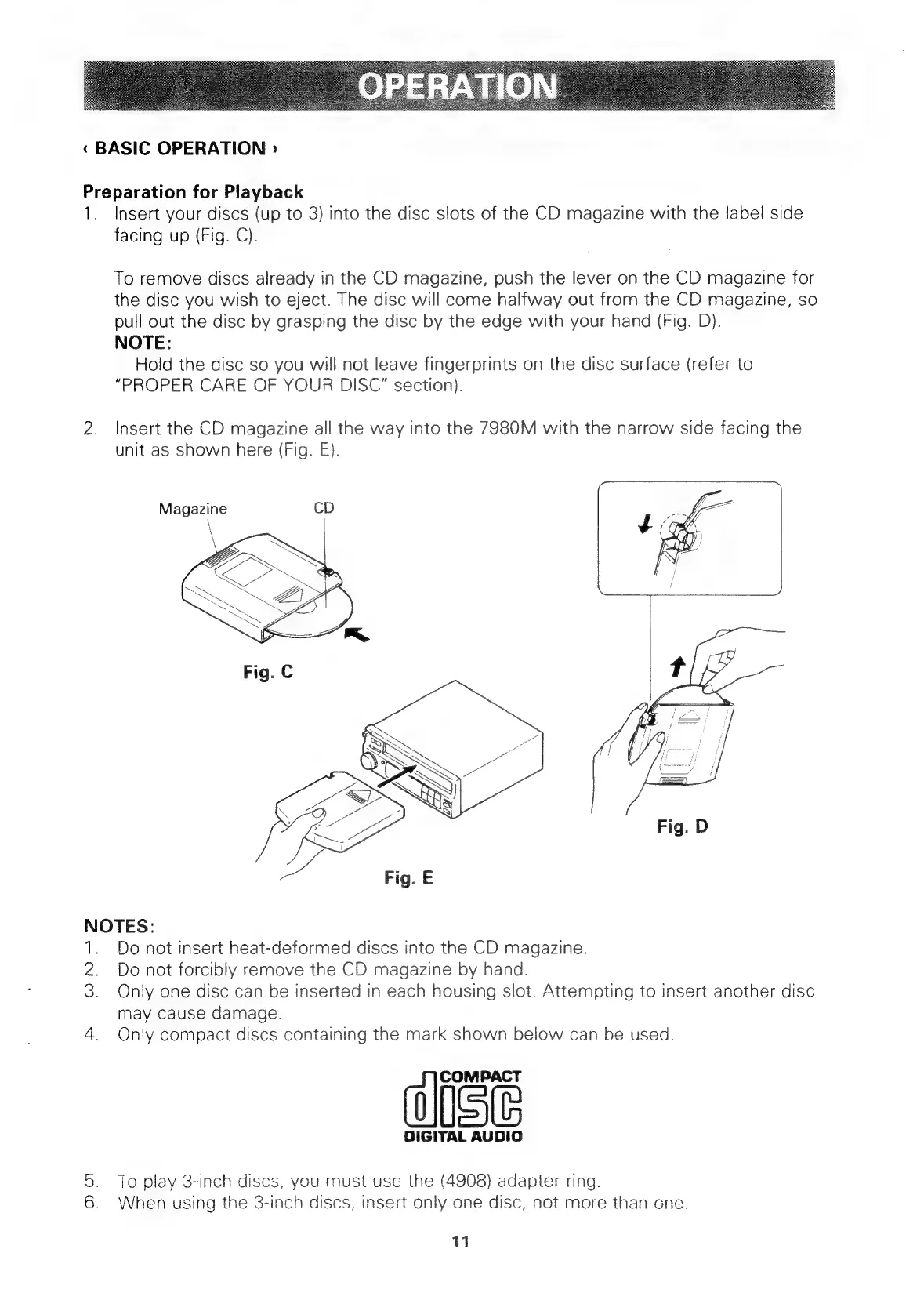
Insert
your
discs
(up
to
3)
into
the
disc
slots
of
the
CD
magazine
with
the
label
side
facing
up
(Fig.
C).
To
remove
discs
already
in
the
CD
magazine,
push
the
lever
on
the
CD
magazine
for
the disc
you
wish
to
eject.
The
disc
will
come
halfway
out
from
the
CD
magazine,
so
pull
out
the
disc
by
grasping
the
disc
by
the
edge
with
your
hand
(Fig.
D).
NOTE:
Hold
the
disc
so
you
will
not
leave
fingerprints
on
the
disc
surface
(refer
to
“PROPER
CARE
OF
YOUR
DISC”
section).
2.
Insert
the
CD
magazine
all
the
way
into
the
7980M
with
the
narrow
side
facing
the
unit
as
Shown
here
(Fig.
E).
Magazine
Fig.
E
NOTES:
1.
Do
not
insert
heat-deformed
discs
into
the
CD
magazine.
2.
Do
not
forcibly
remove
the
CD
magazine
by
hand.
3.
Only
one
disc
can
be
inserted
in
each
housing
slot.
Attempting
to
insert
another
disc
may
cause
damage.
4.
Only
compact
discs
containing
the
mark
shown
below
can
be
used.
COMPACT
DIGITAL
AUDIO
5.
To
play
3-inch
discs,
you
must
use
the
(4908)
adapter
ring.
6.
When
using
the
3-inch
discs,
insert
only
one
disc,
not
more
than
one.
11

Related product manuals