EasyManua.ls Logo

Alpine 3D Shuttle 7980M - Page 12

Alpine 3D Shuttle 7980M
46 pages
Print Icon
To Next Page IconTo Next Page
To Previous Page IconTo Previous Page
Loading...
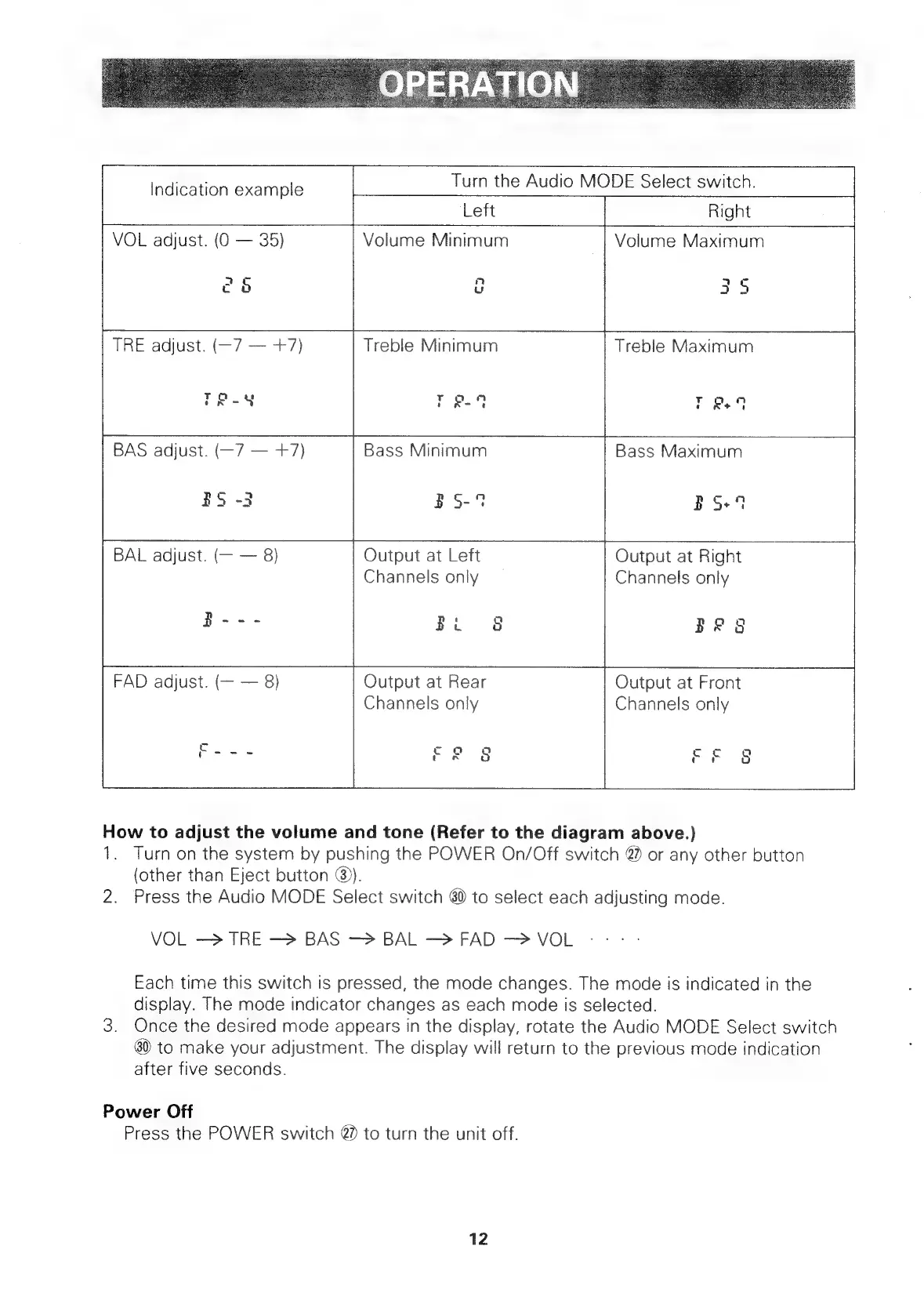
Indication
example
Turn
the
Audio
MODE
Select
switch.
Left
VOL
adjust.
(0
35)
eg
=
Volume
Minimum
mn
u
Right
Volume
Maximum
35
TRE
adjust.
(—7
+7)
TR-¥
BAS
adjust.
(—7
+7)
Treble
Minimum
rR
4
Bass
Minimum
Treble
Maximum
Bass
Maximum
BS+4
BS
-3
BS-%
BAL
adjust.
(—
8)
Output
at
Left
Channels
only
B---
Bi
8
FAD
adjust.
(—
8)
Output
at
Rear
“Fy
Channels
only
Fe
3
|
Output
at
Right
ee
Channels
only
BRS
Output
at
Front
Channels
only
How
to
adjust
the
volume
and
tone
(Refer
to
the
diagram
above.)
1.
Turn
on
the
system
by
pushing
the
POWER
On/Off
switch
@
or
any
other
button
(other
than
Eject
button
@).
2.
Press
the
Audio
MODE
Select
switch
80
to
select
each
adjusting
mode.
VOL
—>
TRE
BAS
—>
BAL
FAD
VOL
Each
time
this
switch
is
pressed,
the
mode
changes.
The
mode
is
indicated
in
the
display.
The
mode
indicator
changes
as
each
mode
is
selected.
3.
Once
the
desired
mode
appears
in
the
display,
rotate
the
Audio
MODE
Select
switch
80
to
make
your
adjustment.
The
display
will
return
to
the
previous
mode
indication
after
five
seconds.
Power
Off
Press
the
POWER
switch
@
to
turn
the
unit
off.
12

Related product manuals