EasyManua.ls Logo

Alpine 3D Shuttle 7980M - Page 13

Alpine 3D Shuttle 7980M
46 pages
Print Icon
To Next Page IconTo Next Page
To Previous Page IconTo Previous Page
Loading...
S.T.M.
(Source
Tone
Memory)
The
Bass
and
Treble
controls
can
be
individually
set
for
each
source
(FM,
MW/LW,
and
CD).
Once
set,
their
positions
are
automatically
memorized.
Whenever
the
source
is
reselected,
the
Bass
and
Treble
controls
will
return
to
your
preset
configuration.
Function
Switching
1.
Tuner
Mode
Press
the
TUNER/BAND
button
©
to
switch
from
CD
to
Radio.
2.
CD
Mode
Press
the
DISC
(
P/E
)
button
@
to
switch
from
Radio
to
CD.
«
RADIO
OPERATION
>
lf
the
unit
is
not
in
the
Radio
mode,
press
the
TUNER/BAND
button
©.
Tuning
Band
Selection
Press
the
TUNER/BAND
button
©
to
select
the
desired
tuning
band.
The
Band
indicator
42
shows
your
selection.
Switching
the
FM
Volume
Use
this
function
if
the
difference
in
volume
is
great
when
switching
between
a
CD
and
the
FM
radio.
1.
Press
the
TUNE
switch
@
for
2
seconds.
2.
Press
the
Preset
No.
1
button
@
to
switch
the
display
between
“F-HI”
and
“F-LO”.
The
FM
volume
can
be
set
to
one
of
two
positions,
high
or
low.
Set
the
position
according
to
the
broadcast
station.
F
-
HI
F-LO
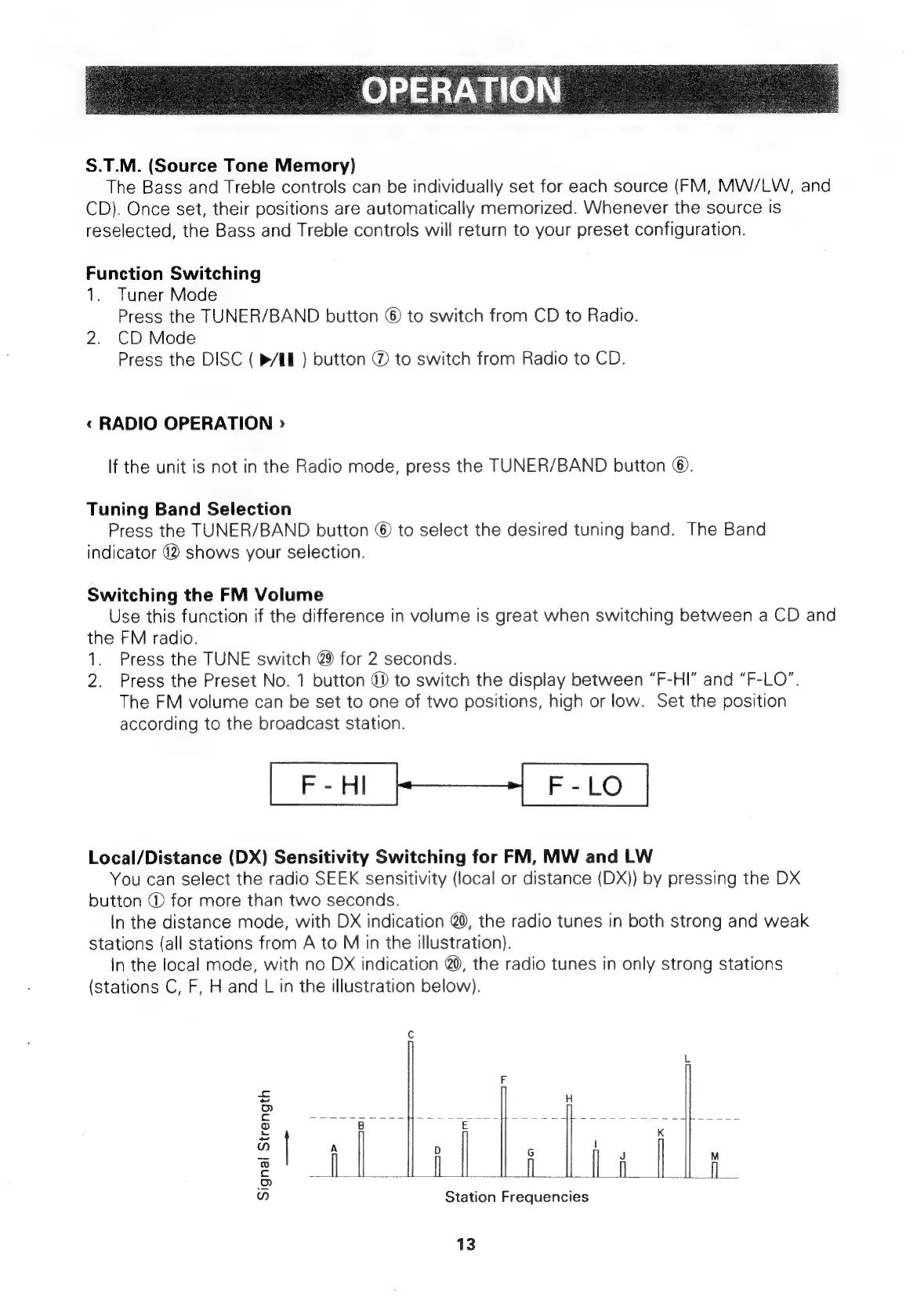
Local/Distance
(DX)
Sensitivity
Switching
for
FM,
MW
and
LW
You
can
select
the
radio
SEEK
sensitivity
(local
or
distance
(DX))
by
pressing
the
DX
button
@
for
more
than
two
seconds.
In
the
distance
mode,
with
DX
indication
@0,
the
radio
tunes
in
both
strong
and
weak
stations
(all
stations
from
A
to
M
in
the
illustration).
In
the
local
mode,
with
no
DX
indication
@0,
the
radio
tunes
in
only
strong
stations
(stations
C,
F,
H
and
L
in
the
illustration
below).
fo)
Signal
Strength
ap
|
aa
|
=o
|
Seaicscaecranen
oa
=—i-
|
vue
ied
cos
Station
Frequencies
13

Related product manuals