EasyManua.ls Logo

Alpine 3D Shuttle 7980M - Page 22

Alpine 3D Shuttle 7980M
46 pages
Print Icon
To Next Page IconTo Next Page
To Previous Page IconTo Previous Page
Loading...
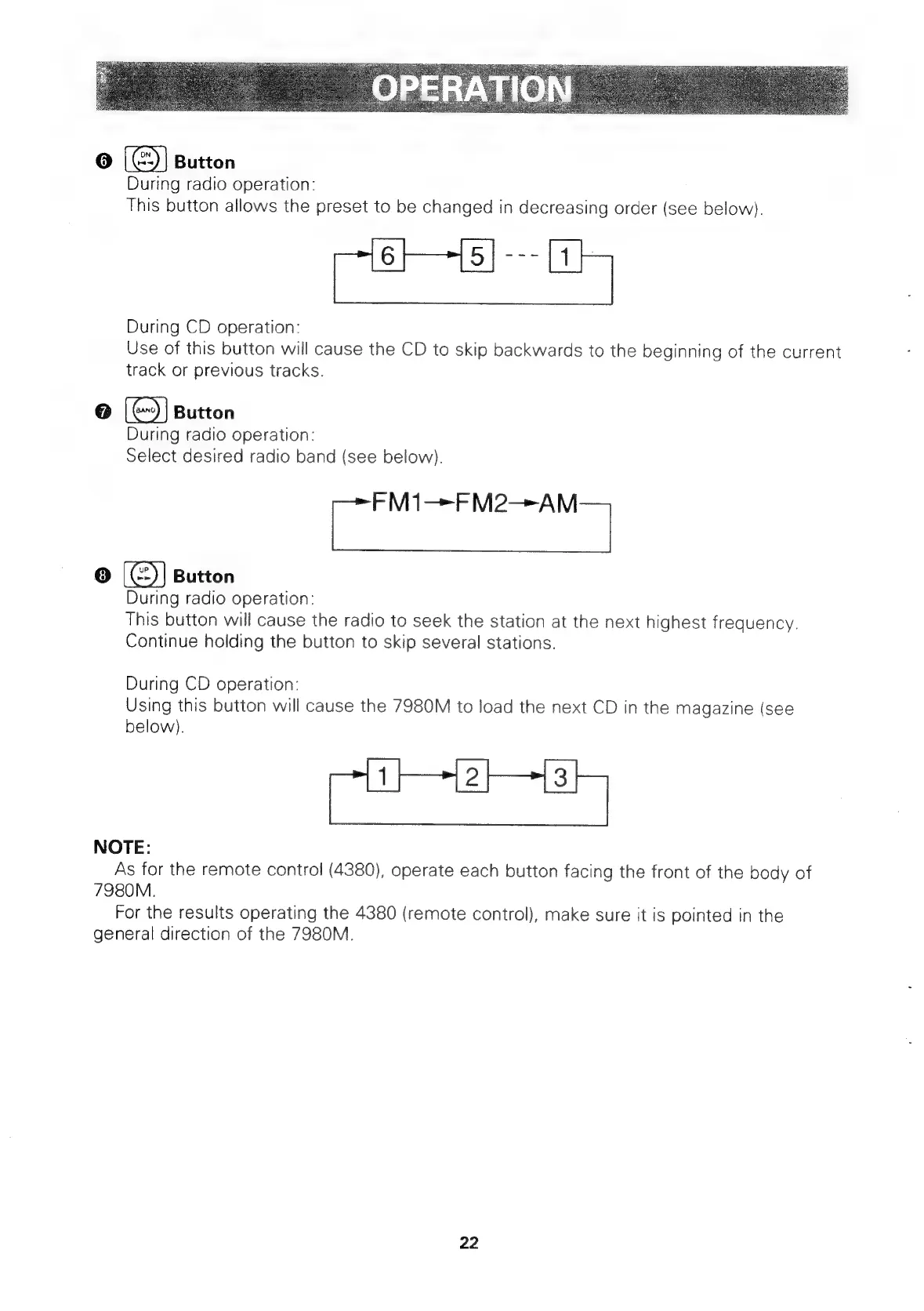
6
]
(6)
Button
During
radio
operation:
This
button
allows
the
preset
to
be
changed
in
decreasing
order
(see
below}.
During
CD
operation:
Use
of
this
button
will
cause
the
CD
to
skip
backwards
to
the
beginning
of
the
current
track
or
previous
tracks.
[
G2)
|
Button
During
radio
operation:
Select
desired
radio
band
(see
below).
Coe
|
18)
Button
During
radio
operation:
This
button
will
cause
the
radio
to
seek
the
station
at
the
next
highest
frequency.
Continue
holding
the
button
to
skip
several
stations.
During
CD
operation:
Using
this
button
will
cause
the
7980M
to
load
the
next
CD
in
the
magazine
(see
below).
NOTE:
As
for
the
remote
control
(4380),
operate
each
button
facing
the
front
of
the
body
of
7980M.
For
the
results
operating
the
4380
(remote
control),
make
sure
it
is
pointed
in
the
general
direction
of
the
7980M.
22

Related product manuals