EasyManua.ls Logo

Alpine 3D Shuttle 7980M - Page 24

Alpine 3D Shuttle 7980M
46 pages
Print Icon
To Next Page IconTo Next Page
To Previous Page IconTo Previous Page
Loading...
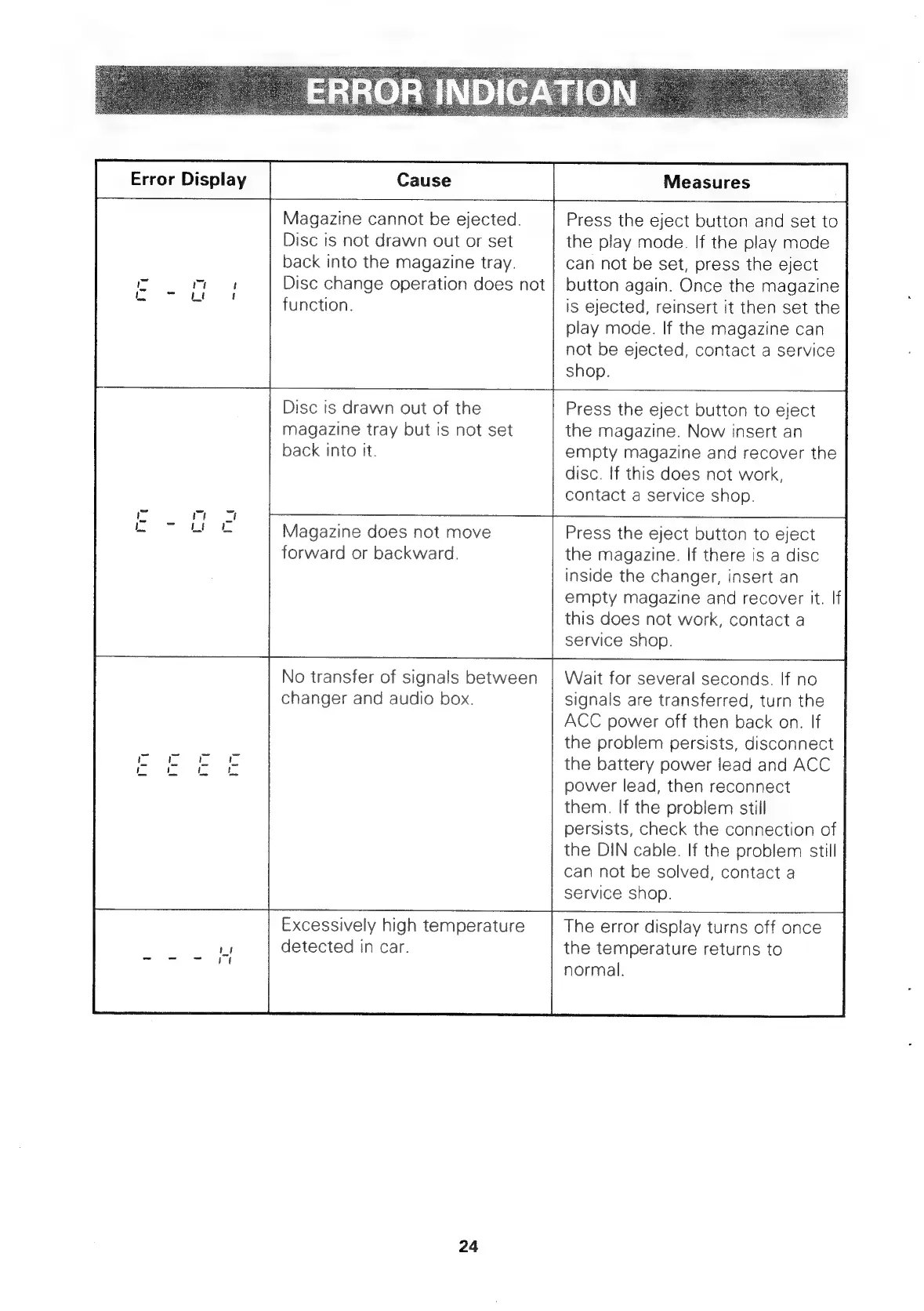
Error
Display
Measures
Magazine
cannot
be
ejected.
|
Press
the
eject
button
and
set
to
Disc
is
not
drawn
out
or
set
the
play
mode.
If
the
play
mode
back
into
the
magazine
tray.
can
not
be
set,
press
the
eject
Disc
change
operation
does
not
|
button
again.
Once
the
magazine
function.
is
ejected,
reinsert
it
then
set
the
play
mode.
If
the
magazine
can
not
be
ejected,
contact
a
service
shop.
Disc
is
drawn
out
of
the
Press
the
eject
button
to
eject
magazine
tray
but
is
not
set
the
magazine.
Now
insert
an
back
into
it.
empty
magazine
and
recover
the
disc.
If
this
does
not
work,
contact
a
service
shop.
ts
Magazine
does
not
move
Press
the
eject
button
to
eject
forward
or
backward.
the
magazine.
If
there
is
a
disc
inside
the
changer,
insert
an
empty
magazine
and
recover
it.
If
this
does
not
work,
contact
a
service
shop.
No
transfer
of
signals
between
|
Wait
for
several
seconds.
If
no
changer
and
audio
box.
signals
are
transferred,
turn
the
ACC
power
off
then
back
on.
If
the
problem
persists,
disconnect
the
battery
power
lead
and
ACC
power
lead,
then
reconnect
them.
If
the
problem
still
persists,
check
the
connection
of
|
the
DIN
cable.
If
the
problem
still
|
can
not
be
solved,
contact
a
|
service
shop.
Excessively
high
temperature
The
error
display
turns
off
once
detected
in
car.
the
temperature
returns
to
normal.
24

Related product manuals