EasyManua.ls Logo

Alpine 7915M - Page 9

Alpine 7915M
21 pages
Print Icon
To Next Page IconTo Next Page
To Previous Page IconTo Previous Page
Loading...
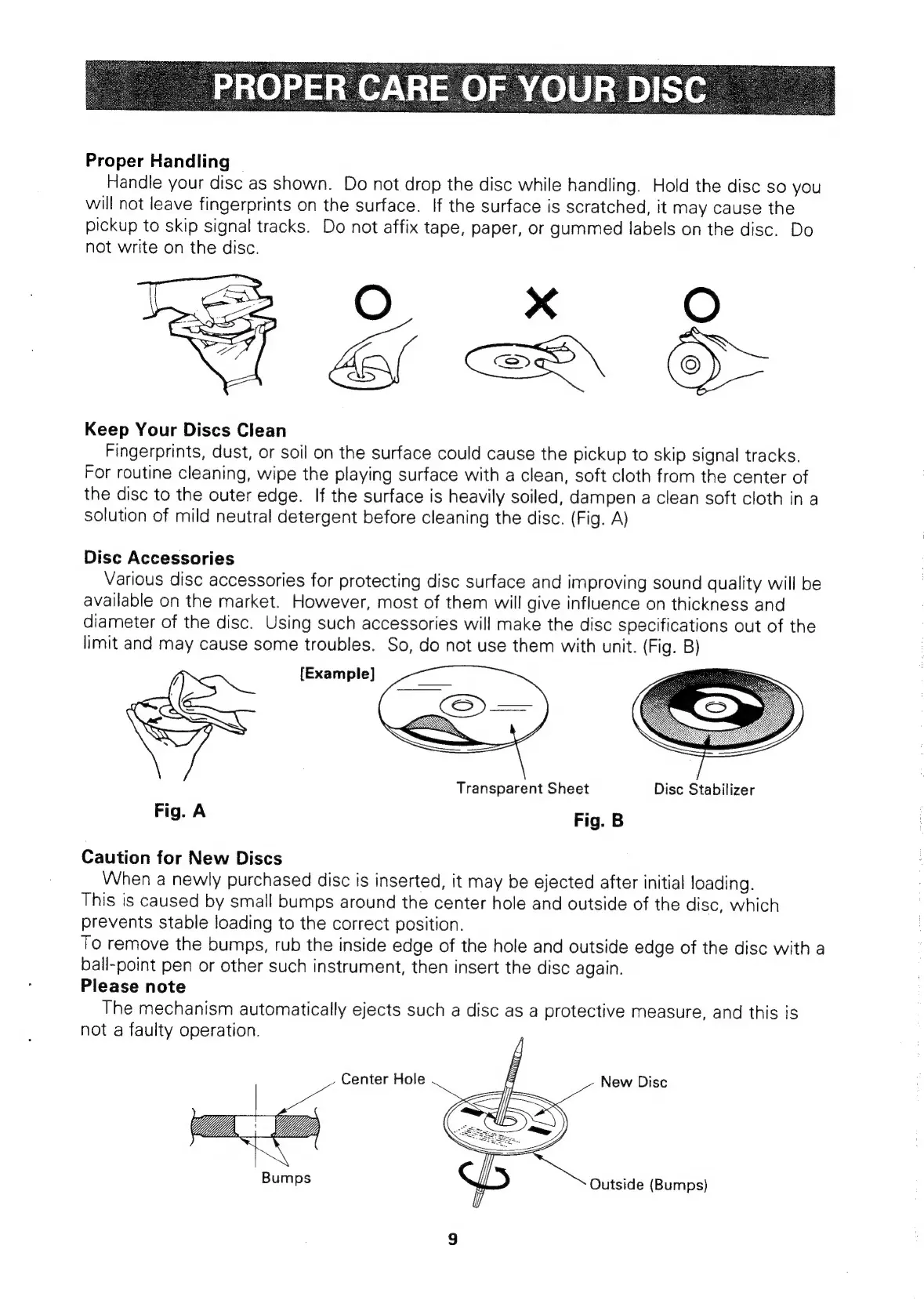
Proper
Handling
Handle
your
disc
as
shown.
Do
not
drop
the
disc
while
handling.
Hold
the
disc
so
you
will
not
leave
fingerprints
on
the
surface.
If
the
surface
is
scratched,
it
may
cause
the
pickup
to
skip
signal
tracks.
Do
not
affix
tape,
paper,
or
gummed
labels
on
the
disc.
Do
not
write
on
the
disc.
Caae©
Ces
Keep
Your
Discs
Clean
Fingerprints,
dust,
or
soil
on
the
surface
could
cause
the
pickup
to
skip
signal
tracks.
For
routine
cleaning,
wipe
the
playing
surface
with
a
clean,
soft
cloth
from
the
center
of
the
disc
to
the
outer
edge.
If
the
surface
is
heavily
soiled,
dampen
a
clean
soft
cloth
in
a
solution
of
mild
neutral
detergent
before
cleaning
the
disc.
(Fig.
A)
Disc
Accessories
Various
disc
accessories
for
protecting
disc
surface
and
improving
sound
quality
will
be
available
on
the
market.
However,
most
of
them
will
give
influence
on
thickness
and
diameter
of
the
disc.
Using
such
accessories
will
make
the
disc
specifications
out
of
the
limit
and
may
cause
some
troubles.
So,
do
not
use
them
with
unit.
(Fig.
B)
Transparent
Sheet
Disc
Stabilizer
Fig.
A
Fig.
B
Caution
for
New
Discs
When
a
newly
purchased
disc
is
inserted,
it
may
be
ejected
after
initial
loading.
This
is
caused
by
small
bumps
around
the
center
hole
and
outside
of
the
disc,
which
prevents
stable
loading
to
the
correct
position.
To
remove
the
bumps,
rub
the
inside
edge
of
the
hole
and
outside
edge
of
the
disc
with
a
ball-point
pen
or
other
such
instrument,
then
insert
the
disc
again.
Please
note
The
mechanism
automatically
ejects
such
a
disc
as
a
protective
measure,
and
this
is
not
a
faulty
operation.
Center
Hole
New
Disc
Bumps
Outside
(Bumps)

Related product manuals