EasyManua.ls Logo

Alpine CDA-7939R - Page 37

Alpine CDA-7939R
47 pages
Print Icon
To Next Page IconTo Next Page
To Previous Page IconTo Previous Page
Loading...
ops080
BAND
|
(/
AUOIO
PROG.
SEL
SEL,
SELECT
T
v
po
ef
1
a
MMA
PINE
REMOTE
CONTROL
UNIT
RUE-4160
X=
gale}i=3.
G40)
alice)
|
Operation
English
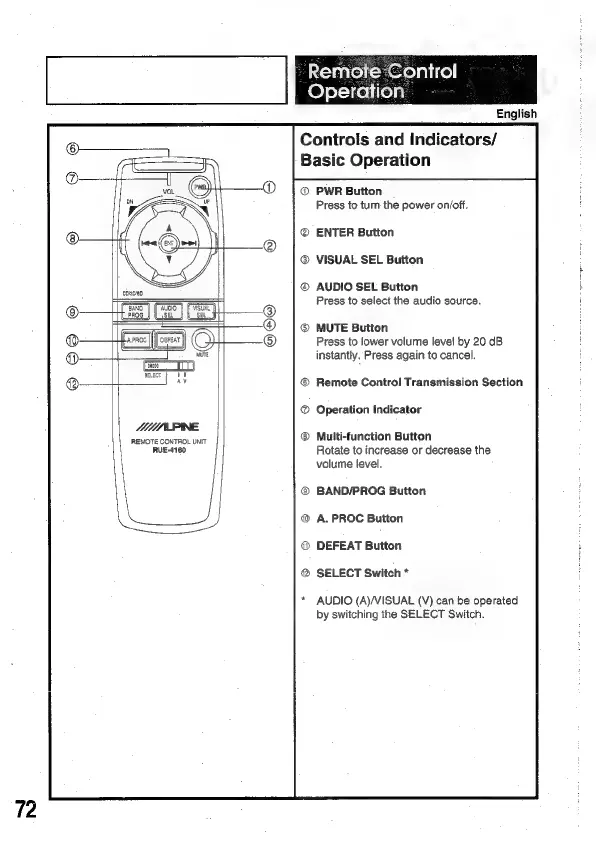
Controls
and
Indicators/
Basic
Operation
@
PWR
Button
Press
to
turn
the
power
on/off.
®
ENTER
Button
VISUAL
SEL
Button
®
AUDIO
SEL
Button
Press
to
select
the
audio
source.
MUTE
Button
Press
to
lower
volume
level
by
20
dB
instantly.
Press
again
to
cancel.
®
Remote
Control
Transmission
Section
®
Operation
Indicator
®
Multi-function
Button
Rotate
to
increase
or
decrease
the
volume
level.
BAND/PROG
Button
A.
PROC
Button
DEFEAT
Button
SELECT
Switch
*
AUDIO
(A)/VISUAL
(V)
can
be
operated
by
switching
the
SELECT
Switch.

Related product manuals