EasyManua.ls Logo

Alpine CDA-7939R - Page 38

Alpine CDA-7939R
47 pages
Print Icon
To Next Page IconTo Next Page
To Previous Page IconTo Previous Page
Loading...
‘AUDIO
) f
VISUAL
SEL SEL
08080
BAND
})
[
AUDIO
|
f
WSUAL
PROG
SEL
SEL
wate
m7
Stat
F=i=J
©)
Ga
Tg
Te
ay
©
=~
Remote
Control
Operation
English
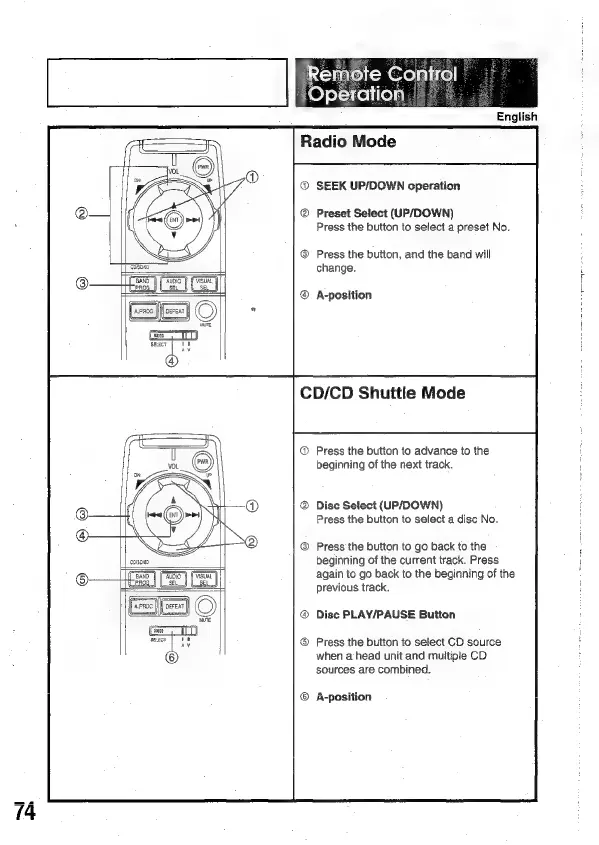
Radio
Mode
SEEK
UP/DOWN
cperation
Preset
Select
(UP/DOWN)
Press
the
button
to
select
a
preset
No.
Press
the
button,
and
the
band
will
change.
A-position
CD/CD
Shuttle
Mode
Press
the
button
to
advance
to
the
beginning
of
the
next
track.
Disc
Setect
(UP/DOWN
Press
the
button
to
select
a
disc
No.
Press
the
button
to
go
back
to
the
beginning
of
the
current
track.
Press
again
to
go
back
to
the
beginning
of
the
previous
track.
Disc
PLAY/PAUSE
Button
®
Press
the
button
to
select
CD
source
when
a
head
unit
and
multiple
CD
sources
are
combined.
A-position

Related product manuals