EasyManua.ls Logo

Alpine CDA-7939R - Page 39

Alpine CDA-7939R
47 pages
Print Icon
To Next Page IconTo Next Page
To Previous Page IconTo Previous Page
Loading...
{aves
(e}i=\
Gel
plice)
Operation
English
Other
Mode
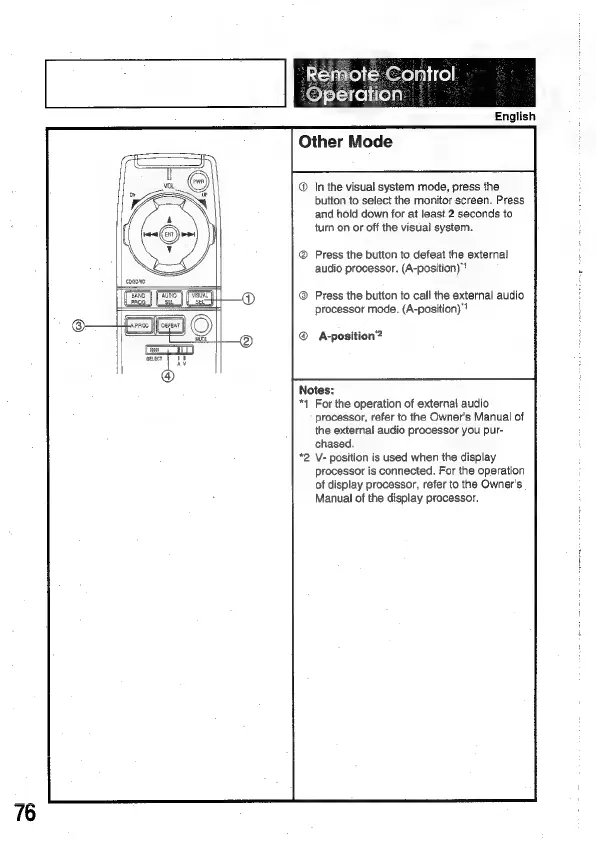
In
the
visual
system
mode,
press
the
button
to
select
the
monitor
screen.
Press
and
hold
down
for
at
least
2
seconds
to
turn
on
or
off
the
visual
system.
®
Press
the
button
to
defeat
the
external
audio
processor.
(A-position)"?
ane
(a
a
®
Gov
Jee)
©)
@
Press
the
button
to
call
the
external
audio
processor
mode.
(A-position)"?
@
A-position’?
Notes:
*1
For
the
operation
of
external
audio
processor,
refer
to
the
Owner's
Manual
of
the
external
audio
processor
you
pur-
chased.
*2
V-
position
is
used
when
the
display
processor
is
connected.
For
the
operation
of
display
processor,
refer
to
the
Owner's
Manual
of
the
display
processor.

Related product manuals