EasyManua.ls Logo

Alpine PKG-RSE3DVD - System Wiring Connections; Power Supply Wiring; AV and Remote Signal Wiring

Alpine PKG-RSE3DVD
17 pages
Print Icon
To Next Page IconTo Next Page
To Previous Page IconTo Previous Page
Loading...
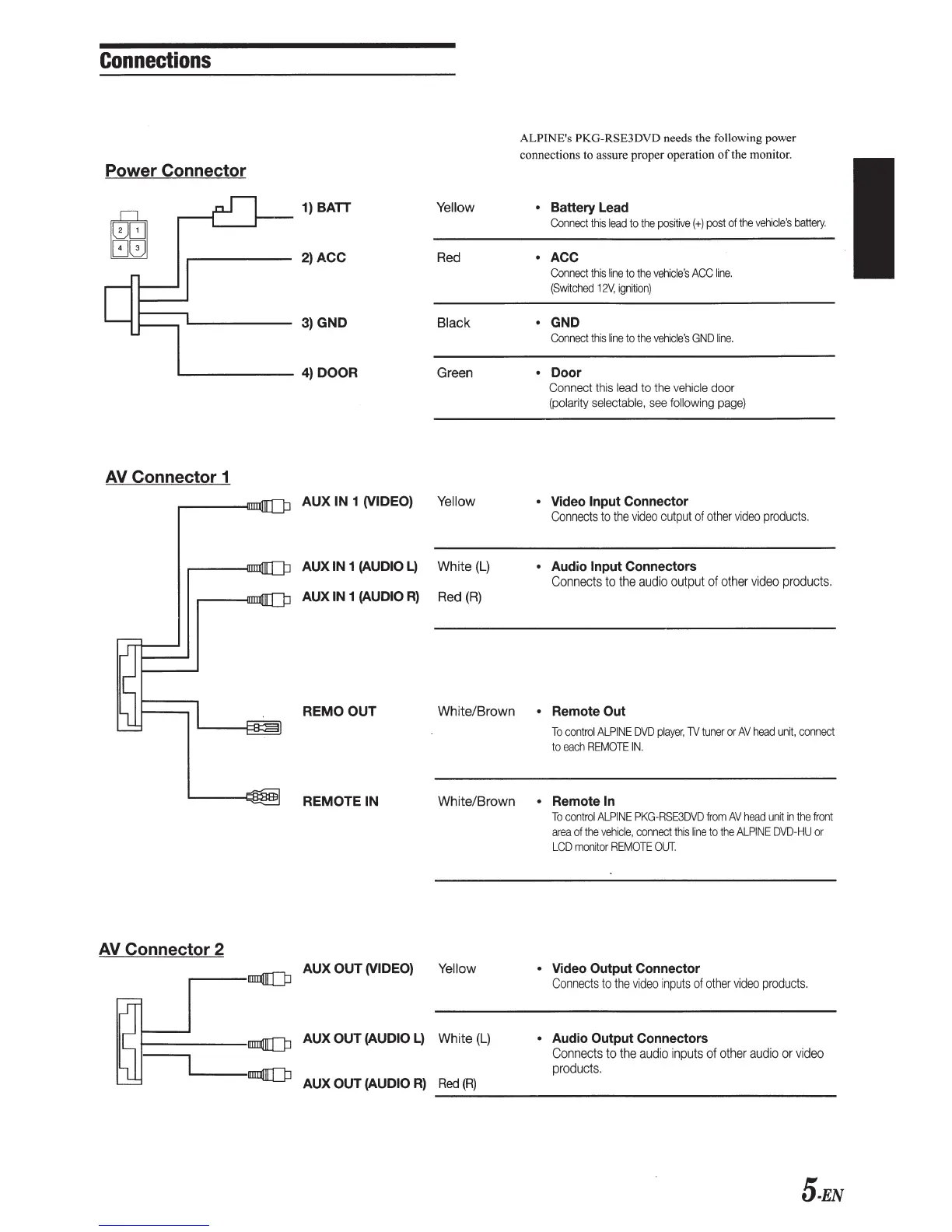
Connections
Power Connector
AV
Connector 1
AV
Connector 2
1) BATT Yellow
2)ACC
Red
3)
GND
Black
4)
DOOR
Green
AUX
IN 1 (VIDEO) Yellow
AUXIN
1 (AUDIO
L)
White
(L)
AUXIN
1 (AUDIO
R)
Red
(R)
ALPINE's PKG-RSE3DVD needs the following power
connections to assure proper operation
of
the monitor.
Battery Lead
Connect
this
lead
to
the
positive(+)
post
of
the
vehicle's
battery.
ACC
Connect
this
line
to
the
vehicle's
ACC
line.
(Switched
12V,
ignition)
GND
Connect
this
line
to
the
vehicle's
GND
line.
Door
Connect this
lead
to
the
vehicle door
(polarity selectable,
see
following
page)
Video Input Connector
Connects
to
the
video
output
of
other
video
products.
Audio Input Connectors
Connects
to
the
audio
output
of
other
video
products.
REMOOUT
White/Brown Remote Out
REMOTE
IN
To
control
ALPINE
DVD
player,
TV
tuner
or
AV
head
unit,
connect
to
each
REMOTE
IN.
White/Brown Remote
In
To
control
ALPINE
PKG-RSE3DVD
from
AV
head
unit
in
the
front
area
of
the
vehicle,
connect
this
line
to
the
ALPINE
DVD-HU
or
LCD
monitor
REMOTE
OUT.
r----nm:JQ[Q:l
AUX
OUT
(VIDEO)
Yellow
Video Output Connector
Connects
to
the
video
inputs
of
other
video
products.
AUX
OUT
(AUDIO
L)
White
(L)
AUX
OUT
(AUDIO
R)
Red
(R)
Audio Output Connectors
Connects
to
the
audio
inputs
of
other
audio
or
video
products.
---------------------------------------------
5-EN

Other manuals for Alpine PKG-RSE3DVD

Related product manuals