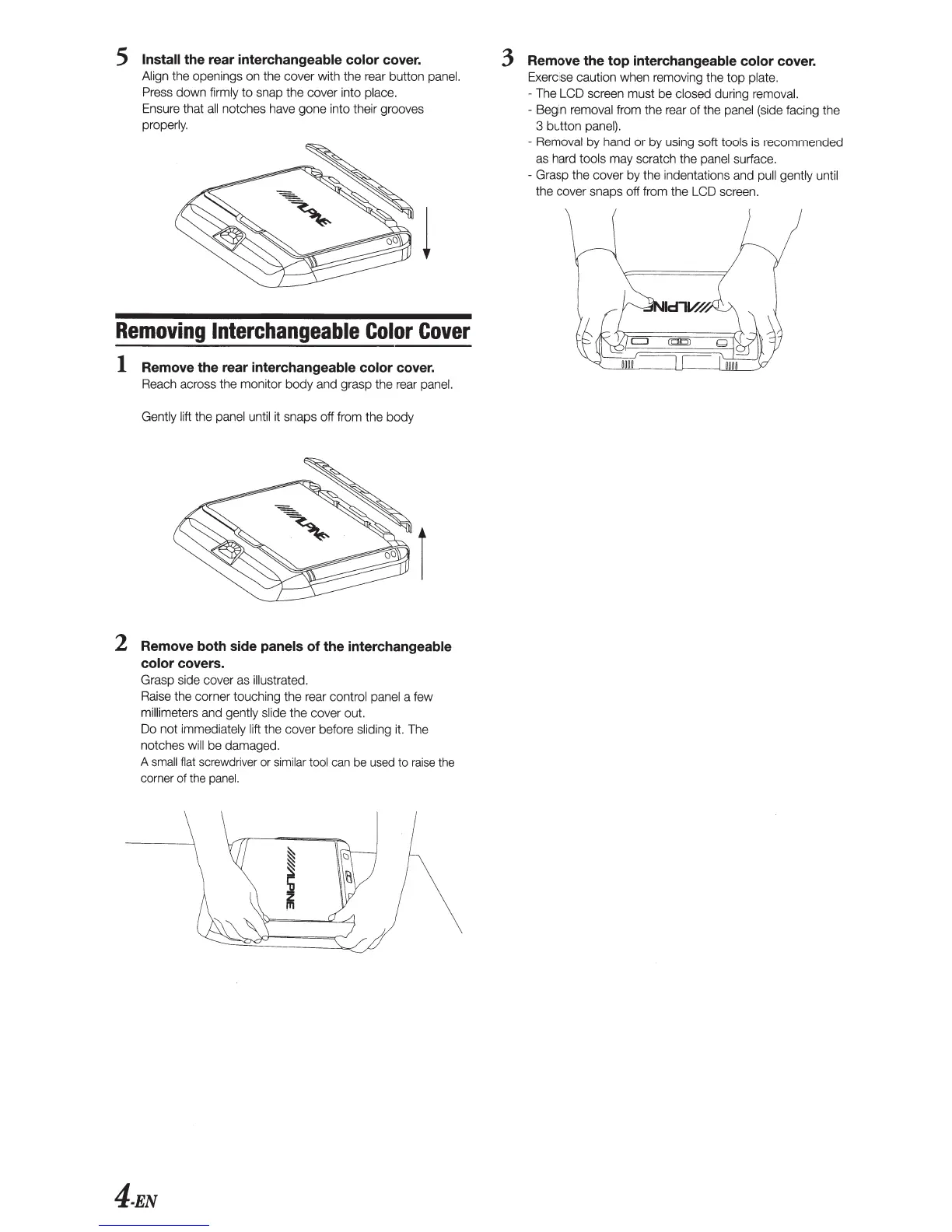
5 Install
the rear
interchangeable color cover.
Align
the openings on the cover with the rear button
panel.
Press
down
firmly
to
snap the cover into
place.
Ensure that
all
notches have gone into their grooves
properly.
Removing
Interchangeable
Color
Cover
1 Remove the rear
interchangeable color
cover.
Reach across the monitor
body
and grasp the rear
panel.
Gently lift
the panel until it snaps off from the body
2
Remove both side
panels
of
the
interchangeable
color
covers.
Grasp side cover as
illustrated.
Raise the corner touching
the
rear
control panel
a few
millimeters
and
gently slide
the cover out.
Do
not
immediately
lift
the cover before
sliding
it. The
notches
will
be damaged.
A
small
flat
screwdriver or
similar tool
can
be used to
raise
the
corner of the
panel.
4-EN
3
Remove the top
interchangeable color cover.
Exercise caution when remov
in
g the
top
plate.
- The LCD screen must be
closed during removal.
-
Beg
in
re
moval
from
the
rear
of
the
panel
(side facing the
3 button
panel).
-
Removal
by
hand
or
by
using soft
tools
is recommended
as hard
tools
may scratch the
panel surface.
- Grasp the cover by the indentations and
pull gently unt
il
the cover snaps off from the LCD screen.










 To Next Page