Installing
the
Overhead
Monitor
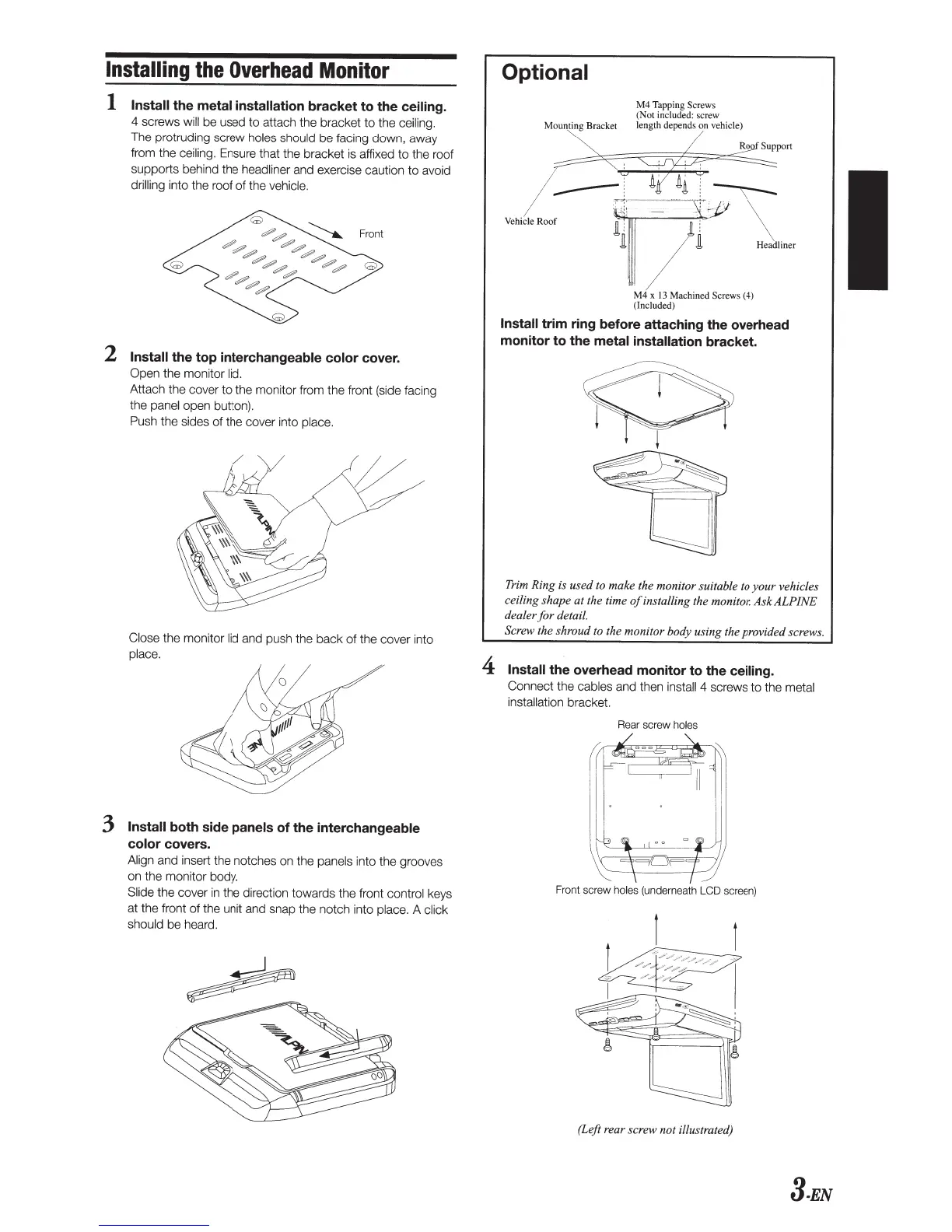
1
Install
the
metal installation
bracket
to
the
ceiling.
4 screws
will
be used
to
attach the bracket
to
the ceiling.
The protruding screw holes should
be
facing down, away
from the ceiling. Ensure that the bracket is affixed to the roof
supports behind the headliner and exercise caution
to
avoid
drilling
into the roof
of
the vehicle.
~
Front
2
Install
the top interchangeable
color
cover.
Open
the monitor
lid.
Attach the cover
to
the monitor from the front (side facing
the panel open button).
Push the sides of the
co
ver into place.
Close
the monitor
li
d
and push the back
of
the cover into
place.
3
Install
both side
panels
of
the
interchangeable
color
covers.
Align and
in
sert the notches on the panels into the grooves
on the monitor body.
Slide
the cover
in
the direction towards the front control keys
at the front
of
the unit and snap the notch into place. A c
li
ck
should
be
heard.
Optional
M4
Tapping Screws
(Not included: screw
Mounting Bracket length depends on vehicle)
---:
n,
·
~i
!
--:-:\
~""''
M
~
[
;
JT"j/
~
""
"
M4 x 13 Machined Screws (4)
(Included)
Install
trim ring before attaching the overhead
monitor to the
metal installation
bracket.
Trim Ring
is
used
to make the monitor suitable to
your
vehicles
ceiling shape
at
the time
of
installing the monitor. Ask ALPINE
dealer
for
detail.
Screw the shroud to the monitor body using the provided screws.
4
Install
the overhead monitor to the
ceiling.
Conne
ct
the
ca
bles and then insta
ll
4 screws
to
the metal
installation bracket.
Rear
screw
holes
Fr
on
t screw holes
(undern
eath
LCD scr
ee
n)
(Left rear screw not illustrated)
3-EN










 To Next Page