13
Español
English Français
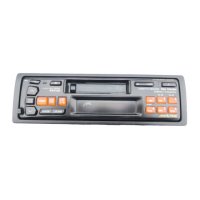
Attaching the Front
Panel
Pose du panneau
avant
Fijación del panel fron-
tal
1
2
1. Insérez d'abord le côté droit du panneau
avant dans l'appareil principal, puis
alignez la saillie du panneau avant sur la
rainure de l’appareil principal.
2. Poussez sur le côté gauche du panneau
avant jusqu'à ce qu'il s'enclenche à fond
dans l'appareil.
Remarque: Avant de mettre le panneau
avant, vérifiez qu'il n'y a pas
de poussière ni saleté sur les
bornes du connecteur et
qu'aucun objet ne se trouve
entre le panneau avant et
l'appareil.
1.First, insert the right side of the front
panel into the main unit. Align the
groove on the front panel with the
projection on the main unit.
2.Push the left side of the front panel until
it locks firmly into the main unit.
Note: Before attaching the front panel,
make sure that there is no dirt or
dust on the connector terminals and
no foreign object between the front
panel and the main unit.
1
1. Inserte primero la parte derecha del panel
frontal en la unidad principal. Alinee el
saliente del panel frontal con la ranura de
la unidad principal.
2. Empuje la parte izquierda del panel frontal
hasta que se bloquee firmemente en la
unidad principal.
Nota: Antes de fijar el panel frontal,
cerciórese de que no haya suciedad
ni polvo en los terminales del
conector, y de que no existan objetos
extraños entre el panel frontal y la
unidad principal.



 To Next Page
 Loading...