35
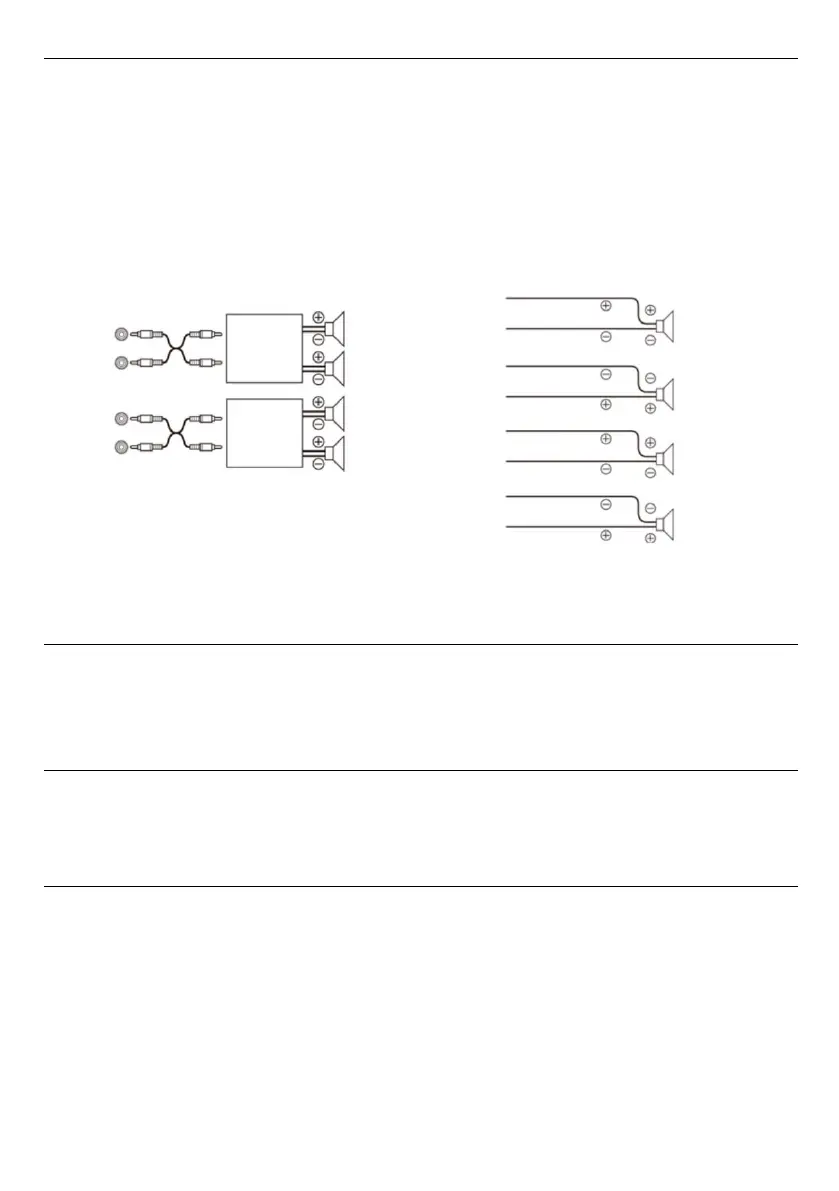
Built-in amplifier
When connected to an external amplifier, the sound quality can be improved by stopping the power supply to the
internal amplifier. In this setting, the built-in amplifier of the main unit is off.
Note:
• When the "built-in amplifier" is set to "off", the system will not output any sound.
Coaxial / Optical fiber
This function is enabled when the Media Player is connected to a power amplifier or audio processor.
Setting item : Coaxial / Optical fiber
Setting content : Off / On (initial setting)
Restore factory settings
After the factory settings are restored, all the settings will be restored to the default settings at the factory except
for the "dealer settings" mode.
Setting item : Restore factory settings
Check mode
Setting item : Check mode, under the settings menu, press and hold , press and hold the knob, long
press and hold to enter the check mode.
Setting content : Firmware update : enter the firmware update menu, select the firmware upgrade file,
and then press OK to update the version.
Dealer settings : Short press to save the dealer settings
Serial number : You can view the serial number of the Media Player
Speak
Front right
Rear right
Rear left
Front left
Amplifier
Amplifier
Front left
Rear left
Front right
Rear right
Front right speaker
On:
Ra
re right speaker
Rare left speaker
Front left speaker
Setting item : Built in power amplifier
Setting content : Off / On (initial setting)
Off: When using the Media Player to drive an external amplifier, please use this mode to turn off the
activation of the built-in speaker.
On: The speaker is driven by an internal amplifier.



 To Next Page