EasyManua.ls Logo

Alpine X209D - Page 14

Alpine X209D
252 pages
Print Icon
To Next Page IconTo Next Page
To Previous Page IconTo Previous Page
Loading...
Owner's manual
SiriusXM
Satell
i
te
Radio
Operation
(Optional)
SiriusXM Satellite
Radio Operation
(Optional)
When an
optional
SiriusXM Tuner
is c
onnect
ed
to
this
unit
, the
following
operations may
be performed.
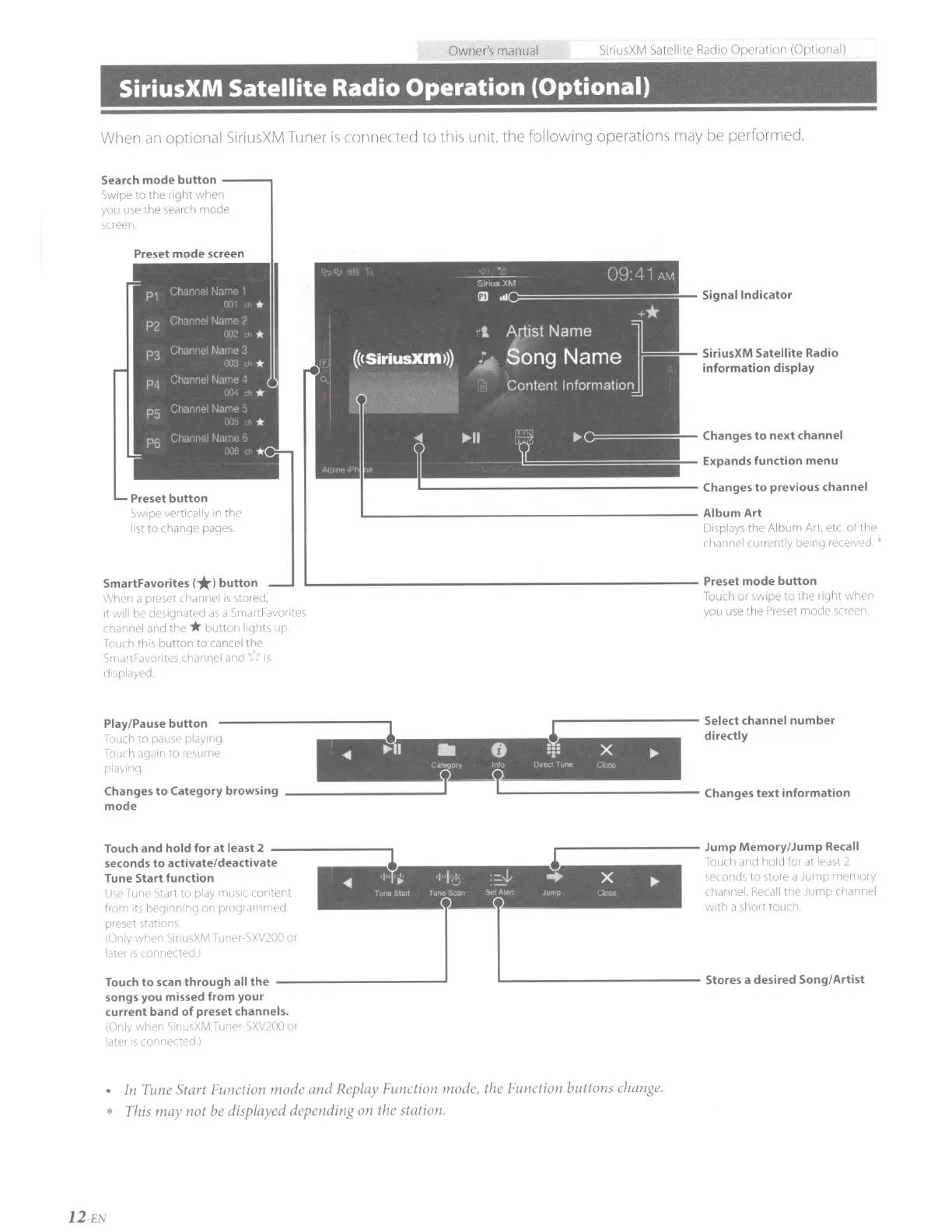
Search
mode
button
----,
Swipe
to
the right
when
you use the search
mode
screen.
Preset
mode
screen
Preset button
Swipe
vertically
in the
lis
t
to change pages.
Signal Indicator
SiriusXM
Satellite
Radio
information
display
Changes
to
next
channel
Expands function menu
'-----------------------
Album
Art
D1splays
the
Album Ar
t,
et
c.
of
the
channel currently bemg
received.
'
SmartFavorites
(*)button
When
a preset
channel
is
stored,
L-------------------------
Preset
mode
button
it
will
be
designated
as
a SmartFavorites
channel
and the *
button
lights
up
Touch this
button
to
cancel
the
Sma
rtFavorites
channel and
i::I
is
displayed.
Touch
or
swipe
to
the right
when
you use the Preset
mode
screen.
lr----------
Select channel
number
1
directly
-411
...
II
..
8
:::
X
.,.
t!'to(jUf~
tr
,)
P•
h
f
r
~
'-I<,._
Play/Pause
button
Touch
to
pause
play1ng
Touch again
to
resume
playing.
Changes
to
Category browsing
_________
__,T
TL-------------
Changes
text
information
mode
Touch
and
hold for at
least
2
--------,
.----------
Jump
Memory
/Jump
Recall
seconds
to
activate/deactivate
1
Touch and
hold
for at least 2
Tune Start function
seconds
to
store a
Jump
memory
Use
Tune Start
to
play
music
content
channel. Recall
the
Jump
channel
from its beginning
on
programme
_d
__________
j
lb.------------
with
a short touch.
preset stations.
(Only
when
S1riusXM
Tuner-SXV200
or
later
is
connected l
Touch
to
scan
through
all
the
Stores a desired Song/Artist
songs you missed from your
current band
of
preset
channels.
(Only
when
S1riusXM
Tuner-SXV200
or
later
is
connected.)
In
Tune Start Function
mode
and
Replay Function
mod
e,
the Function buttons change.
* This
may
not be displayed depending on the station.
12
-
EN

Table of Contents