EasyManua.ls Logo

Alpine X209D - Page 15

Alpine X209D
252 pages
Print Icon
To Next Page IconTo Next Page
To Previous Page IconTo Previous Page
Loading...
Owner's
manual
HDMIDVD
HDMI
Device
(DVD
Player)
Operation
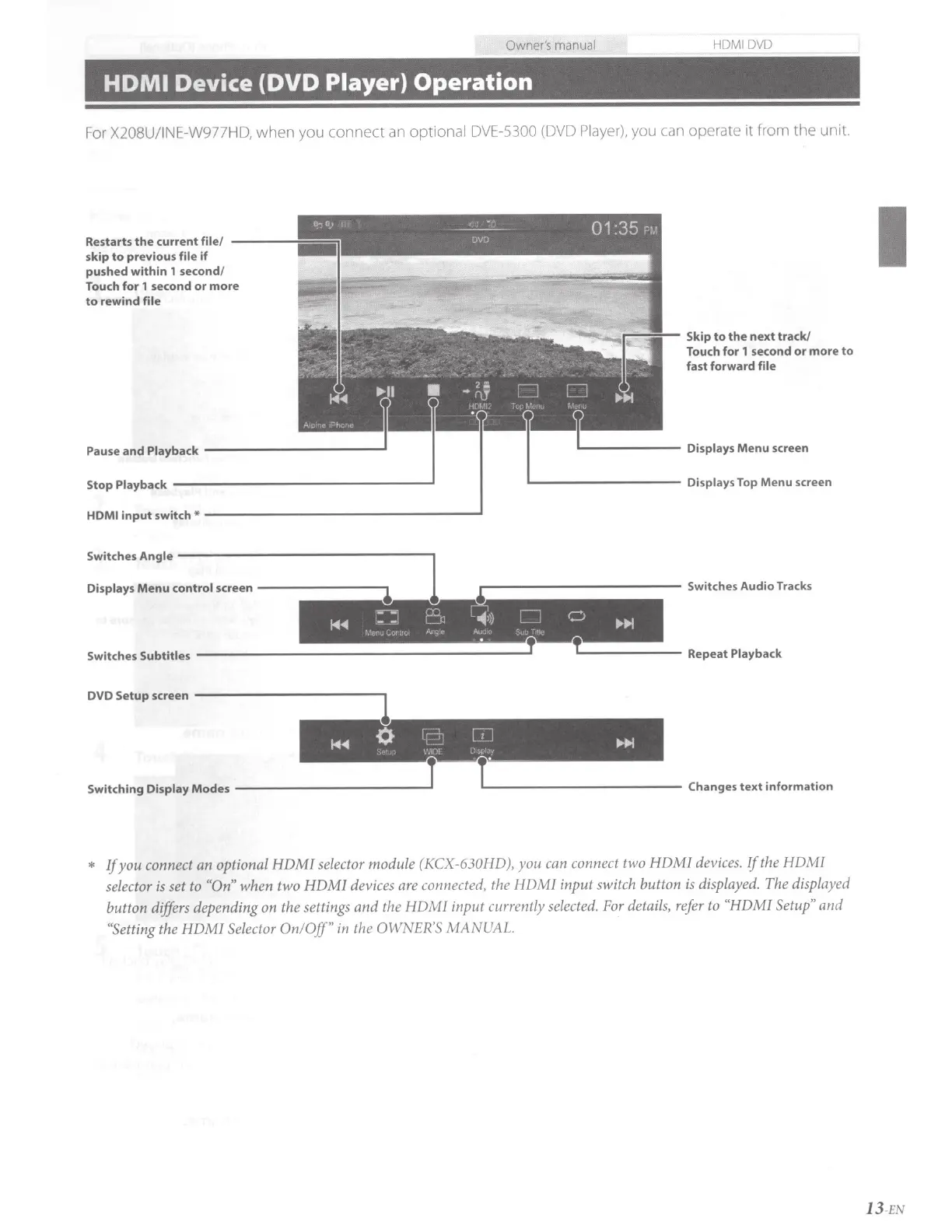
For X208U/INE-W977HD,
when
you
connect
an
optional DVE-5300
(DVD Player),
you can operate
it
from
the
unit.
Restarts
the
current
file/
----
skip
to
previous
file
if
pushed
within
1
second/
Touch
for
1
second
or
more
to
rewind
file
Pause
and
Playback
-----------'
Stop
Playback
-----------------'
r---5:---
Skip
to
the
next
track!
Touch for 1
second
or
more
to
fast
forward
file
L-.-----
Displays
Menu screen
...._
________
Displays
Top Menu
screen
HDMI
input
switch*
-----------------'
Switches Angle
-----------------.
1
Displays
Menu
control
screen
-------...,.
..------------
Switches Audio Tracks
Switches
Subtitles
-------------------...a
,._
______
Repeat
Playback
DVD
Setup
screen
------------,1
Switching
Display
Modes
___________
_,T
T._
___________
Changes
text
information
*
If
you conn
ec
t an optional HDMJ selector modu
le
(KCX-630HD), you
can
connect two HDMJ
devices.
If
the HDMI
se
l
ec
tor is
se
t to
"O
n"
when two HDMJ devi
ces
are
connected, the HDMI input switch button
is
displayed. The displayed
button differs depending on the
se
tt
ings
and the HDM I
input
currently
selected.
For
de
tail
s,
refer
to
"HDMJ Setup" and
"Se
tting
the HDMI Selector
On
/Off"
in
the OWNER
'S
MANUAL.
I
13
-EN

Table of Contents