11-EN
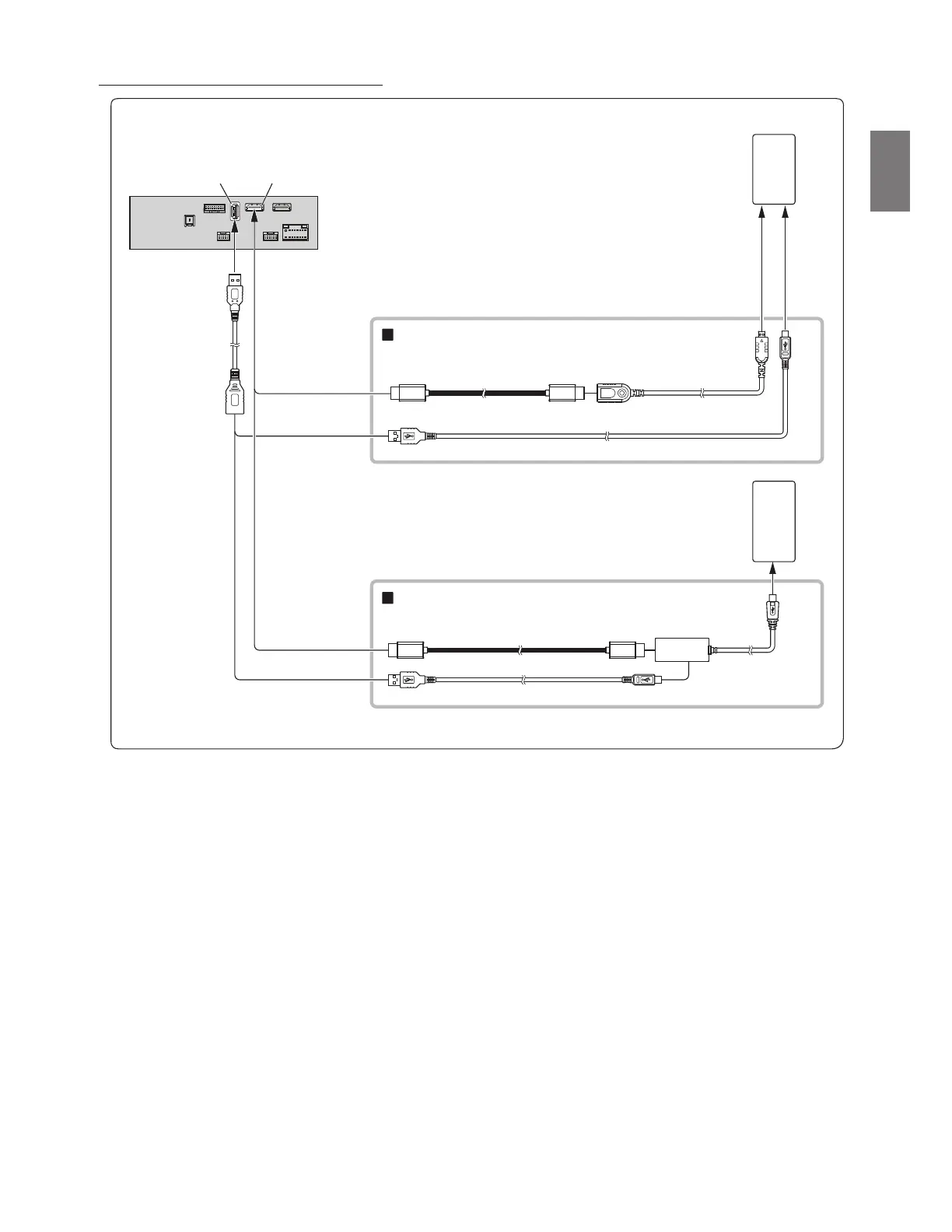
Connection of an HDMI Device (Android device)
• A connection kit or adapter kit suitable for the type of terminal on the connecting device is required.
• Set the HDMI Setup to “HDMI.” For details, refer to “HDMI Setup” in the OWNER’S MANUAL.
• If you connect an optional HDMI selector module, you can connect two HDMI devices. When you use the HDMI selector module, set the HDMI Selector
to “On.” For details, refer to “Setting the HDMI Selector On/Off” in the OWNER’S MANUAL. For details on how to connect, also refer to the OWNER’S
MANUAL of the HDMI selector module.
* When connecting an HDMI connection cable, be sure to secure it using the supplied HDMI Fixation Bracket. For details on how to secure it, see “Note on
using HDMI Connection Cables” (page 4).
USB connector
HDMI Type-D
conversion adapter
HDMI input connector*
USB extension cable
(Included)
HDMI connection kit KCU-610HD (sold separately)
Android device with
HDMI connector
(sold separately)
HDMI connection cable
Micro USB conversion cable
Android device with
MHL connector (sold
separately)
MHL conversion adapter
MHL connection kit KCU-610MH (sold separately)
HDMI connection cable
Micro USB conversion cable



 To Next Page