13-EN
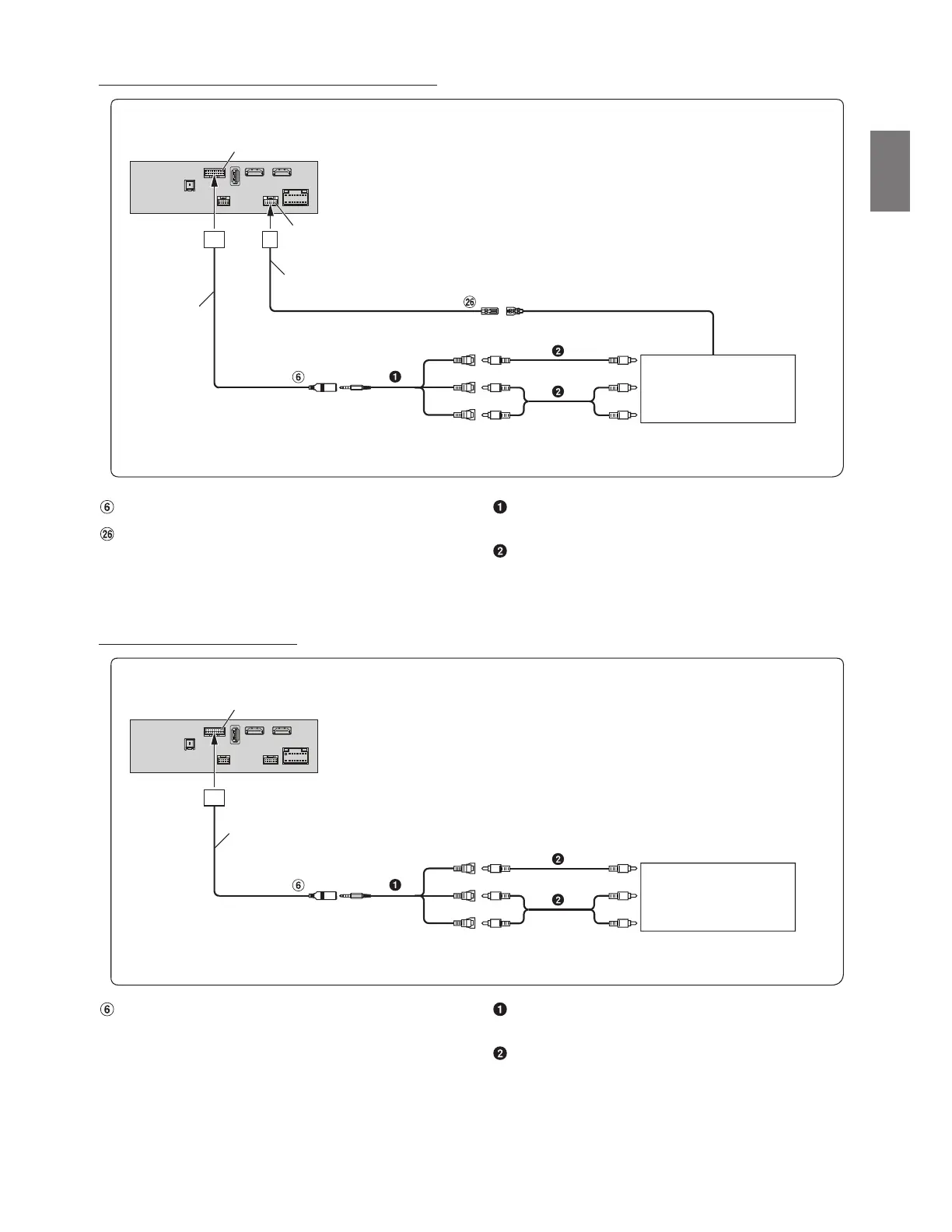
Connection of a Mobile Digital TV Receiver or USB Player
AUX Input Connector
Remote Control Output Lead (Brown)
AV/RCA Interface Cable (4-pole mini AV plug to 3-RCA)
(sold separately)
RCA Extension Cable (sold separately)
• For details on using an AV/RCA interface cable (4-pole mini AV plug to 3-RCA), see “Usable AV/RCA Interface Cable (4-pole mini AV plug to 3-RCA)”
(page 7).
• Set the AUX Name to “DVB-T” or “USB Player.” For details, refer to “Setting the Auxiliary (AUX) Name” in the OWNER’S MANUAL.
Connection of an External Device
AUX Input Connector AV/RCA Interface Cable (4-pole mini AV plug to 3-RCA)
(sold separately)
RCA Extension Cable (sold separately)
• You can change the name of an external device. For details, refer to “Setting the Auxiliary (AUX) Name” in the OWNER’S MANUAL.
• For details on using an AV/RCA interface cable (4-pole mini AV plug to 3-RCA), see “Usable AV/RCA Interface Cable (4-pole mini AV plug to 3-RCA)”
(page 7).
Interface cable
AUX INPUT
CAN I/F connector
(Yellow)
W.REMOT connector
To Video Output terminal
REMOTE IN
(White/Brown)
To Audio Output terminal
W.REMOTE cable
REMOTE OUT
(Brown)
(Red)
(White)
Mobile Digital TV Receiver
(sold separately)
CAN I/F connector
AUX INPUT
(Yellow)
(White)
(Red)
To Video Output terminal
To Audio Output terminal
External Device
(sold separately)
Interface cable


 To Next Page