Loc?~i
_
on
ofControls,!~rning
Power
On
or
Off
Getting
Started
Location
of
Controls
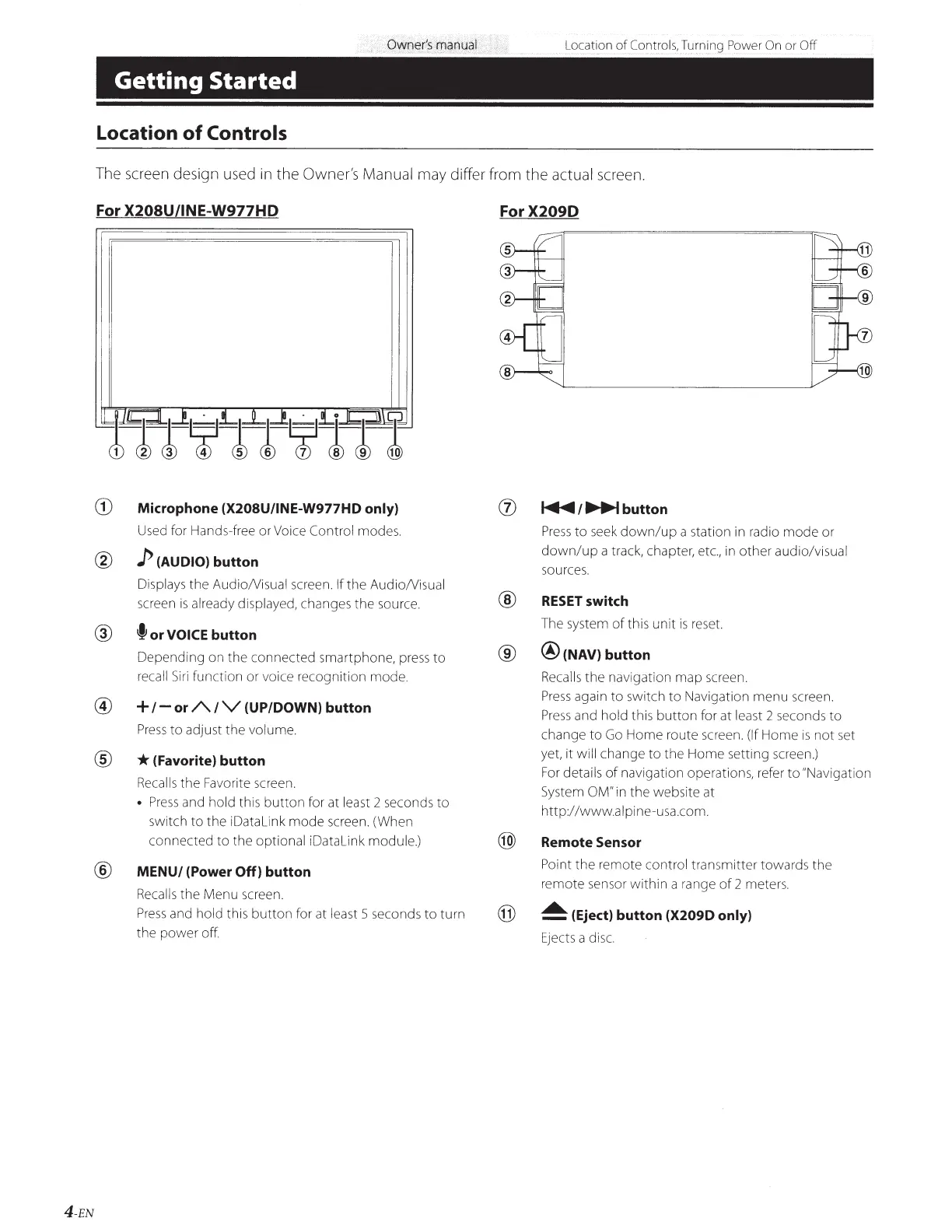
The screen design used in the Owner's
Manual
may differ from
the
actual
screen.
For X208U/INE-W977HD
ForX209D
CD
Microphone
(X208U/INE-W977HD only)
(j)
~/~button
Used for Hands-free or Voice
Control
modes.
Press
to
seek
down/up
a station in radio
mode
or
@
p
(AUDIO)
button
down/up
a track, chapter, etc., in
other
audio/visual
sources.
Displays the AudioNisual screen.
If
the
AudioNisual
®
screen
is
already displayed, changes
the
source.
RESET
switch
@
f
or
VOICE button
The system
of
this
unit
is
reset.
Depending
on the
connected
smartphone, press
to
®
@
(NAV) button
recall
Siri
function or voice recognition mode. Recalls
the
navigation
map
screen.
@
+
1-
or
A
IV
(UP/DOWN) button
Press
again
to
switch
to
Navigation
menu
screen.
Press
and
hold
this
button
for at least 2 seconds
to
Press
to
adjust
the
volume.
change
to
Go
Home
route screen.
(If
Home
is
not
set
®
*(Favorite)
button
yet, it
will change
to
the
Home
setting screen.)
Recalls
the
Favorite screen.
For
details
of
navigation operations, refer
to
"Navigation
•
Press
and
hold
this
button
for at least 2 seconds
to
System
OM" in
the
website at
switch
to
the
iDatalink
mode
screen. (When
http:/
/www.alpine-usa.com.
connected
to
the optional
iDatalink
module.)
@
Remote Sensor
®
MENU/ (Power
Off)
button
Point
the
remote control transmitter towards
the
Recalls
the Menu screen.
remote sensor
within
a range
of
2 meters.
Press
and
hold this
button
for at least 5 seconds
to
turn
@
~
(Eject) button
(X209D only)
the
power
off.
Ejects a disc.
4-EN



 To Next Page