
 Need help?
Do you have a question about the Altec Lansing BABY BOOM and is the answer not in the manual?
Lists the essential accessories provided with the speaker, including USB and AUX cables.
Details the location and function of charging port, AUX IN, power, volume, and microphone buttons.
Explains the meaning of the LED indicator light colors during charging and operation.
Outlines the charging procedure and estimated charging time up to 3 hours.
Step-by-step guide to pairing the speaker with a Bluetooth-enabled phone.
Instructions for playing, pausing, and navigating music tracks using speaker controls.
Guide to connecting two speakers for an enhanced stereo sound experience.
Detailed steps for pairing Speaker 1 and Speaker 2 into True Wireless Mode.
Important safety guidelines covering usage, environment, and handling to prevent damage.
Information on the integrated battery, its limitations, and proper disposal methods.
Instructions for answering, ending, and redialing calls using the speaker.
Guide on connecting audio devices using a 3.5mm auxiliary cable.
Details Altec Lansing's one-year warranty coverage and exclusions for product defects.
Information on how to get warranty service and troubleshooting assistance.
Statements regarding FCC rules and user guidance for potential interference.
Provides phone number and email for customer support and inquiries.
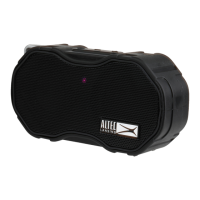
The Altec Lansing Baby Boom is a rugged Bluetooth speaker designed for portability and durability, offering a range of features for audio playback, hands-free calling, and multi-speaker connectivity. Its robust construction makes it suitable for various environments, including outdoor and wet conditions.
The primary function of the Baby Boom speaker is to provide wireless audio playback from Bluetooth-enabled devices such as smartphones. It connects wirelessly to a phone, allowing users to stream music, podcasts, or other audio content. Beyond simple audio playback, the speaker also integrates a microphone, enabling it to function as a hands-free speakerphone for answering and making calls. This feature allows users to communicate without needing to hold their phone, which is particularly useful in situations where hands might be occupied or wet.
A notable feature is its True Wireless Pairing capability, which allows two Baby Boom speakers to be linked together. When paired, these two speakers create a stereo sound experience, with one acting as the left channel and the other as the right. This enhances the audio output, providing a more immersive and powerful sound, suitable for larger spaces or outdoor gatherings where a single speaker might not suffice.
The speaker also supports wired audio input via a 3.5mm auxiliary (AUX) cable. This means that devices without Bluetooth capabilities, or users who prefer a wired connection, can still connect to the speaker and play audio. This versatility ensures compatibility with a wide range of audio sources.
Powering the device is an integrated lithium-polymer battery, which provides portable operation without the need for a constant power source. The battery is rechargeable, allowing for repeated use. An LED indicator light provides visual feedback on the charging status, turning red when charging and blue when fully charged.
Operating the Baby Boom speaker is designed to be intuitive, with clearly labeled buttons for various functions. The main control panel includes buttons for power, play/pause, answering calls, and adjusting volume. The power/play/pause/answer button serves multiple roles: a single press can play or pause music, or answer an incoming call, while a press and hold action can power the device on or off, or end a call. Dedicated volume buttons allow for easy adjustment of the audio level.
Pairing the speaker with a Bluetooth phone is a straightforward process. Users initiate a pairing mode on the speaker, indicated by a flashing red and blue LED, and then select the "altec baby boom" device from their phone's Bluetooth settings. Once connected, the speaker is ready for wireless audio streaming.
For True Wireless Pairing, the process involves a sequence of steps to link two speakers. First, the primary speaker is paired with a Bluetooth phone. Then, the second speaker is powered on, and both speakers are put into a True Wireless Mode, indicated by flashing red and blue LEDs. After a short wait, the two speakers will automatically pair with each other, with one designated as the left channel and the other as the right, providing a stereo audio experience. When two speakers are connected in True Wireless mode, phone calls are routed only through the first speaker paired with the phone.
The hands-free calling feature is activated when a call comes in while the speaker is connected to a phone. Users can answer the call with a single press of the power/play/pause/answer button and end it with another press and hold. The integrated microphone ensures clear communication during calls.
The AUX IN port allows for easy connection of external audio devices using the provided 3.5mm cable. This is a plug-and-play feature, requiring no special setup beyond connecting the cable.
The speaker's rugged design is a significant usage feature. It is rated IP67 waterproof and sandproof, meaning it can withstand immersion in water and exposure to sand without damage. This makes it ideal for use at the beach, by the pool, or in other outdoor environments where conventional speakers might be vulnerable. Additionally, the speaker is designed to float in water, adding to its convenience and preventing loss in aquatic settings. The battery life is also optimized for extended use, providing several hours of playback on a single charge.
The Baby Boom speaker is designed for minimal user maintenance, focusing on durability and ease of care. The rugged construction, including its waterproof and sandproof capabilities, inherently reduces the need for extensive cleaning or protection from environmental elements. After exposure to water or sand, a simple rinse or wipe-down is usually sufficient to clean the exterior.
Charging the device is a key maintenance task. The speaker includes a charging port and comes with a USB cable for this purpose. The LED indicator light provides clear feedback on the charging status, helping users know when the battery is full. It is recommended to charge the device fully before initial use and whenever the battery runs low to ensure optimal performance and battery longevity. The manual advises that charging can take up to three hours.
The device is equipped with an integrated lithium-polymer battery that is not user-replaceable. This design choice simplifies maintenance for the user, as there is no need to open the device or handle battery replacements. However, it also means that if the battery's performance degrades over time, the entire unit would need professional service or replacement.
To ensure the longevity of the speaker, users are advised to avoid exposing it to excessive heat, flames, or direct sunlight, and to store it in temperatures below 40°C. It is also important to handle the speaker carefully, avoiding dropping, puncturing, or subjecting it to excessive trauma, as these can damage internal components.
For any issues or repairs, the manual explicitly states that users should not attempt to repair the product themselves. Instead, they should contact a qualified service center. This approach ensures that any necessary repairs are performed correctly and that the device's integrity, especially its waterproof sealing, is maintained.
The product comes with a one-year warranty, covering defects in material or workmanship under normal usage. This warranty provides a safety net for users, ensuring that manufacturing defects can be addressed through repair or replacement without charge. For warranty service or troubleshooting, customers are directed to contact Altec Lansing's customer support via phone or website.
Finally, responsible disposal is encouraged. Users are advised to recycle or dispose of the speaker properly, following local laws and rules, especially given its integrated lithium-polymer battery, which requires specific handling for environmental safety.
 General
| Number of speakers | - |
|---|---|
| Audio output channels | - channels |
| Product type | Stereo portable speaker |
| Product color | Black |
| LED indicators | Yes |
| Product design | Rectangle |
| Volume control | Buttons |
| Protection features | Shock resistant, Snow resistant, Waterproof |
| Bluetooth range | 10 m |
| Connectivity technology | Wireless |
| Power source type | Battery, USB |
| Battery life (max) | 6 h |
| Battery recharge time | 3 h |
| Recommended usage | Mobile phone / Smartphone |
| RMS rated power | - W |
| Quantity per pack | 1 pc(s) |
 Weight and Dimensions
| Width | - mm |
|---|---|
| Weight | - g |






 To Next Page