EasyManua.ls Logo

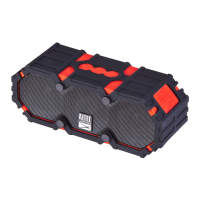
Altec Lansing IMW475 Mini LifeJacket - User Manual

Altec Lansing IMW475 Mini LifeJacket
2 pages
Print Icon
To Next Page IconTo Next Page
Loading...
1. Make sure the following items are
included in your package.
4. Pairing Your Speaker With a Bluetooth Phone 5. Listening to Music on Your Speaker 6. Wired External Audio Input
You can also use the included 3.5mm Auxiliary Cable
to connect audio devices through the AUX In port on
your speaker.
2. For a look at the various buttons on your speaker,
view the graphic below.
3. Charging: In order to charge your speaker’s internal battery, connect
one end of the included USB cable to the charging port on your speaker.
Connect the other to a USB port or AC charging adapter. The LED Light
indicator turns red when charging, and turns o when fully charged.
Charging may take up to 3 hours.
AC Adapter
Mini LifeJacket
USB Cable
AUX Cable
I
tem # IMW475
Quick Start Guide
R
U
G
GED
B
L
U
E
T
O
O
TH
S
PEA
K
E
R
① Power
② Volume –
③ Volume +
④ LED Light Indicator
⑤ Charging Port
⑥ AUX IN Port
Bottom View: 1/4" attachment point for use with a
tripod stand or suction cup mounts (available
separately)  
 
-Press and hold the Power button for around 5s. Your speaker
will enter pairing mode with voice once powered on.
-Go to the Bluetooth Manager of your Bluetooth device. Search
Bluetooth devices and select “MiniLifeJacket2” to start connecting.
-If required, enter the PIN code " 0000
" and confirm the
entry. Once paired, you will hear your speaker audibly say: “You are
now paired, enjoy.”
Play/Pause
Press the Power button to get music from your audio source to
play or pause.
Next/Previous Song
Press and hold the Volume + or Volume- buttons for 2s to
advance to the next song or go back to the previous one.
Increase/Decrease Volume
Press and hold the Volume + or Volume - buttons to
increase or decrease the volume.
1
2
3
4
5
6
7
Indicator
5 Second
Question and Answer IconNeed help?

Do you have a question about the Altec Lansing IMW475 Mini LifeJacket and is the answer not in the manual?

Summary

Product Overview and Components

Included Package Contents

Lists the items provided in the speaker's packaging.

Speaker Interface Identification

Details the buttons, ports, and indicator on the speaker.

Speaker Operational Guide

Charging the Speaker

Instructions for connecting the speaker to a power source for charging.

Bluetooth Device Pairing

Steps to wirelessly connect a Bluetooth phone to the speaker.

Music Playback and Volume Control

How to play, pause, skip tracks, and adjust the volume.

Wired Audio Connectivity

Using the AUX IN port for wired audio input.

Technical Support

Support Contact Information

Website and phone number for customer and technical support.

Product Features and Special Functions

Key Product Features

Highlights like waterproof, battery life, and speakerphone.

iOS Siri Activation

How to use the speaker to activate Siri on an iOS device.

Warranty and Compliance Information

One Year Limited Warranty

Details of the product's warranty coverage and exclusions.

Obtaining Warranty Service

Procedures and contact info for warranty claims and troubleshooting.

FCC Compliance Statement

Explains compliance with FCC rules and potential interference.

Summary

Product Overview and Components

Included Package Contents

Lists the items provided in the speaker's packaging.

Speaker Interface Identification

Details the buttons, ports, and indicator on the speaker.

Speaker Operational Guide

Charging the Speaker

Instructions for connecting the speaker to a power source for charging.

Bluetooth Device Pairing

Steps to wirelessly connect a Bluetooth phone to the speaker.

Music Playback and Volume Control

How to play, pause, skip tracks, and adjust the volume.

Wired Audio Connectivity

Using the AUX IN port for wired audio input.

Technical Support

Support Contact Information

Website and phone number for customer and technical support.

Product Features and Special Functions

Key Product Features

Highlights like waterproof, battery life, and speakerphone.

iOS Siri Activation

How to use the speaker to activate Siri on an iOS device.

Warranty and Compliance Information

One Year Limited Warranty

Details of the product's warranty coverage and exclusions.

Obtaining Warranty Service

Procedures and contact info for warranty claims and troubleshooting.

FCC Compliance Statement

Explains compliance with FCC rules and potential interference.

Altec Lansing IMW475 Mini LifeJacket Specifications

General IconGeneral
BrandAltec Lansing
ModelIMW475 Mini LifeJacket
CategoryPortable Speakers
LanguageEnglish

Related product manuals