EasyManua.ls Logo

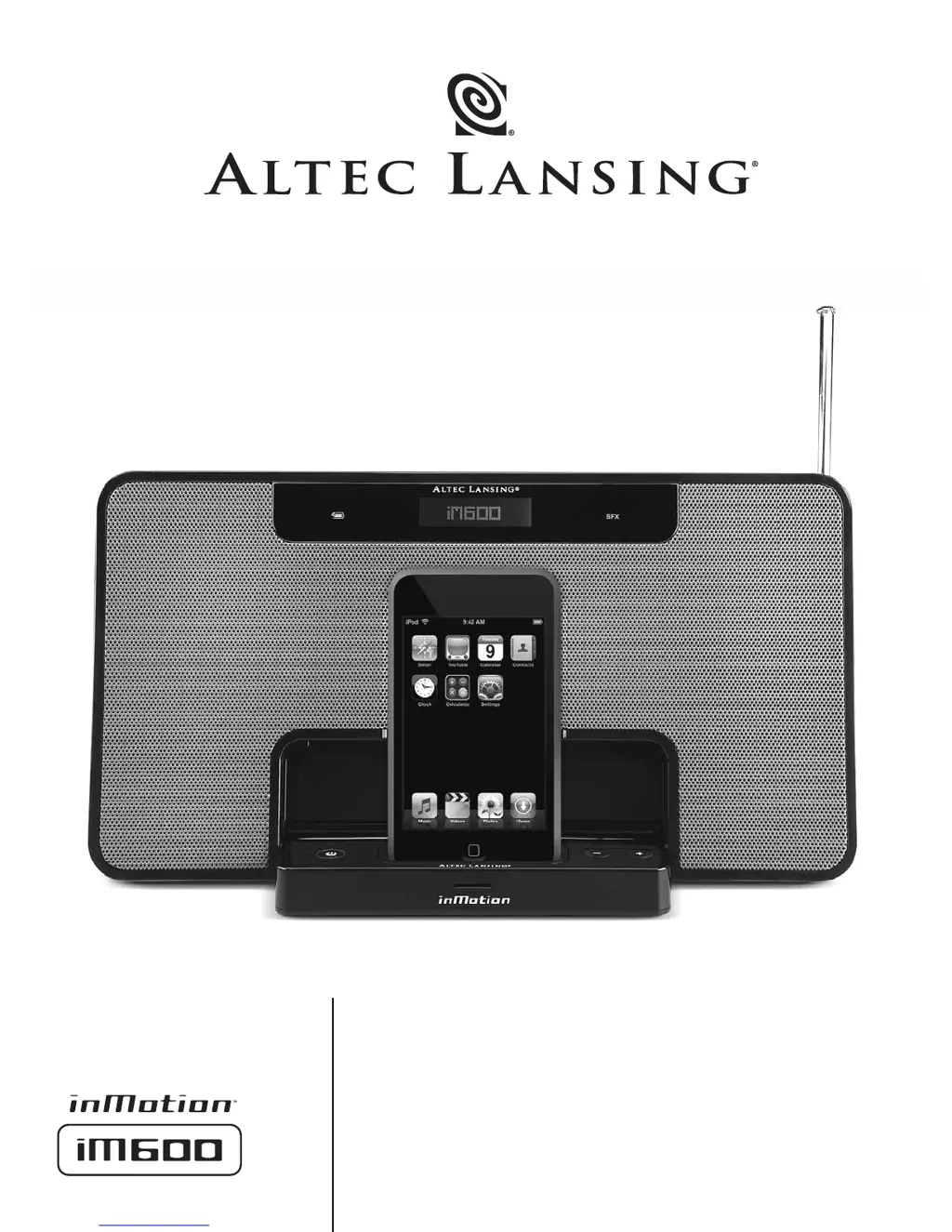
Altec Lansing INMOTION IM600 - User Manual

Altec Lansing INMOTION IM600
8 pages
Print Icon
To Next Page IconTo Next Page
Loading...
User’s guide

Other manuals for Altec Lansing INMOTION IM600

Questions and Answers

  • D
    Devon GreenJul 30, 2025
    Why is my Altec Lansing Speaker System making a crackling sound?
    • C
      Carlos StoneJul 30, 2025
      If you hear a crackling sound from your Altec Lansing Speaker System, consider these potential causes: * If you're using an iPod, it might not be correctly seated in the docking station. Turn off the iPod, remove it, reseat it, and turn it on again. * If you're using an alternate audio source, the connection to the inMotion iM600 might be faulty, or there could be an issue with the audio source itself. Connect the audio source to the AUX input on the back of the inMotion iM600 using a 3.5mm stereo cable. Set the volume on the audio source at mid-level, and adjust the volume on the inMotion iM600 from minimum to a comfortable listening level.
  • T
    Tami KennedyAug 5, 2025
    What to do if Altec Lansing inMotion iM600 controls do not function?
    • D
      daviesjeremyAug 5, 2025
      If your Altec Lansing inMotion iM600 is behaving erratically or the controls aren't working, it might be due to static electricity, a momentary power interruption, or abnormal operating conditions. Here's what you can do: 1. Disconnect the power supply from the wall outlet. 2. Disconnect the rechargeable battery per instructions in the “Power” section. 3. Wait 20–30 seconds. 4. Reconnect the rechargeable battery. 5. Reconnect the power supply.
  • R
    Roy CampbellAug 10, 2025
    Why is there crackling sound from Altec Lansing Speaker System when connected to PC?
    • L
      luis19Aug 10, 2025
      If you're hearing a crackling sound from your Altec Lansing Speaker System when it's connected to a PC or laptop, the operating system’s volume level might be set too high. Check the operating system volume level and decrease it if necessary.
  • D
    David NguyenAug 14, 2025
    How to stop radio interference on Altec Lansing Speaker System?
    • O
      Olivia PowellAug 15, 2025
      If you are experiencing radio interference with your Altec Lansing Speaker System, the unit may be too close to a radio tower. Try moving the unit to see if the interference goes away.
  • B
    brandonmckeeAug 20, 2025
    How to stop intermittent buzzing on Altec Lansing Speaker System?
    • K
      Kathryn ReedAug 20, 2025
      If you're experiencing intermittent buzzing with your Altec Lansing Speaker System, the unit might be located too close to a GSM cell phone. Move the GSM cell phone away from the unit.
  • A
    Alan HarveyOct 24, 2025
    Why is there no sound coming from my Altec Lansing Speaker System?
    • J
      Jeremy WilliamsOct 25, 2025
      If no sound is coming from your Altec Lansing Speaker System, there are several possible reasons: * The volume may be set too low. Try pressing and holding the “+” button to increase the volume. * The incorrect source might be selected. Press the [Source] button until the correct source is displayed on the LCD screen. * If you're using an iPod, it may not be correctly seated in the docking station. Turn off the iPod, remove it, reseat it, and turn it back on. * If using another audio source, ensure it is properly connected to the inMotion iM600, and that the audio source itself is working correctly. Connect the audio source to the AUX input on the back of the inMotion iM600 using a 3.5mm stereo cable. Set the volume on the audio source at mid-level, and adjust the volume on the in...

Summary

Users Guide

Safety and Warnings

Electric Shock Precautions

Warnings regarding electric shock, opening the device, and proper plug usage.

Appliance Exposure Warning

Caution to protect the appliance from rain or moisture to prevent fire or shock.

Power Cord and Outlet Connection

Instructions for safely connecting the power cord to the AC wall outlet.

Rechargeable Battery Safety

Cautions about battery replacement, heat exposure, and proper disposal.

Important Safety Instructions

Comprehensive list of safety guidelines for installation, operation, and maintenance.

Limited Warranty Information

Details of the one-year limited warranty, coverage, exclusions, and service.

Customer Service and Support

Contact information and resources for customer assistance and troubleshooting.

International Distribution

Guidance for international customers seeking product distribution information.

Equipment Disposal Guidelines

Instructions for proper disposal of electronic equipment for environmental protection.

Getting Started with Your iM600

Placing the Speaker System

Instructions on where and how to position the iM600 speaker system for optimal use.

Assembling the Speaker System

Steps for docking an iPod into the iM600 and connecting other audio sources.

Powering the iM600

Details on using AC wall power and the built-in rechargeable battery.

Starting Playback

Instructions on how to turn on the system and start playing audio from the iPod.

Powering Off the System

Procedure for turning off the iM600 speaker system.

Auto Shut-Down Feature

Explanation of the auto shut-down feature during battery-only operation.

Using iM600 Features

FM Radio Operation

How to activate, scan, and program FM radio stations.

Alarm Clock Functionality

How to use the iPod and iM600 to function as an alarm clock.

Connecting Alternate Audio Sources

Guide on connecting external audio devices via the auxiliary input jack.

Volume Adjustment

How to adjust the master volume level using the device's controls.

Enhancing Bass Output

Information on using the SUB OUT jack for optional subwoofer connection.

Troubleshooting Common Issues

Power and Charging Problems

Solutions for issues related to the rechargeable battery not charging or no power.

No Sound or Incorrect Source

Troubleshooting steps for no sound output or incorrect audio source selection.

iPod Docking Issues

Guidance on resolving problems with the iPod not being seated correctly.

Alternate Audio Source Problems

Tips for resolving connection or playback issues with alternate audio sources.

Sound Distortion and Interference

Solutions for crackling sounds, distorted audio, radio interference, and buzzing.

System Errors and Control Issues

Steps to resolve erratic behavior, unexpected functions, or unresponsive controls.

Altec Lansing INMOTION IM600 Specifications

General IconGeneral
FM radioYes
USB 2.0 ports quantity1
Product colorBlack
LED indicatorsPower
Dimensions (WxDxH)83 x 43 x 152 mm
Compatible productsiPod
Battery life (max)5 h
Weight and Dimensions IconWeight and Dimensions
Weight900 g

Related product manuals