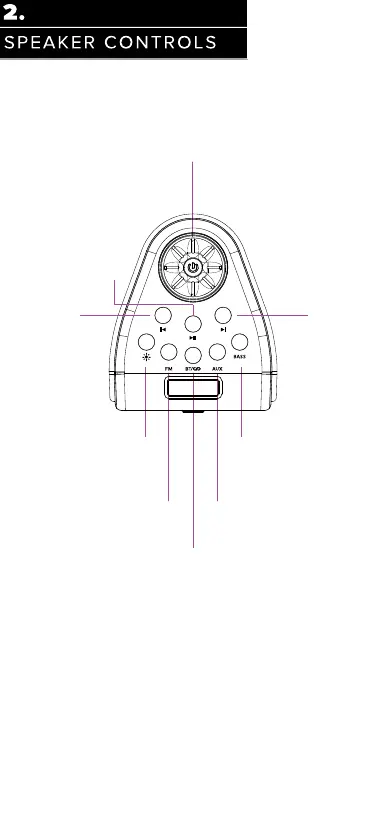
Press and hold button for 3 seconds to
power on or power off speaker
Brief introduction to buttons on top panel
Power Button:
Play/Pause (BT mode only),
AUX mode: Short press MUTE
Previous song Next song
Reset to default settings:
Press and hold the BASS button for 10S to reset all settings back to factory default.
Light Modes:
Briefly press to turn on the lighting.
Cycles through 9 modes and
then back to off
FM Mode:
Briefly press to enter into FM mode
AUX mode:
Briefly press to enter into AUX mode
BT & Party-sync Button:
Briefly press to enter into Bluetooth pairing mode,
Press and hold for Bluetooth disconnect,
Double-click for party-sync connect or disconnect
Bass Modes:
Briefly press to cycle through 3 bass
modes, Standard (flat), Bass Enhance
1 and Bass Enhance 2




 To Next Page