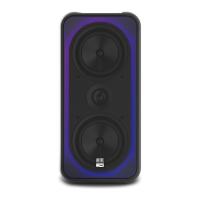
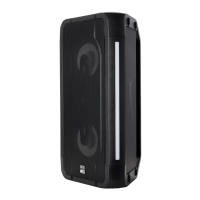
The Altec Lansing Shockwave 100 (IMT7001) is a wireless party speaker designed to deliver powerful audio with dynamic lighting effects. With 150W peak power, this speaker is built to enhance any gathering with its robust sound and visual flair.
Function Description:
The Shockwave 100 serves as a portable audio system, capable of playing music wirelessly via Bluetooth or through wired connections. It features a built-in FM radio, allowing users to tune into their favorite stations. The speaker also supports microphone inputs, making it suitable for karaoke or public address applications. A key feature is its integrated lighting effects, which synchronize with the music or can be customized to create a specific ambiance. Additionally, the speaker includes a USB output port for charging mobile devices, adding to its utility during events.
Usage Features:
The speaker's top panel houses a control interface for easy operation.
- Power Control: A dedicated power button allows users to turn the speaker ON and OFF by pressing and holding it for 3 seconds.
- Microphone Volume Control: Two MIC volume buttons (MIC VOL- and MIC VOL+) are available to independently increase or decrease the volume of each connected microphone, providing flexibility for dual-microphone setups.
- Mode Selection: The "FM/AUX" button toggles between FM radio and auxiliary input modes. The "BT/PAIR" button is used for Bluetooth pairing and stereo pairing with another compatible speaker. The "LIGHTS" button controls the various lighting effects.
- Audio Adjustment: "VOLUME-" and "VOLUME+" buttons allow for overall speaker volume adjustment. "BASS-" and "BASS+" buttons provide control over the bass level, enabling users to fine-tune the sound to their preference.
- Playback Control: In Bluetooth mode, dedicated buttons are used for "Previous song/change FM station" and "Next song/change FM station." A "Play/Pause" button is also available for controlling music playback in Bluetooth mode. Holding the "Play/Pause" button initiates an FM scan in FM mode.
Bluetooth Connection:
Connecting to the Shockwave 100 via Bluetooth is straightforward. Users need to enable Bluetooth on their mobile device and select "AL Shockwave 100" from the list of available devices.
Stereo Pairing (Requires Two Speakers):
For an immersive stereo experience, two Shockwave 100 speakers can be paired together.
- Primary Speaker Setup: Turn on one speaker, pair it with a mobile device, and start playing music. This speaker will act as the HOST (Primary speaker), and its display will show 'Bt'. The 'Bt' will flash during pairing and become solid once connected.
- Secondary Speaker Setup: Turn on a second compatible speaker, which will serve as the Secondary speaker.
- Initiate Pairing on Primary: Press and hold the "BT/PAIR" button on the Primary speaker for approximately two seconds until its display changes from solid 'Bt' to flashing 'HOSt'.
- Initiate Pairing on Secondary: Quickly press the "BT/PAIR" button on the Secondary speaker. Its display will change from flashing 'Bt' to flashing 'St PAIr' (stereo pairing).
- Connection Confirmation: Once connected, both speakers' displays will show 'Bt'. They will then play the same music from the audio source, with one speaker playing the Left channel and the other playing the Right channel, creating a stereo soundstage.
Lighting Control:
The "LIGHTS" button on the control panel allows users to cycle through various lighting modes, with the cone lights typically displayed while music is playing.
- LED 1: Side lights scroll multi-color, and cones change color with the beat. Press and hold to cycle through single-color scrolls.
- LED 2: Sides and cones follow the music and automatically change color every 3 seconds.
- LED 3: Side lighting displays one color, and cones flash the same color with the music. Press and hold for 3 seconds to change the color.
- LED 4: Side lights are off, and cones flash into one color. Press and hold for 3 seconds to change the color.
- LED 5: Side lights display a bar graph from the middle in one color, and cones flash the same color. Press and hold for 3 seconds to change the color.
- LED 6: Sides and cones slowly change colors automatically every 3 seconds. Press and hold to turn the cone lights off.
- LED 7: Side lights flash one color, and cones are off. Press and hold for 3 seconds to change the color.
- LED 8: Side lights display a multi-color bar graph from the middle, and cones flash.
- LED 9: Side lights fade between colors, and cones are off.
- OFF: All lighting is turned off.
The speaker features several ports for connectivity:
- USB OUT: A 5V-1A USB port for charging mobile devices.
- MIC1 & MIC2: Two input ports for wired microphones.
- AUX: An auxiliary input for connecting devices via an audio cable.
- DC IN: A 15V-1.5A port for the power adapter.
Maintenance Features:
- Cleaning: The speaker should only be cleaned with a dry cloth.
- Environmental Precautions: Avoid using the speaker near water or in moist environments, and do not place it on wet surfaces. It should not be exposed to dripping or splashing liquids, and objects filled with liquids (like vases) should not be placed on the apparatus.
- Ventilation: Do not block any ventilation openings to ensure proper airflow and prevent overheating.
- Heat Sources: Avoid installing the speaker near heat sources such as radiators, heat registers, stoves, or other heat-producing apparatus.
- Power Cord Protection: Protect the power cord from being walked on or pinched, especially at the plugs, convenience receptacles, and the point where it exits the apparatus.
- Accessories: Only use attachments and accessories specified by the manufacturer.
- Cart/Stand Use: If using with a cart, stand, tripod, bracket, or table, exercise caution when moving the combination to prevent tip-over.
- Unplugging: Unplug the apparatus during lightning storms or when unused for long periods.
- Servicing: Refer all servicing to qualified personnel. Do not attempt to remove the cover or back, as there are no user-serviceable parts inside. Contact a professional for any suspected problems.
- Electrical Safety: The device is a Class II or double-insulated electrical appliance, designed not to require a safety connection to electrical earth. Ensure the power plug is fully inserted into the outlet. If the provided plug does not fit, consult an electrician for replacement of the obsolete outlet.

 Need help?
 General


 To Next Page