AL Shockwave 100
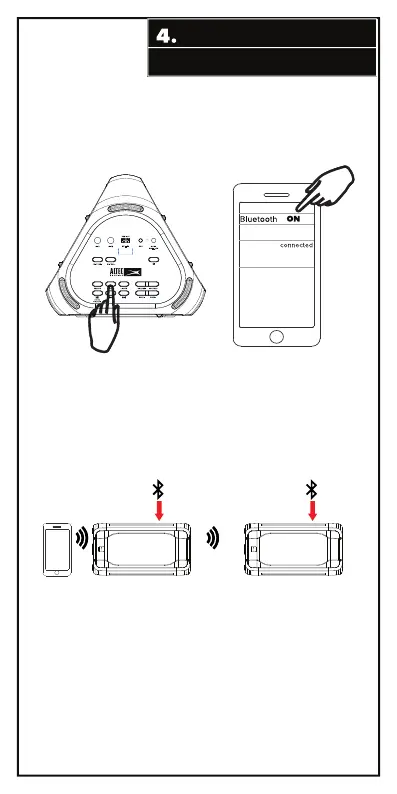
BLUETOOTH CONNECTION
Stereo pairing (requires two speakers) :
1. Have one speaker turned on, paired, and playing music. It will serve as the
HOST (the Primary speaker). The display will be showing ‘Bt’. (Pair by pressing the
BT/PAIR button, ‘Bt’ flashes on the display screen and becomes solid when pairing
is complete.
2. Turn on an additional compatible speaker, it will serve as the Secondary
speaker.
3. Press and hold the BT/PAIR button on the Primary speaker for approximately
two seconds or until the display changes from solid ‘Bt’ to flashing ‘HOSt’.
4. Quickly press the BT/PAIR button on the Secondary speaker. The display will change
from flashing ‘Bt’ to flashing ‘St PAIr’ (stereo pairing).
5. The speakers will connect and both displays will show ‘Bt’. The speakers
will now play the same music from the same audio source, one will play Left and
one will play Right.
Go to the Bluetooth settings page on your phone. Make sure Bluetooth
is on before connecting to the available device “AL Shockwave 100”.
Primary Speaker
Secondary Speaker



 To Next Page