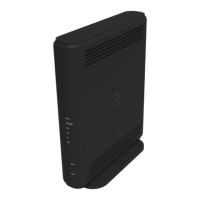
The UBC1319AA00 is a DOCSIS 3.0 Wireless eMTA (Embedded Multimedia Terminal Adapter) designed for use with Altice services, functioning as a Quick Installation Guide for subscribers. This device serves as a voice gateway, providing internet, telephone, and wireless connectivity.
Function Description:
The UBC1319AA00 acts as a central hub for your home network, connecting to your cable service to provide high-speed internet access, voice over IP (VoIP) telephone service, and Wi-Fi connectivity. It supports DOCSIS 3.0, ensuring compatibility with modern cable internet standards for fast and reliable data transfer. The device includes multiple ports for wired connections, such as Ethernet for computers and other network-enabled devices, and RJ-11 for analog telephones. Its wireless capabilities allow for the creation of a Wi-Fi network, enabling various devices to connect to the internet without physical cables.
Important Technical Specifications:
- Model Number: UBC1319AA00
- DOCSIS Standard: DOCSIS 3.0/2.0/1.0 certified, ensuring broad compatibility with cable internet services.
- Ethernet Speed: Supports 10/100/1000 Mbps Ethernet, enabling Gigabit Ethernet speeds for wired connections when connected to compatible devices.
- Wireless Standard: Complies with Wireless 802.11a/b/g/n/ac, offering a wide range of Wi-Fi connectivity options and speeds.
- Wireless Frequencies: Operates on both 2.4GHz and 5GHz radio bands.
- Wireless Default SSID: "MyAltice" followed by a space and the last 6 characters of the WAN MAC address (in lower case). This applies to both 2.4GHz and 5GHz bands.
- Wireless Security: WPA2-PSK with AES encryption.
- WPA2-PSK Wireless Key: A six-digit key (0-9) in groupings of 2, 3, or 4 digits, two hyphens, and one name of a color, found on the device label. Example: 5112-orange-91.
- Local Web Page User Access: Accessible via http://192.168.100.1 or http://192.168.0.1.
- Local Web Page Login: Login: MSO, Password: changeme.
- Power Adapter: Requires a 100-240V, 50/60Hz power adapter. Only the supplied power adapter should be used.
- Operating Temperature: Maximum operating temperature of 104°F (40°C).
- Operating Altitude: Regular operating altitude is 2000 m, maximum operating altitude is 4500 m.
- Dimensions for Wall Mounting: Screws needed are 7.2 +/- 0.5 mm (A), 2.6 +/- 0.15 mm (B), 19.0 +/- 1.2 mm (C), and 3-4 mm (D). Wall screws should be installed 158mm (6.2 inches) apart.
Usage Features:
- Vertical Installation: The device must be installed vertically using the included leg stands to achieve optimum wireless performance.
- Connectivity Ports:
- RF (Cable): Connects to the cable wall outlet using a coaxial cable (not supplied).
- ETH (Ethernet) 1-2: Connects to Ethernet-enabled devices like computers, gaming consoles, or wireless access points (routers) using RJ45 Ethernet cables (supplied).
- TEL (Telephone): Connects to an analog telephone using an RJ11 phone cable (not supplied) when voice service is provisioned.
- PWR (Power): Connects to the supplied power adapter.
- USB: Connects to USB devices.
- WPS Button: Located on the front panel, the WPS button facilitates Wi-Fi Protected Setup (WPS) for easy connection of client Wi-Fi devices. When pushed, it flashes for 4 minutes, and after a successful connection, the LED remains on for 5 minutes before turning off.
- INFO Button (LED ECO Mode): Controls the LED ECO Mode. When enabled, LEDs (except POWER) automatically turn off to conserve energy. Pushing the INFO button disables ECO Mode for 30 seconds, allowing LEDs to operate in Normal State. ECO Mode is automatically disabled during faulty or alarm conditions. By default, ECO Mode is enabled 3 minutes after power-up.
- Wall Mounting: The device can be mounted on a wall using specific screws and the provided leg stand pieces as a template. This requires separating the leg stand pieces and mounting them onto the device before securing the device to the wall.
- Cable Splitter Compatibility: To connect both the modem and a television to the same wall outlet, a cable line splitter (not included) must be used.
Maintenance Features:
- RESET Button: A small object (like a paper clip) can be inserted into the RESET opening. Holding for less than 5 seconds power cycles the device. Holding for more than 5 seconds resets the device to factory default settings, erasing all customized settings.
- Grounding: The coaxial cable should be grounded to the earth as close as practical to the building entrance, adhering to ANSI/NFPA 70 and National Electrical Code (NEC) Section 820.93 guidelines, for safety and optimal performance.
- Power Adapter Safety: Only the supplied, keyed power adapter should be used, ensuring it is fully inserted for a snug connection.
- Disconnection for Abnormality: If the cable modem becomes damaged or exhibits abnormal behavior, the power plug should be disconnected from the AC wall outlet immediately.
- Cable Management: When connecting the coaxial cable, avoid bending or over-tightening to prevent strain on the connector and potential damage.
- FCC Compliance: The device complies with Part 15 of the FCC Rules, meaning it should not cause harmful interference and must accept any interference received. Any unauthorized changes or modifications could void the user's authority to operate the equipment.
- Radiation Exposure: The equipment complies with FCC radiation exposure limits and should be installed and operated with a minimum distance of 30 cm between the radiator and the user's body.
- CATV Installer Note: Installers are reminded to follow National Electric Code section 820-93 regarding grounding the coaxial cable shield to the building's grounding system as close to the cable entry point as practical.
- LED Behavior Indicators: The front panel LEDs provide visual cues for the device's status:
- DS/US (downstream/upstream): Solid White in Normal State; Blinks White if there's a network problem or device cannot link properly.
- INTERNET: Solid White in Normal State; Blinks White if CPE fails to obtain an IP address.
- WPS: Blinks White when the WPS button is pushed; otherwise OFF.
- WIFI: Solid White when WiFi is Enabled; OFF when WiFi is Disabled; Blinks White during WiFi initialization issues.
- PHONE: Solid White when eMTA is Registered Successfully; OFF when eMTA is Disabled; Blinks White if eMTA registration failed.
- POWER: Solid White (always ON if power connected).
- Rear Panel LED Indicators:
- TEL: Solid Green when telephone is connected; Blinks Green during a telephone call; OFF when telephone is NOT connected.
- ETH 1-2: Solid Green when an Ethernet device is connected; Blinks Green when data is being transmitted; OFF when an Ethernet device is NOT connected.

 Need help?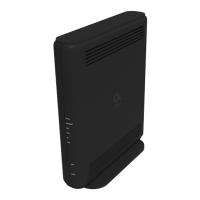

 To Next Page
 General