IP 720 User Manual 5
Note: * Indicates a normal operating mode key feature, which is
available only after registering the IP 720 with the phone server
and logged in as an extension.
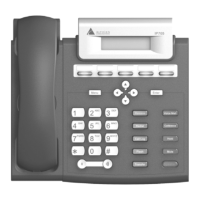
14 Navigation
buttons
/buttons let you scroll through text on the LCD
screen.
button selects a menu item or setting.
button returns to previous configuration menu or
deletes the last digit input.
15 Enter Confirms selections made in the LCD, including
settings.
16 Release Releases a call, exits from the menu, releases phone
from an active state.
17 Redial* Redials up to last 16 calls and up to 32 digits.
18 SpeedDial* Displays a list of Station Speed Dial entries
configured through MaxCommunicator/MaxAgent
or MaxAdministrator. To make an outgoing call, use
the / buttons to select a Speed Dial entry, then
press Enter.
19 Call Log* Displays the caller IDs of up to 99 incoming calls.
To dial, use the / buttons to select a call log
entry, then press Enter.
20 Flash* For system feature codes that need a flash to
complete.
21 Transfer* Transfers a call.
22 Volume Adjusts volume of ringer, speaker, handset and
headset.
23 Dial Pad Functions like a dial pad on a traditional telephone
and is also used for inputting some settings that are
accessed through the phone’s menu.


 To Next Page