PRODUCT OVERVIEW | 5
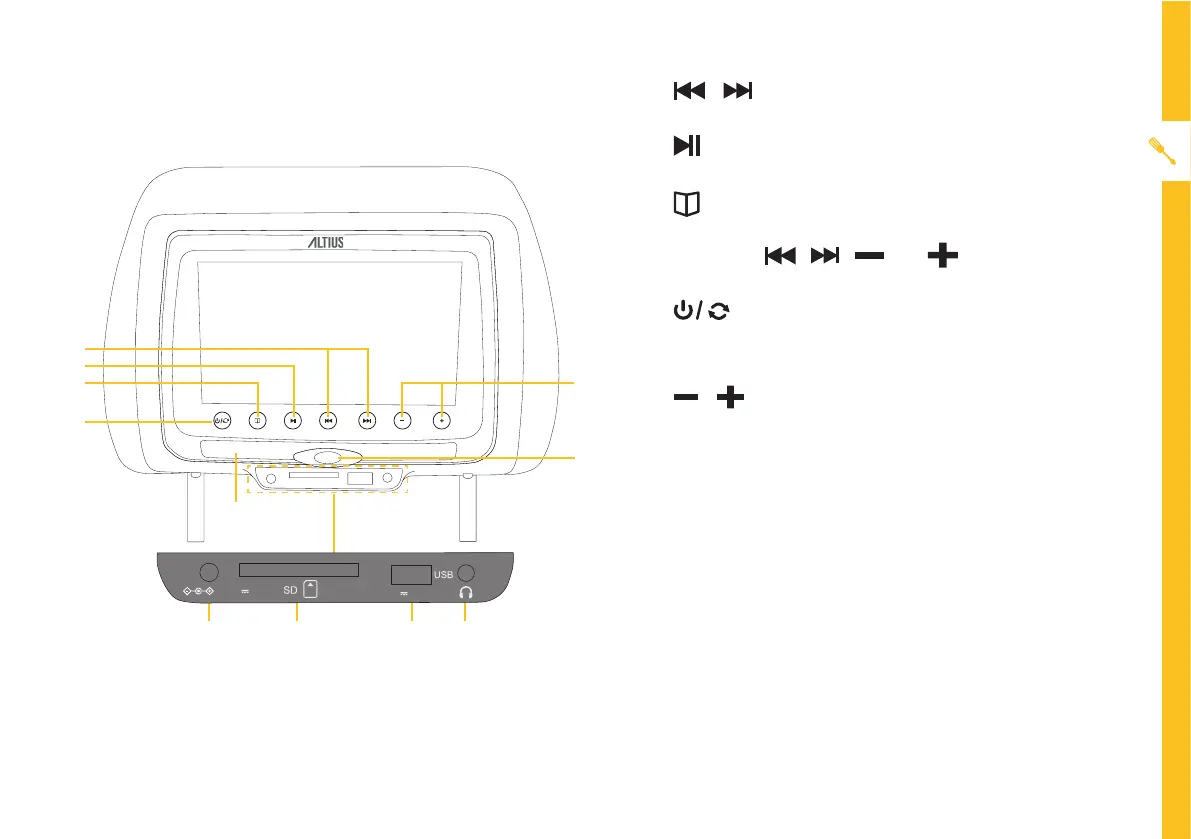
bUttoNs aNd FUNctioNs
1
2
3
4
6
8
7
9 10 11
5
1. / : Move to the previous/next chapter or
track.
2. : Press to play or pause. Press and hold to
return.
3. : Press to go into the quick screen setting menu.
Press and hold to enter the system settings menu.
In menus, , , and work as navigation
keys.
4. : Press to turn on the unit when the unit is
off. Press and hold to turn off the unit when the unit
is on. Press to switch between AV and DVD mode.
5. / : Press to increase or decrease the audio
volume.
6. DVD Tray Open/Close Button : Press to open the
DVD disc compartment.
7. Remote Sensor
8. DC Power Input : You can connect the supplied car
adaptor to this socket and the car’s cigarette lighter
socket.
9. SD Card Slot : Insert a SD card for media playback.
10. USB Port : Insert a USB for media playback.
11. Headphones Port : Connect to your earphones
(included).
5V 500mA
DC 12V 1.5A


 To Next Page