INSTALLATION | 7
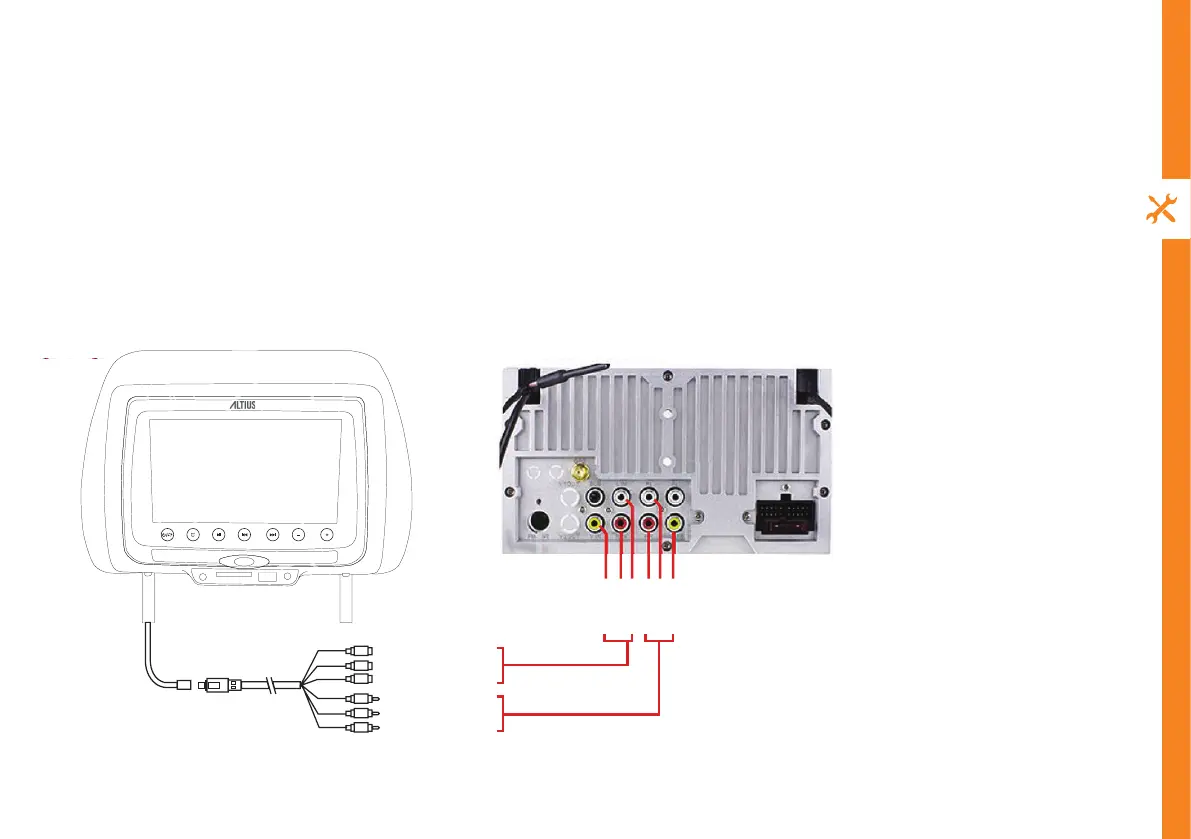
Video out
L out
R out
L in
R in
Video in
Video out (Yellow)
Audio out (Red/R)
Audio out (White/L)
Video in (Yellow)
Audio in (White/L)
Audio in (Red/R)
Professional installation (auto specialist only)
1. Remove the original headrest.
2. From the 6 pairs of installation tubes (16/14/13.8/12.7/12.5/12 mm in diameter) included in the product, select the
correct pair for the poles of your car’s headrest.
3. Adjust the space between the two poles of the headrest and install the headrest into position. Adjust its height as
required.
4. Run the radio antenna and AV cable through the seat’s pole, then connect the AV cable bundle (included) to the
car’s AV system (see diagram below).
5. Connect the DC connector of the car power adaptor (included) into the DC In port of the headrest DVD player.


 To Next Page