7
Features
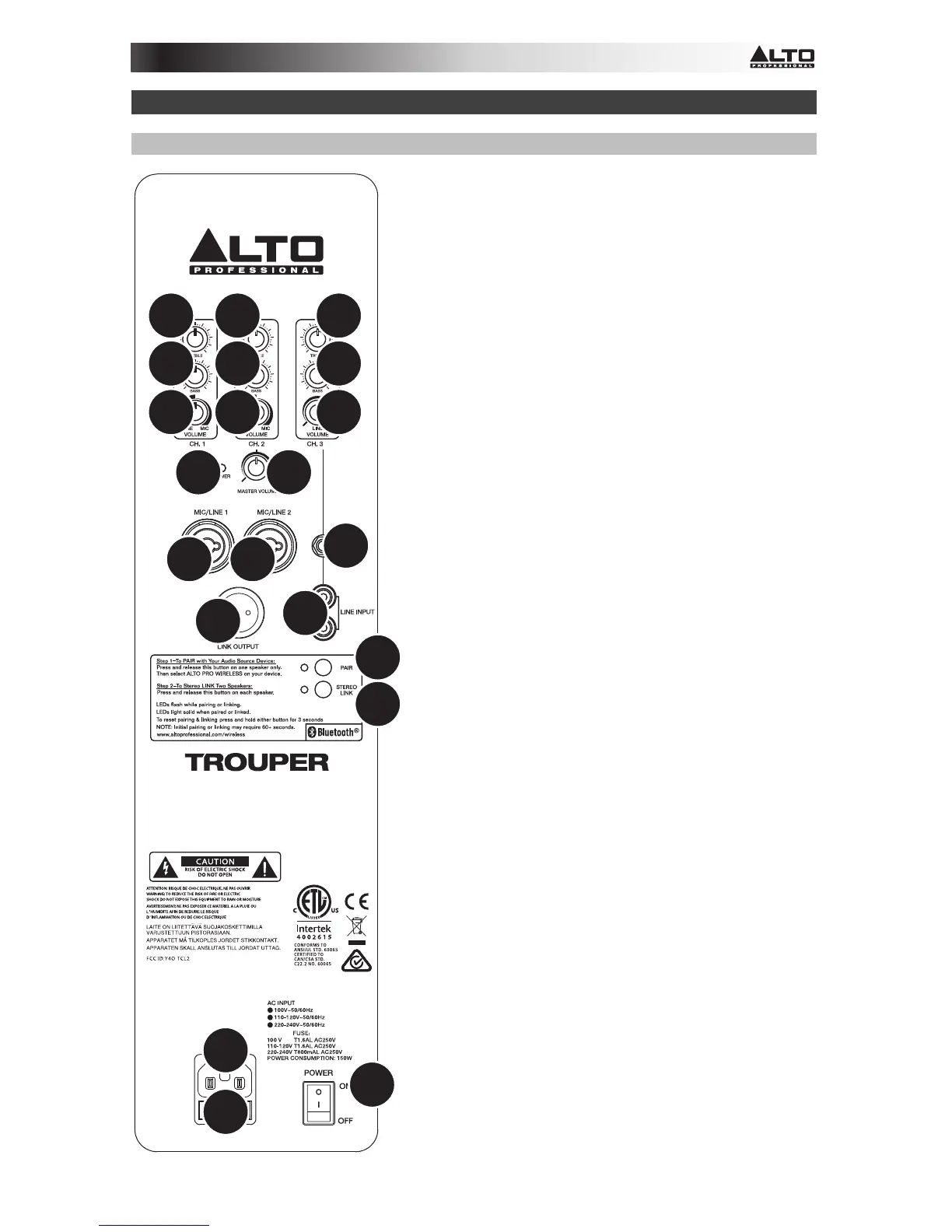
Rear Panel
1. Power Input: Connect the included power cable
to this input and connect the other end of the
cable to a power source. Make sure the
loudspeaker's Power Switch is set to "off" when
plugging and unplugging the cable.
2. Fuse: If the unit's fuse is broken, lift this tab to
replace the fuse. Replace it with a fuse with an
appropriate rating (printed under the unit's power
cable input). Using a fuse with an incorrect rating
can damage the unit and/or fuse.
3. Power Switch: Turns the loudspeaker system
on/off. Make sure the Master Volume knob is set
to "zero" before turning it on.
4. Power LED: Illuminates when the loudspeaker
system is on.
5. Master Volume: Turn this knob to adjust the
output volume of the loudspeaker system. This
does not affect the Link Output volume.
6. Pair: Press and release this button to pair the
loudspeaker system to your Bluetooth device.
See the Bluetooth > Pairing section for pairing
instructions.
7. Stereo Link: When using a pair of Trouper
loudspeaker systems, press and release this
button on each loudspeaker to "link" them for
wireless stereo audio. See the Bluetooth >
Linking section for more information.
8. Input: Use a standard 1/4" (6.35 mm) TRS, TS, or
XLR cable (not included) to connect your sound
source to Channel 1 or 2. Use a standard 1/8"
(3.5 mm) TRS or RCA cable (not included) to
connect a sound source to Channel 3. If you use
a microphone that requires +48V of phantom
power, you must connect it to an external
phantom power supply. Trouper does not supply
any phantom power.
9. Input Volume: Turn this knob to adjust the input
volume of the channel. (The signal from a paired
Bluetooth device is sent to Channel 3.)
10. Input Treble: Adjusts the high/treble frequencies
of the channel. (The signal from a paired
Bluetooth device is sent to Channel 3.)
11. Input Bass: Adjusts the low/bass frequencies of
the channel. (The signal from a paired Bluetooth
device is sent to Channel 3.)
1
2
3
4
5
6
7
88
8
8
9
10
11
9
10
11
9
10
11
12


 To Next Page
 Loading...