
EasyManua.ls Logo

Altronics redback C 8867C - User Manual

Altronics redback C 8867C
7 pages
Print Icon
To Next Page IconTo Next Page
Loading...
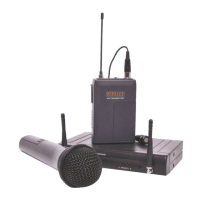
REDBACK® C 8867C & C 8868C 16 Channel UHF Wireless Mic System
16 Channel UHF
Wireless Microphone Systems
C 8867C: Receiver & Handheld Transmitter Microphone
C 8868C: Receiver & Beltpack Transmitter
®
Operating Instructions
Manufactured exclusively for Altronic Distributors Pty Ltd

Questions and Answers

  • D
    Derek GarciaAug 1, 2025
    How to fix Altronics Microphone system with no sound?
    • M
      Melissa GarciaAug 2, 2025
      If your Altronics Microphone system has no sound, try these steps: * Ensure the microphones and receiver have power. * Verify the transmitter and receiver are on the same frequency. * Confirm the audio amplifier is on and connected to the receiver output. * Make sure the transmitter isn't too far from the receiver and the Squelch control isn't too high. * Check for obstructions or metal objects near the receiver.
  • J
    jacquelinemillerAug 17, 2025
    What to do if Altronics Microphone system has sound interference?
    • B
      bashleyAug 17, 2025
      If you're experiencing sound interference with your Altronics Microphone system: * Check the antenna location. * If using multiple transmitters, ensure they are set to different frequencies. * Investigate whether nearby microphones, TVs, or radios are causing interference.

Summary

System Overview and Specifications

System Overview

Provides a general introduction to the wireless microphone system and its intended applications.

Key Features

Lists the main capabilities and functionalities of the REDBACK C 8867C/C 8868C system.

Technical Specifications

Details the technical parameters, frequency range, sensitivity, and output specifications.

Usage Precautions

Highlights essential safety and operational guidelines to ensure proper use and prevent damage.

Receiver and Installation

Receiver Panel Identification

Identifies and describes the front and rear panel controls and connectors of the receiver unit.

Installation Procedures

Step-by-step instructions for setting up the wireless microphone system correctly.

Handheld Transmitter Details

Handheld Transmitter Description

Details the physical components and design of the C 8867C handheld microphone transmitter.

Handheld Transmitter Specifications

Outlines the technical parameters, power output, and frequency range of the handheld transmitter.

Handheld Transmitter Operation

Instructions on how to power on, set channels, and manage the handheld transmitter.

Troubleshooting and Connections

Troubleshooting Common Issues

Provides solutions for common problems such as no sound, interference, and distortion.

Receiver Connection (Mic In)

Illustrates how to connect the wireless receiver to an audio mixer or amplifier using a 3-pin XLR lead.

Receiver Connection (Line In)

Illustrates how to connect the wireless receiver using a 6.35mm jack lead for line-level input.

Warranty and Service

Service and Warranty Information

Details the procedures for repairs, warranty coverage, and exclusions.

Distributor Contact

Provides contact details for Altronic Distributors Pty. Ltd. for inquiries and support.

Altronics redback C 8867C Specifications

General IconGeneral
Polar PatternCardioid
Frequency Response50Hz - 15kHz
Sensitivity-45dB ±3dB (0dB=1V/Pa at 1kHz)
ConnectorXLR
ColorBlack
Output Impedance600Ω
Impedance600 ohms