4
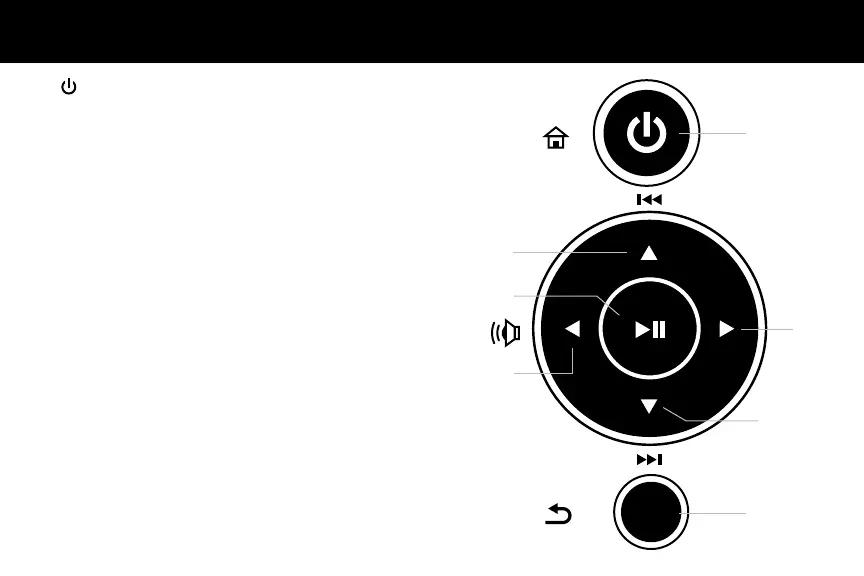
Frame Control Close-Up
1 - Power On / Off (Hold until power turns on or off)
2 - Menu
(a) Press to return to previous screen
(b) Press & hold to return to Main Menu
3 - ►║ Play / Pause
(a) Press to select option on Main Menu
(b) Press to pause slideshow, music or video
4 - ▲ Up Arrow
(a) Press to navigate UP when selecting options
(b) Press to select Previous le (Photo & Music mode)
(c) Press & hold to Fast Forward
5 - ▼ Down Arrow
(a) Press to navigate DOWN when selecting options
(b) Press to select Next le (Photo & Music mode)
(c) Press & hold to Scan Backward
6 - ◄ Left Arrow
(a) Press to navigate LEFT when selecting options
(b) Press & hold to lower volume
7 - ► Right Arrow
(a) Press to navigate RIGHT when selection options
(b) Press & hold to increase volume
MENU
1
2
4
3
7
5
6






 To Next Page