APPENDIX E: EtherNet/IP
TM
COMMUNICATIONS
IS-300CR INVERTER POWER SUPPLY
990-418 E-33
Section VI. Weld Schedule Controller Software
Application
Besides controlling the IS-300CR inverter power supply via a supplied MA-660A pendant, an IS-300CR
that has built-in EtherNet/IP
TM
connectivity can also be controlled with the “IS-300CR Weld Controller
Windows Software” Application. The “IS-300CR Weld Controller Windows Software” Application
allows the user to control the IS-300CR weld screen data and weld schedules via the Allen Bradley
®
PLC controller tags by using the EtherNet/IP
TM
communication protocol. To communicate, the user
would need to configure the IS-300CR Weld Controller Application with the Allen Bradley
®
PLC IP
address that it needs to connect and communicate with.
Communication Setup
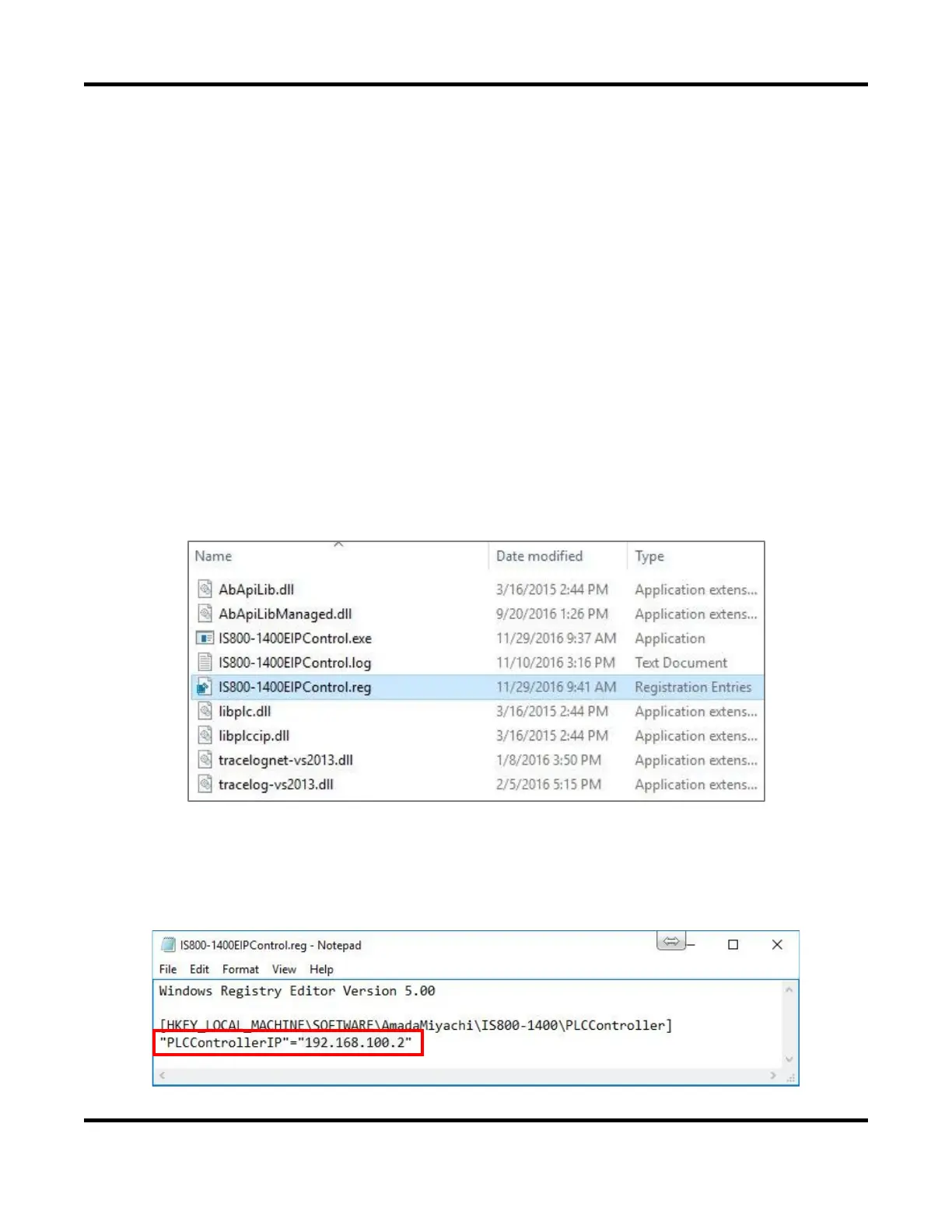
By default the IS-300CR Weld Controller Application is configured to communicate with Allen
Bradley
®
PLC IP address ‘192.168.100.2’.
To change to a different Allen Bradley
®
PLC IP address, for example with IP address ‘10.0.0.2’, from the
\IS_Series_AB_EthernetIP\Windows_EthernetIP_WeldControl\ folder,
• Select the file IS800-IS1400EIPControl.reg
• Perform a right-mouse select.
• When the pop-up menu appears, choose the Edit option.
• The “IS800-IS1400EIPControl.reg” file will open in notepad for editing. Another option is to
open a new notepad session, then drag and drop this “IS800-IS1400EIPControl.reg” file into it.


 To Next Page
 Loading...