CHAPTER 3: USING PROGRAMMING FUNCTIONS
IS-300CA INVERTER POWER SUPPLY
3-4 990-418
NOTE: The screen shows the settings for the IS-300CA. Unit, resolution, and setting range change
depending on the settings of CTRL/CURR RANGE.
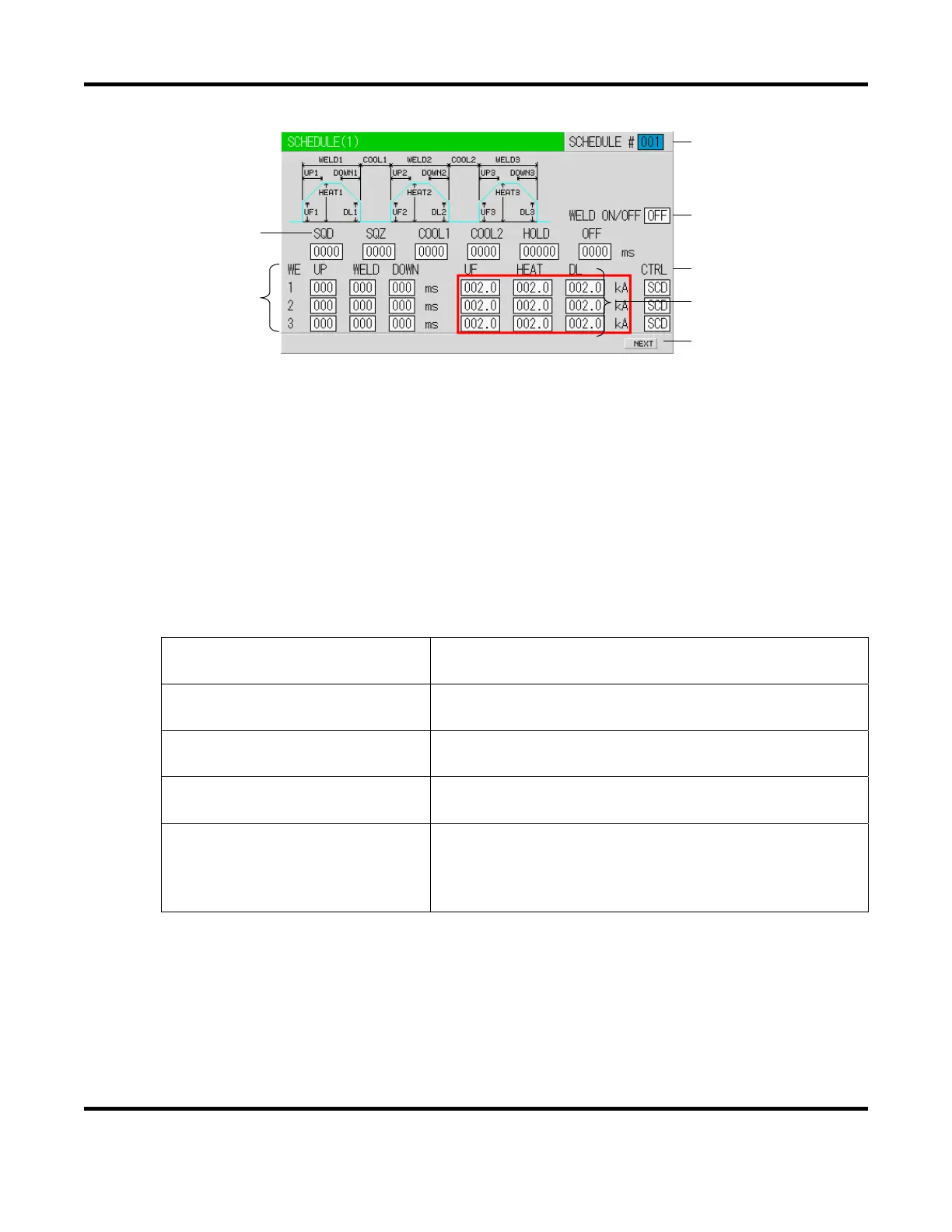
a. SCHEDULE #
Select from #1 to #255 to set the SCHEDULE.
Normally select #1 first, then select additional schedules in sequential order.
b. TIME
Set the time for each operation during welding. Units of time are in ms or CYC. The screen
above is in ms setting. CYC can be selected via the MODE SELECT screen. See the Timing
Chart for each operation.
SQD / Squeeze delay time
Length of time added to SQZ; only for the first weld after
start signal in repeat operation
SQZ / Squeeze time
Length of time until proper squeeze is applied to
workpiece
COOL1 and COOL2
Cooling time 1 and Cooling time 2
Length of time to cool workpiece after turning off welding
current
HOLD / Hold time
Length of time to hold workpiece after turning off welding
current
OFF / Off time (*)
Length of time to turn off valve signal between repeated
operations.
(No repeat operation if set to "0" or the upper/lower limit
judgment error occurs in a sequence.)
* OFF / Off time
Count and step value are updated each welding.
RE-WELD does not work simultaneously with OFF. When OFF is set, RE-WELD
becomes invalid.
START SIG.MODE has limitations. When OFF is set, MAINTAINED of START
SIG.MODE
does not work. It works as LATCHED.
(b)
(c)
(a)
(d)
(e)
(f)
(g)


 To Next Page
 Loading...