MA-627A
3. Name and Functions of Each Section
3-1
3. Name
and
Functions of Each Part
MA - 6 2 7A
ON
ENTER
MENU
OFF
RESET
TROUBLE
CURSOR
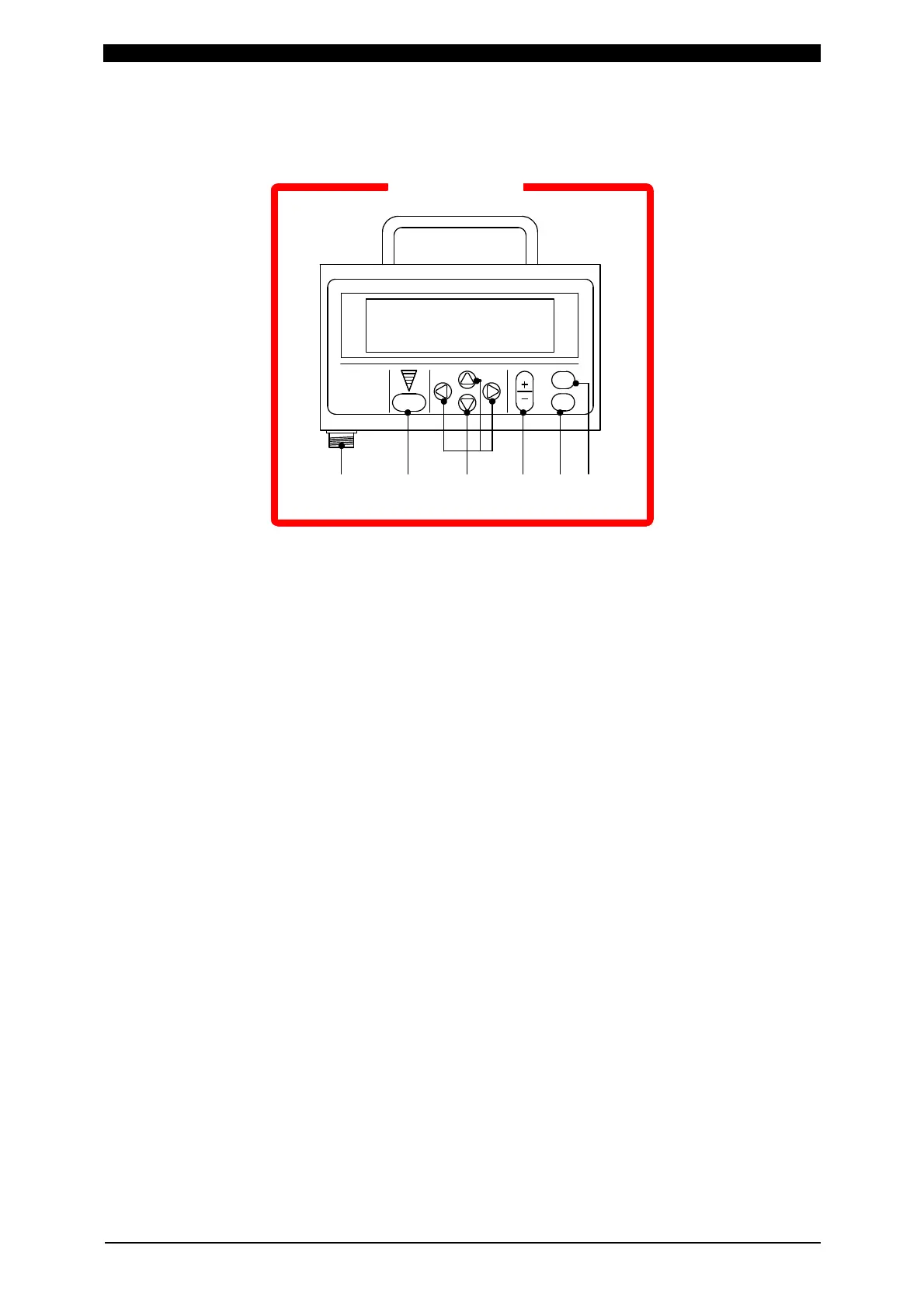
①②③④⑤⑥
① [TROUBLE RESET] Key
Pressing this key after the cause of trouble is eliminated while an error message
is indicated turns off the error massage.
② [CURSOR] Keys
Pressing these keys moves the cursor to up, down, to the right or to the left to
select an item.
③ [+ON/-OFF] Key
Pressing this key changes over the value of the currently selected items or
changes that value. Pressing the +ON side selects YES, and pressing the -OFF
side selects NO.
④ [ENTER] Key
Pressing this key enters the data set with the [+ON/-OFF] key in the product
connected to the MA-627A.
The product connected to the MA-627A does not recognize the data settings until
this key is pressed. After setting the data, be sure to press this key to enter the
data.
⑤ [MENU] Key
Pressing this key changes the screen when there are two or more screens.
⑥ Connector
Receives the circuit cable. The other end of the cable must be connected to the
[PROGRAM UNIT] connector of the product to be used with the equipment.



 To Next Page