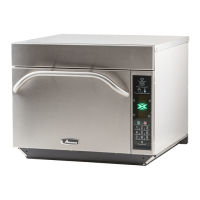
This document is an owner's manual for a High Speed Combination Oven, specifically the AXP/MXP model, which combines microwave, convection, and radiant heating technologies.
Function Description:
The oven is designed for high-speed cooking, offering various cooking methods to achieve optimal results for a wide range of food items. It supports multiple cooking stages, allowing users to program up to four different cooking cycles consecutively without repeated input. This feature is particularly useful for frozen or delicate foods, enabling precise control over temperature, microwave power, fan speed, and radiant heating at each stage. The combination of heating elements allows for efficient cooking, browning, and crisping. The oven can also function as a microwave-only oven, provided the cavity temperature is below 200°F (95°C).
Important Technical Specifications:
- Temperature Range: The oven can be preheated to temperatures between 200°F (95°C) and 520°F (270°C).
- Microwave Power: Adjustable, with settings up to 100%.
- Fan Speed: Adjustable, with settings up to 100%.
- Radiant Heating: Adjustable, with settings up to 100%.
- Maximum Cook Time: Total combined stages cannot exceed 100 minutes.
- Oven Rack: Designed to be placed with the rear guard positioned toward the back of the oven. Food should not be cooked directly on the oven floor.
- Electrical Requirements: The oven should be plugged into a separate circuit with the electrical rating as provided in product specifications. It must be properly grounded to avoid electrical shock.
- Clearances:
- North American (UL/CSA) models: 2" (5.1 cm) clearance around the top and sides, and 2" (5.1 cm) between air discharge and back wall.
- International (50 Hz) models: 7" (18 cm) clearance around the top, 2" (5.1 cm) around sides, and 2" (5.1 cm) between air discharge and back wall.
- Oven bottom must be at least 3 feet (91.5 cm) above the floor.
- Accessories: Metal containers up to 1¼ inch (3.18cm) in height can be used. Aluminum foil and containers with metal covers are not to be used with microwave power. Recommended accessories include Non-Stick Basket (SB10), Baking Sheet (1/4 size), Oven Paddle (PA10), Pizza Screen, Ceramic Dish, and Pizza Stone.
Usage Features:
- User Interface: Features a touch screen display, a control dial for menu navigation and selection, and a keypad for time, programmed pad, and data input.
- Ergonomic Design: The door handle is ergonomically designed for one-handed operation.
- Preheating: The oven can be preheated to a desired temperature, with the status displayed on the screen.
- Preprogrammed Menus: The oven comes with several preprogrammed menu items categorized into Appetizers/Sides, Pasta/Pizza, Meats, Seafood/Subs, Desserts/Soup, and Breakfast/Breads. These simplify cooking by offering pre-set cooking cycles.
- Manual Cooking: Users can manually input specific cook times, temperatures, microwave power, fan speed, and radiant heating settings for up to four stages.
- Saving Manual Programs: Satisfactory manual cook settings can be saved to the oven's menu for future use.
- EZCard Port: Equipped with an EZCard Data Port for transferring cooking programs to or from the oven.
- User Options: Customizable settings include digit entry mode, menu display levels (1, 2, or 3), manual lock, program lock, door open behavior (resets timer or pauses cycle), keybeep settings (on/off, volume), end of cycle beep, keyboard window duration, preheat warnings, temperature scale (°F or °C), clean filter display frequency, auto menu settings, magnetron control, microwave-only mode, manual program save, automatic shut off, and data transfer.
- Safety Features: Grounding instructions are provided to prevent electrical shock. Warnings are given regarding hot surfaces and the need to use oven mitts or tongs when removing hot items.
Maintenance Features:
- Daily Cleaning: Recommended to clean the oven daily. This involves shutting off the oven, allowing it to cool, removing the rack and accessories, lifting the bottom element to remove baked-on particles, spraying the interior with ACP Oven Cleaner (Item CL10), wiping with a damp towel, and then spraying with ACP Oven Shield Oven Protectant (Item SH10). The exterior should be cleaned with a mild detergent solution.
- Weekly Cleaning: Includes cleaning the air filters located on each side of the oven. Filters should be removed, washed in a mild detergent solution, rinsed, dried, and reinstalled.
- Cleaning Products: Only non-caustic cleaning products are recommended. The use of products containing ammonia, phosphates, chlorine, sodium, or potassium hydroxide (lye) can damage critical oven parts and void the warranty. Chemco's Dirt Buster III Oven Cleaner (Item Q 890-06) and Oven Shield Oven Protectant (Item Q959-06) are specifically recommended.
- Filter Maintenance: The "Clean Filter" message will display for 24 hours when cleaning is needed. Regular cleaning of air filters and vents is crucial to prevent overheating.
- General Care: Avoid blocking or obstructing oven filters. Do not install the oven near heat sources. Do not use water-pressure type cleaning systems. Do not cook foods with plastic wrap. Do not use abrasive scouring pads on ceramic side covers or red sealant. Do not operate the oven empty in microwave mode.
- Troubleshooting: A section is provided for common issues like the oven not operating, intermittent operation, entries not accepted, fan running during non-cooking times, display remaining lit after turning off, "Clean Filter" display, and frozen display, along with possible causes and solutions.

 Need help?
 General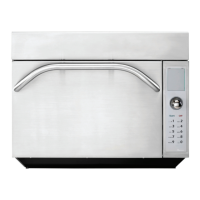

 To Next Page