Need help?
Do you have a question about the Amazfit A2171 and is the answer not in the manual?
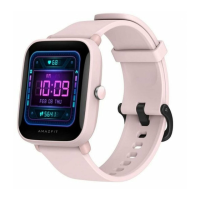
The Amazfit Bip 3 Pro is a smartwatch designed for daily wear and activity tracking, offering a range of features to support a healthy and connected lifestyle. This device is intended to be worn on the wrist, providing convenient access to its functions and continuous monitoring capabilities.
The primary function of the Amazfit Bip 3 Pro is to serve as a smart companion that tracks various aspects of your health and fitness. It is equipped with a heart rate sensor, allowing for continuous or on-demand heart rate monitoring. This feature is crucial for understanding your cardiovascular health during workouts and throughout the day. Beyond heart rate, the watch is capable of measuring blood oxygen saturation (SpO2), which provides insights into your body's oxygen levels, an important indicator of overall well-being.
As a fitness tracker, the Amazfit Bip 3 Pro records your daily activities, including steps taken, distance covered, and calories burned. It supports various workout modes, enabling you to track specific exercises and gain detailed performance metrics. The watch can help you set fitness goals and monitor your progress over time, encouraging a more active lifestyle.
In addition to health and fitness tracking, the smartwatch offers smart notifications, allowing you to receive alerts for incoming calls, messages, and app notifications directly on your wrist. This keeps you connected without needing to constantly check your mobile phone. The device also includes basic smartwatch functionalities such as time display, alarms, and potentially other utility features that enhance daily convenience.
The Amazfit Bip 3 Pro integrates with a companion mobile application, the Zepp App, which serves as the central hub for data synchronization, analysis, and device management. Through the app, users can view their health and fitness data in detail, customize watch settings, and update the device's firmware. This seamless interaction between the watch and the app ensures a comprehensive and personalized user experience.
To begin using the Amazfit Bip 3 Pro, the watch must first be turned on by pressing and holding the power button. If the watch does not power on, it is recommended to charge it before attempting again. Once powered on, the watch needs to be paired with a mobile phone. This is achieved by downloading and installing the Zepp App from the Google Play Store or Apple App Store. After installing the app, users register an account and log in, then follow the in-app prompts to pair the watch. It is important to note that the watch should not be paired directly through the phone's Bluetooth settings; instead, the pairing process should be initiated and completed within the Zepp App for proper functionality. For an optimal experience, it is advised to use the most recent version of the Zepp App, and the mobile phone's operating system should be Android 7.0, iOS 12.0, or above.
Charging the Amazfit Bip 3 Pro is straightforward. The watch comes with a dedicated charging cable and base. To charge, the watch is placed into the charging base, ensuring that the metal contacts on the back of the watch align closely with those on the charging base. The charging cable is then connected to a power adapter (preferably 1A or above) or a computer's USB port. The watch screen will display the charging progress. It is crucial to use the original charging base and ensure it is dry before charging to prevent damage.
Wearing the watch correctly is essential for both comfort and accurate data collection. The watch strap should be worn neither too tight nor too loose, allowing enough space for the skin to breathe. This ensures comfort during prolonged wear and allows the heart rate and blood oxygen sensors to function effectively. When measuring blood oxygen saturation, it is particularly important to wear the watch correctly: avoid wearing it on the wrist joint, keep the arm flat, ensure a comfortable and appropriately tight fit between the watch and the skin, and keep the arm still throughout the measurement. External factors such as arm sag, arm sway, arm hair, or tattoos can affect measurement accuracy or even cause the measurement to fail. For workouts, it is recommended to tighten the watch strap to ensure stable sensor readings, and then loosen it afterward for comfort.
The watch strap is designed for user-friendly disassembly and assembly, allowing for customization or replacement. Users can refer to the provided illustrations to guide them through the process. After assembling the strap, it is important to pull it gently to ensure it is securely installed.
Proper maintenance is key to prolonging the life and ensuring the continued performance of the Amazfit Bip 3 Pro. Users should avoid using harsh detergents such as soap, hand sanitizer, bath foam, or lotion for cleaning the device. These substances can leave chemical residues that may irritate the skin, corrode the device materials, or degrade its water resistance. Instead, gentle cleaning methods are recommended.
For users who wear the device while bathing (if supported by the device's water resistance rating), swimming (if supported), or during activities that cause sweating, it is important to promptly clean and dry the device afterward. This helps prevent the buildup of moisture and residues that could affect the device or cause skin irritation.
It is important to note that if the watch has a leather strap, it is typically not waterproof. Therefore, users should avoid getting leather straps wet, as this can shorten their service life and potentially damage the material. For watches with light-colored straps, it is advisable to avoid contact with dark clothing to prevent staining, which can be difficult to remove.
Environmental factors also play a role in device maintenance. The Amazfit Bip 3 Pro should not be placed in direct sunlight for extended periods. Exposure to excessively high or low ambient temperatures can lead to device failure or reduce its lifespan.
Regarding water resistance, while the device may have a certain water resistance rating, there are specific activities to avoid. Users should not wear the watch during snorkeling, hot showers, hot springs, saunas (steam rooms), diving, underwater diving, water skiing, or any other activities involving high-speed water currents. These activities can exceed the device's water resistance capabilities and lead to damage.
During transportation, the device should be handled with care. It should be kept dry and away from humidity to prevent any potential damage from moisture.
For long-term storage, if the product is not going to be used for an extended period, it is recommended to power off the device. Additionally, to prevent battery damage from over-discharge, the battery should be recharged to 100% every 6 months. This practice helps maintain battery health and ensures the device is ready for use when needed.
For any troubleshooting or further assistance, users are directed to check the FAQ section on the official Amazfit support website.


 To Next Page
 General