Need help?
Do you have a question about the Amazfit BIP 5 and is the answer not in the manual?
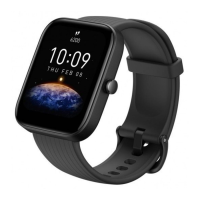
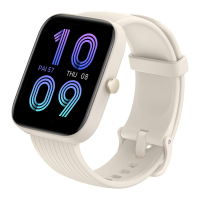
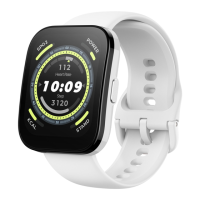
The Amazfit Bip 5 (model A2215) is a smartwatch designed to provide a comprehensive and personalized health and fitness experience. It comes with a smartwatch with a band, a charging base, and an instruction manual.
The Amazfit Bip 5 serves as a personal health and fitness companion, offering scientific sleep and workout guidance. It aims to help users adopt and maintain a healthy lifestyle through its various features. The watch is equipped with a heart rate sensor and charging contacts, allowing for continuous monitoring and easy recharging.
To begin using the Amazfit Bip 5, users must first pair it with their mobile phone. This is done by downloading and installing the Zepp app, which is essential for unlocking the watch's full potential. The app can be found by scanning a QR code provided in the manual or by searching for "Zepp" in the Google Play Store or Apple App Store. After installing the app, users need to register an account and log in, then follow the in-app prompts to pair the watch. It's crucial to pair the watch through the Zepp app and not directly via the mobile phone's Bluetooth settings for correct setup. For an optimal experience, it is recommended to use the most recent version of the Zepp app, and the mobile device's operating system should be Android 7.0, iOS 14.0, or above.
The watch is turned on by pressing and holding the power button. If the watch does not turn on, it should be charged first.
Charging the Amazfit Bip 5 is a straightforward process. The watch's charging cable should be connected to a power adapter or a computer's USB port. The watch is then placed into the charging base, ensuring that the metal contacts on the back of the watch align closely with the charging base. Once charging begins, the watch screen will display the charging progress. It is important to use the charging base that comes with the watch and to ensure the base is dry before charging. A 1A or above power adapter is recommended for charging.
The watch strap is designed for easy disassembly and assembly, allowing users to customize or replace the band as needed. After assembling the strap, it should be pulled properly to ensure it is securely installed.
For accurate measurements of heart rate, blood oxygen, and other health metrics, the watch should be worn correctly. It is recommended to wear the watch at a distance of at least one finger away from the carpal bone, with the strap comfortably snug. During workouts, the watch should be worn as tightly as possible to prevent it from shaking, which helps in obtaining more accurate heart rate data. After a workout, the strap can be loosened for comfort. When measuring blood oxygen saturation, it is important to avoid wearing the watch on the wrist joint, keep the arm flat, maintain a comfortable (appropriately tight) fit between the watch and the skin, and keep the arm still throughout the measurement process. External factors such as arm sag, arm sway, arm hair, or tattoos can affect the accuracy of measurements or cause them to fail.
Proper care and maintenance are essential for the longevity and performance of the Amazfit Bip 5. Users should avoid using detergents such as soap, hand sanitizer, bath foam, or lotion for cleaning, as these chemical residues can irritate the skin, corrode the device, or degrade its water resistance. When using light-colored watch straps, it is advisable to avoid contact with dark clothing to prevent staining.
The device should not be placed in direct sunlight for extended periods, as excessively high or low ambient temperatures can lead to device failure. The Amazfit Bip 5 is not suitable for wear during activities such as bathing, swimming, snorkeling, showers, hot springs, saunas (steam rooms), diving, underwater diving, water skiing, or any other activities involving water currents.
During transportation, the device should be handled with care, kept dry, and away from humidity. It is also important not to wear the watch during MRI examinations or in other highly magnetic environments, as this could damage the watch.
For troubleshooting, users can refer to the FAQ section on the Amazfit support website: https://support.amazfit.com/en. If the product is not going to be used for a long time, it is recommended to power it off before storing. To prevent battery damage from over-discharge, the battery should be recharged to 100% every six months.
The Amazfit Limited Warranty covers manufacturing defects for 12 months from the original purchase date, or for a longer period if required by applicable consumer laws in the user's country. This warranty is in addition to any rights provided by local consumer laws. Further support and information can be found on the official website: en.amazfit.com, and the support page: support.amazfit.com/en.
 General
| Display type | Digital |
|---|---|
| Pixel density | 260 ppi |
| Display diagonal | 1.91 \ |
| Display resolution | 320 x 380 pixels |
| Display technology | LCD |
| Shape | Rectangular |
| Band size | - |
| Band material | Silicone |
| Watch case size | 38 mm |
| Watch case color | Pink |
| Wrist size range | 155 - 210 mm |
| Market positioning | Smartwatch |
| International Protection (IP) code | IP68 |
| Battery life | 26 day(s) |
| Battery type | Built-in battery |
| Battery capacity | 300 mAh |
| Battery life (max) | 240 h |
| Recommended activity | Baseball, Basketball, Boxing, Climbing, Cycling, Fishing, Fitness, Football (soccer), Gymnastics, Hunting, Pilates, Rowing, Running, Skateboarding, Skiing, Surfing, Taekwondo, Walking, Yoga |
| Mobile network connection | No |
| Bluetooth version | 5.2 |
| Mobile operating systems supported | Android 10, Android 10.0, Android 11.0, Android 12.0, Android 13.0, Android 7.0, Android 7.1, Android 7.1.2, Android 8.0, Android 8.1, Android 9.0, iOS 14, iOS 14.5, iOS 15 |
 Weight and Dimensions
| Weight | 26 g |
|---|---|
| Dimensions (WxDxH) | 38.09 x 11.2 x 45.94 mm |

 To Next Page