EN
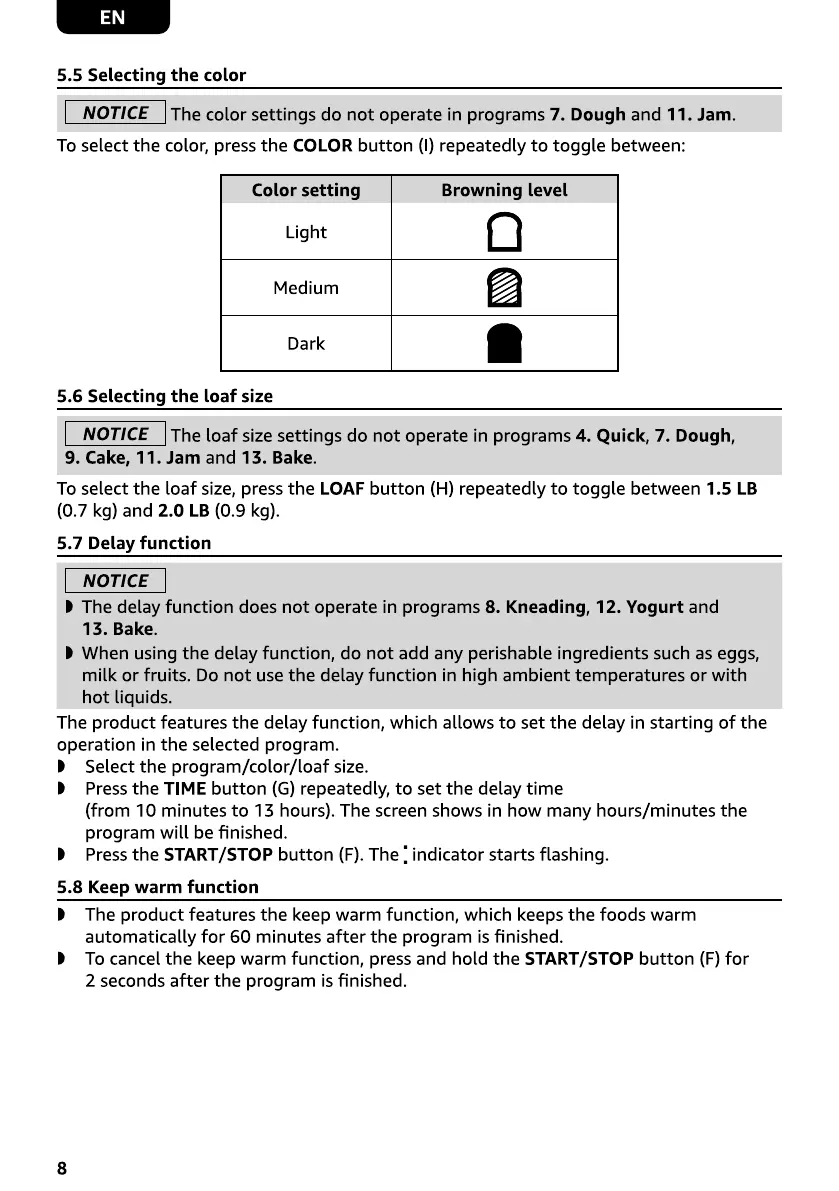
5.5 Selecting the color
NOTICE The color settings do not operate in programs 7. Dough and 11. Jam.
To select the color, press the COLOR button (l) repeatedly to toggle between:
Color setting
Light
Medium
Dark
5.6 Selecting the loaf size
Browning level
a
NOTICE The loaf size settings do not operate in programs 4. Quick, 7. Dough,
9. Cake, 11. Jam and 13. Bake.
To select the loaf size, press the LOAF button (H) repeatedly to toggle between 1.5 LB
(0.7 kg) and 2.0 LB (0.9 kg).
5.7 Delay function
NOTICE
D The delay function does not operate in programs 8. Kneading, 12. Yogurt and
13. Bake.
D When using the delay function, do not add any perishable ingredients such as eggs,
milk or fruits. Do not use the delay function in high ambient temperatures or with
hot liquids.
The product features the delay function, which allows to set the delay in starting of the
operation in the selected program.
D Select the program/color/loaf size.
D Press the TIME button (G) repeatedly, to set the delay time
(from 10 minutes to 13 hours). The screen shows in how many hours/minutes the
program will be finished.
D Pressthe START/STOP button (F).The : indicator starts flashing.
5.8 Keep warm function
D The product features the keep warm function, which keeps the foods warm
automatically for 60 minutes after the program is finished.
D To cancel the keep warm function, press and hold the START/STOP button (F) for
2 seconds after the program is finished.
8


 To Next Page
 Loading...