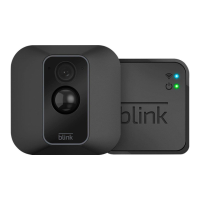
The Blink XT2 is a wireless, battery-powered outdoor/indoor security camera designed to provide home monitoring and surveillance. It operates as part of a Blink Home Monitor system, which typically includes a Sync Module to facilitate communication between the cameras and the Blink Home Monitor App.
Function Description:
The Blink XT2 camera is designed to capture video and detect motion, allowing users to monitor their property remotely. It offers live view recording, enabling users to automatically record and save live views from their XT2 camera(s). Motion detection is optimized for subjects moving horizontally across the field of view, rather than directly toward or away from the camera. The system supports individual camera arming/disarming, where cameras can be armed to detect motion by tapping a running man icon in the app (blue for armed, gray for disarmed). It also features scheduled system arming, allowing users to set specific dates and times for the system to automatically arm or disarm. The camera includes a blue recording LED that can be manually switched ON or OFF by removing the back cover, indicating when the camera is recording or streaming video.
Important Technical Specifications:
- Model Number (Blink XT2): BCM00200U and BCM00201U
- Electrical Rating (Blink XT2): Power: 2 x 1.5V AA Single Use Lithium Metal batteries and optional (not included) USB 5V 1A external power supply.
- Operating Temperature (Blink XT2): -4 to 113 degrees F (-20 to 45 degrees C).
- Model Number (Sync Module): BSM00203U
- Electrical Rating (Sync Module): 100-240V 50/60 HZ 0.2A.
- Operating Temperature (Sync Module): 32 to 95 degrees F (0 to 35 degrees C).
- Connectivity: Home WiFi Network (2.4GHz only).
- Internet Access: Upload speed of at least 2 Mbps.
- Wireless Range: Connectivity between the camera and Sync Module is optimized when positioned within 100 ft (30.5 m) of each other. WiFi range is dependent on conditions, and distance between Blink devices and WiFi can vary.
- Water Resistance: The Blink XT2 can withstand outdoor use and has been tested to withstand water projected through a 6.3mm nozzle at a volume of 12.5 liters per minute and a pressure of 30 kPa at a distance of 3 meters for at least 3 minutes. It is not intended for underwater use.
Usage Features:
- Installation: The installation process involves three main steps: downloading the Blink Home Monitor App, connecting the Sync Module, and adding/positioning the camera(s). Users can follow in-app instructions or the steps provided in the quick start guide.
- App Control: The Blink Home Monitor App is central to controlling the system. It allows users to add systems, add cameras, view live feeds, adjust camera settings, and manage motion detection.
- System Setup: For new systems, users start by downloading the app and creating an account, then adding a system and connecting the Sync Module. For adding a camera to an existing system, users go directly to adding the camera.
- Camera Positioning: Cameras should be placed in desired locations, ensuring strong WiFi and Sync Module signal strengths, which can be checked in camera settings. Live view in the app helps adjust the camera's position for optimal viewing.
- Battery Installation: The camera requires two AA 1.5V non-rechargeable lithium metal batteries. These are inserted after removing the camera's back cover.
- Mounting: The mounting kit includes two screws, one mount, and an optional mount extender. The mount extender increases the camera's range of motion. The mount is attached to a wall, and the camera snaps onto the circular portion of the mount, allowing for angle adjustment to optimize the field of view.
- Live View Recording: Users can enable "Save all XT2 Live Views" in the system name dropdown menu of the app to automatically record and save live views.
- Motion Detection Optimization: Motion detection is most effective when subjects move horizontally across the camera's field of view.
- Recording Indicator: The blue recording LED on the camera can be toggled ON or OFF via a switch located under the back cover, using tweezers or a similar tool.
Maintenance Features:
- Battery Replacement: The camera uses non-rechargeable lithium metal batteries. When batteries are low or worn out, they should be promptly removed and disposed of according to local and national regulations. Mixing old and new batteries or different types (lithium and alkaline) is not recommended.
- Cleaning: Avoid spilling food, oil, lotion, or other abrasive substances on the Blink XT2. Do not expose it to pressurized water, high velocity water, or extremely humid conditions (like a steam room).
- Software Updates: Users should ensure their mobile device meets the minimum software requirements for the Blink Home Monitor App. The latest requirements can be found on blinkforhome.com/requirements.
- Troubleshooting & Support:
- Support articles are available at support.blinkforhome.com.
- In-app support can be accessed via the hamburger menu, by tapping 'Contact Customer Support' and then 'Call Tech Support'.
- Online support tickets can be opened by visiting support.blinkforhome.com and selecting 'contact us'.
- Direct phone support is available at 781-332-5465.
- Product Disposal: Electronic devices, including the Blink XT2, should be disposed of or recycled in accordance with local laws and regulations. Information on device support and recycling can be found at http://www.amazon.com/devicesupport.
- Safety Safeguards:
- Read and follow all safety instructions to prevent fire, electric shock, or injury.
- Do not open, disassemble, bend, deform, puncture, or shred batteries.
- Do not modify, insert foreign objects into, or immerse batteries in liquids.
- Dispose of used batteries properly.
- If a battery leaks, remove all batteries, recycle them, and flush any fluid contact with skin or clothes with water immediately.
- Insert batteries with correct polarity (+/-).
- The Sync Module's AC adapter and USB cable should only be used as included. Do not force the adapter into an outlet, expose it to liquids, or use if damaged.
- Supervise children when the device is used near them.
- Only use manufacturer-recommended accessories.
- Avoid touching the Sync Module or connected wires during a lightning storm.
- The power adapter is designed only for use with the Sync Module.
- The device is designed for use in a particular region and should not be used or distributed outside that region.

 Need help?
 General

 To Next Page