12Lockit Users manual |
You can use your NanoLockit both as a Timecode Generator AND a Live
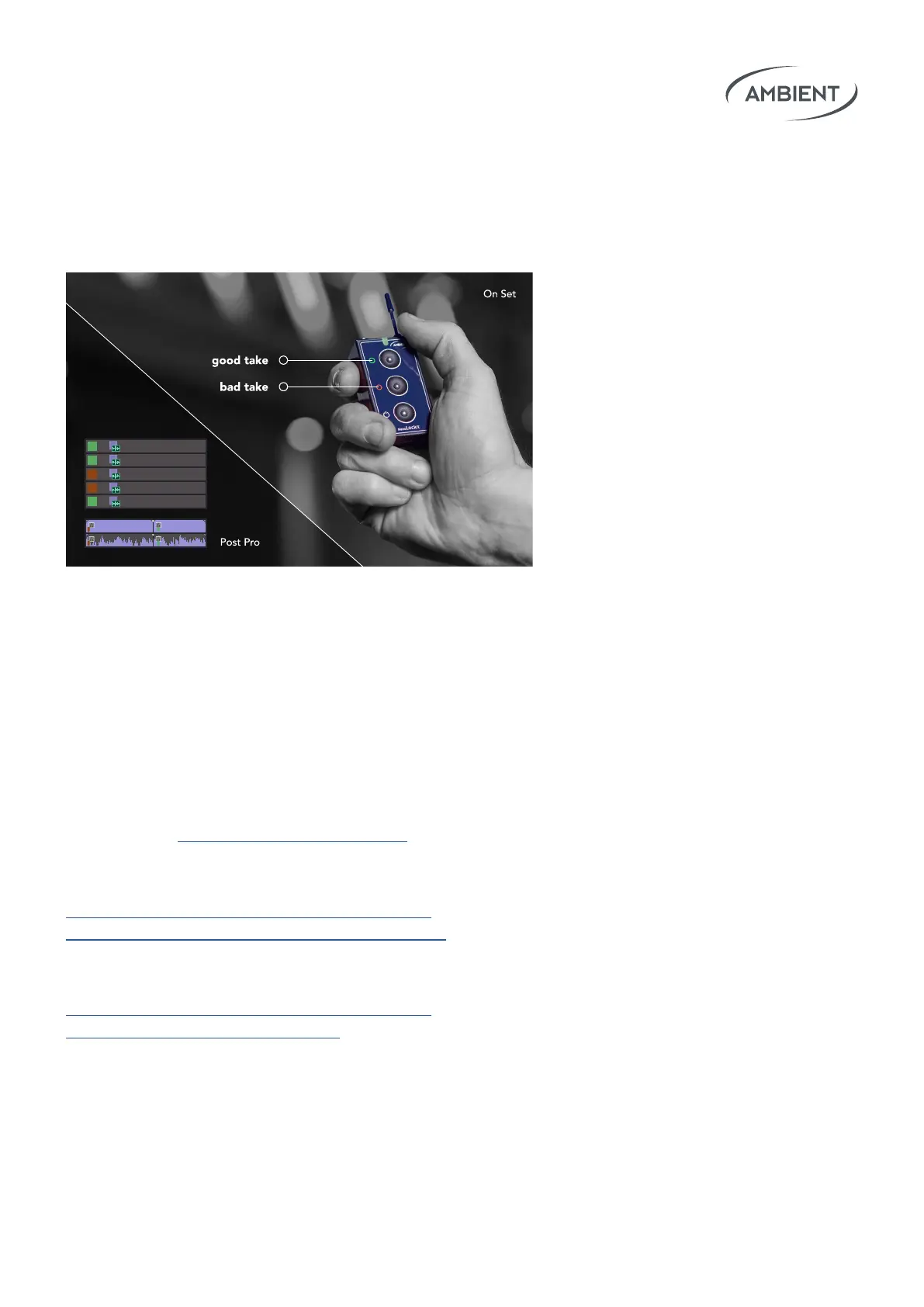
Logger. The goal of the Logging feature is to mark good and bad clips
(or several parts of a clip) directly on set. This can save loads of time in
post-production.
Logging basically works by pressing the green or the red button, meaning
“good” and “bad”. The Markers are locally stored on the NanoLockit as a
.markers le that can be downloaded via a USB connection to your computer.
The NanoLockit Logger Software for Windows or Mac OS enables
you to download your logs from the NanoLockit.
Please check ambient.de/en/downloads for the latest version.
Learn more about the logging workow in
postproduction following this link:
https://faq.ambient.de/hc/en-001/articles/
4415296890642-Logging-in-Post-Production
To learn how to use the NanoLockit as a Logger
on Set please read this FAQ article:
https://faq.ambient.de/hc/en-001/articles/
4415296799634-Logging-on-Set
793_0143.MXF
793_0144.MXF
793_0145.MXF
793_0146.MXF
793_0147.MXF
793_0143.MXF [V]793_0145.MXF [V]
7. Logging Feature


 To Next Page